
Computers
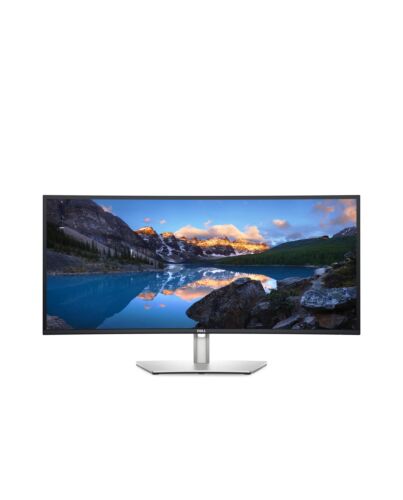
DELL UltraSharp U3421WE computer monitor 86.6 cm (34.1") 3440 x 1440 pixels LCD Black
£561.00
In stock
- Immediately available
- Discreet Packaging
- Free Shipping
Product Details
Description
Key Features
- 86.6cm (34.1") WQHD 3440 x 1440 LED IPS
- 8ms, 21:9, 300cd/m², 1000:1
- USB, HDMI, DisplayPort
Reasons To Buy
Productivity never looked so good
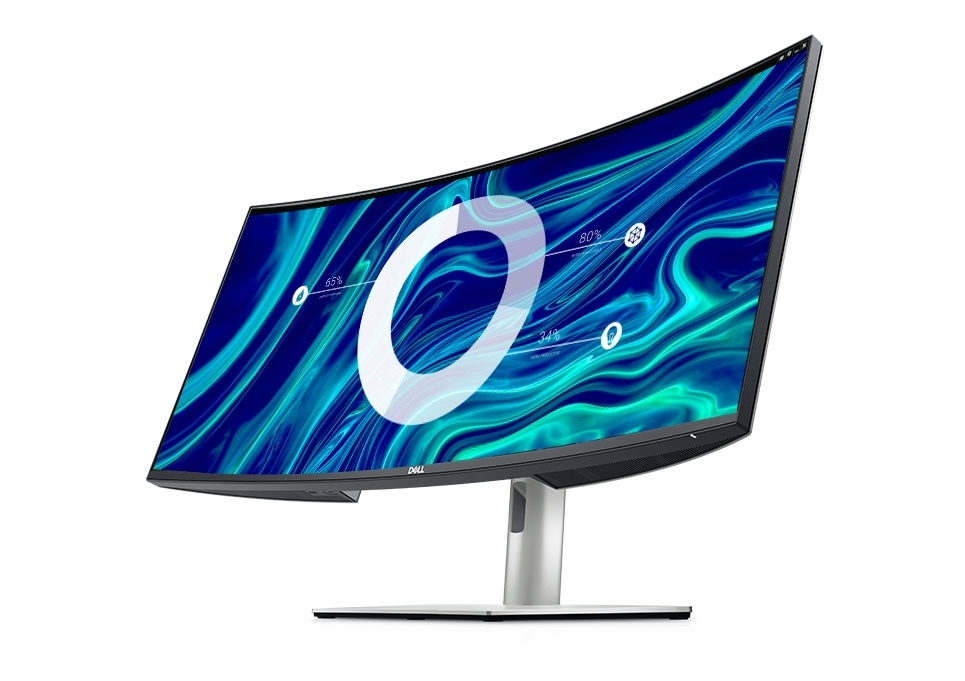
All-encompassing experience: The 1900R screen curvature creates a wider field of view, minimizes reflection and offers near uniform visual focus, for a more comfortable
visual experience over extended viewing periods. Plus, the built-in, dual 5W speakers deliver great sound.
Unparalleled focus: Get incredible depth, breadth and a wrap-around view that helps you focus on your work. With IPS technology, you can expect consistent color and picture quality across a wide 178° viewing angle.
Enhanced color coverage
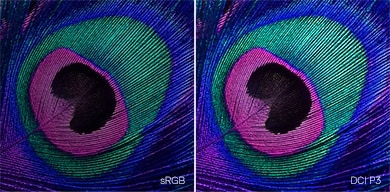
Accurate color, out of the box: Your monitor is factory calibrated at 99% sRGB to an accuracy of Delta-E less than 2 for accurate colors right f the start.
Your productivity hub
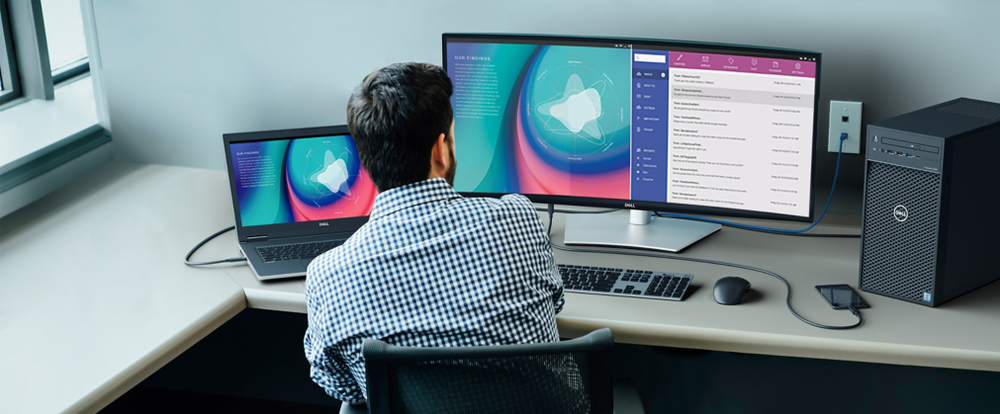
Extensive connectivity: Easily connect to a variety of devices with extensive connectivity options, including DP1.4, HDMI, USB-C and super speed USB 5Gbps. Plus, quick access ports conveniently located at the front enable fast connection to peripherals and charging of mobile phones (up to 15W power charging via USB-C).
Enhanced manageability: MAC Address pass-through, PXE Boot, and Wake-on-LAN are conveniently built in.
Multitask efficiently: Connect two PC sources to the monitor. Our intelligent Auto KVM feature detects the latest connected PC and seamlessly switches controls over. View content f both PC sources with Picture-by-Picture (PbP) and Picture-in-Picture (PiP), and use the KVM (keyboard, video and mouse) feature control both PCs with a single keyboard and mouse.
Masterful redesign
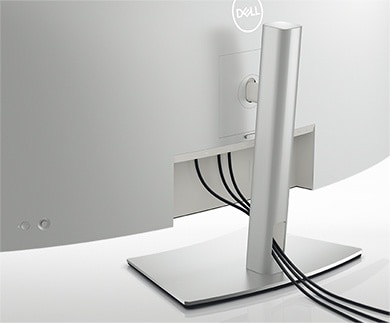
Beauty meets function: Crafted with a premium, platinum silver finish, this sleek monitor features a compact base and a hidden cable management design that runs the cables through the monitor riser.
Comfort is key: Tilt, swivel and adjust the height of your monitor to a maximum of 150mm because you should be comfortable while you work.
Easy on the eyes: Optimize eye comfort with a flicker-free screen and ComfortView, a feature that reduces harmful blue light emissions.
Dell Display Manager
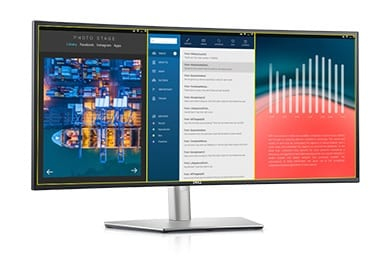
Seamless transitions: The auto-restore feature remembers where you left off, so applications will go back to where you left them, even after you’ve unplugged.
More ways to manage: Asset management reports allow IT managers to quickly capture and track monitor information as well as configure multiple monitors at once through a single setup.
The key to convenience: Shortcut keys can save you even more time, letting you easily configure your display management settings so you can get to work faster.
Green thinking: for today and tomorrow
Eco-conscious packaging: To reduce our manufacturing impact on the environment, this monitor is shipped Styrofoam-free, and the packaging is made of at least 75% recycled cardboard.
Energy conservation: Save energy when your monitor is not in use with PowerNap, a feature that dims or puts your monitor to sleep when it’s not in use.
A brand you can rely on

Features
Dell UltraSharp USB-C 34" - U3421WE

An immersive 34" WQHD curved monitor with wide color coverage and extensive connectivity including RJ45, USB-C® and quick-access front ports.

Productivity never looked so good
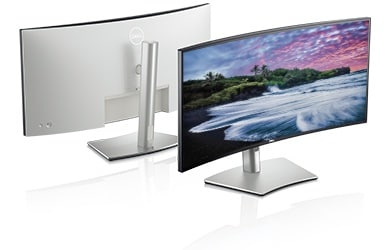
Immersive productivity: See more and achieve more on this 34” ultrawide WQHD (3440 x 1440) curved screen. With wider onscreen space, you can multitask effectively—without the need for a dual monitor setup.All-encompassing experience: The 1900R screen curvature creates a wider field of view, minimizes reflection and offers near uniform visual focus, for a more comfortable
visual experience over extended viewing periods. Plus, the built-in, dual 5W speakers deliver great sound.
Unparalleled focus: Get incredible depth, breadth and a wrap-around view that helps you focus on your work. With IPS technology, you can expect consistent color and picture quality across a wide 178° viewing angle.

Enhanced color coverage
Consistent vibrant colors: See stunning images in true-to-life color with an incredible color depth of 1.07 billion colors, and wide color coverage of industry standards including 99% sRGB, 99% Rec. 709 and 95% DCI-P3 color coverage. With 95% coverage of the DCI-P3 color space (which typically offers nearly 25% more coverage than sRGB), DCI-P3 is quickly becoming the color standard for creating and viewing content.Accurate color, out of the box: Your monitor is factory calibrated at 99% sRGB to an accuracy of Delta-E less than 2 for accurate colors right f the start.


Your productivity hub
Connect to productivity: With options including RJ45 and USB-C®, your monitor serves as a productivity hub that delivers stable Ethernet and up to 90W of power delivery—all in a clutter-free setup.Extensive connectivity: Easily connect to a variety of devices with extensive connectivity options, including DP1.4, HDMI, USB-C and super speed USB 5Gbps. Plus, quick access ports conveniently located at the front enable fast connection to peripherals and charging of mobile phones (up to 15W power charging via USB-C).
Enhanced manageability: MAC Address pass-through, PXE Boot, and Wake-on-LAN are conveniently built in.
Multitask efficiently: Connect two PC sources to the monitor. Our intelligent Auto KVM feature detects the latest connected PC and seamlessly switches controls over. View content f both PC sources with Picture-by-Picture (PbP) and Picture-in-Picture (PiP), and use the KVM (keyboard, video and mouse) feature control both PCs with a single keyboard and mouse.

Masterful redesign
Designed with you in mind: Navigate the menu and adjust screen settings with the easy-to-use joystick control. Plus, the three-sided, ultra thin borders let you dive in without distraction.Beauty meets function: Crafted with a premium, platinum silver finish, this sleek monitor features a compact base and a hidden cable management design that runs the cables through the monitor riser.
Comfort is key: Tilt, swivel and adjust the height of your monitor to a maximum of 150mm because you should be comfortable while you work.
Easy on the eyes: Optimize eye comfort with a flicker-free screen and ComfortView, a feature that reduces harmful blue light emissions.

Dell Display Manager
Productive at every level: Easy Arrange allows you to easily tile multiple applications across one or more screens with 38 pre-set window partitions and the ability to personalize up to five windows, giving you improved multitasking abilities.Seamless transitions: The auto-restore feature remembers where you left off, so applications will go back to where you left them, even after you’ve unplugged.
More ways to manage: Asset management reports allow IT managers to quickly capture and track monitor information as well as configure multiple monitors at once through a single setup.
The key to convenience: Shortcut keys can save you even more time, letting you easily configure your display management settings so you can get to work faster.

Green thinking: for today and tomorrow
Environmental standards: This monitors meet the latest regulatory and environmental standards such as EnergyStar®, and TCO, and is registered under EPEAT®.Eco-conscious packaging: To reduce our manufacturing impact on the environment, this monitor is shipped Styrofoam-free, and the packaging is made of at least 75% recycled cardboard.
Energy conservation: Save energy when your monitor is not in use with PowerNap, a feature that dims or puts your monitor to sleep when it’s not in use.
Advancing sustainability: Dell Technologies is committed to reducing environmental impact throughout the product lifecycle.

Connectivity Options
Ports & Slots:1. Security lock slot | 2. Power connector | 3. HDMI port x 2 | 4. Stand lock feature | 5. DisplayPort | 6. USB-C upstream port | 7. Audio line-out port | 8. USB upstream port | 9. Super speed USB 5Gbps (USB 3.2 Gen1) x 3 | 10. RJ45 port | 11. Super speed USB 5Gbps (USB 3.2 Gen1) | 12. USB-C downstream port
Cables Included:
1. Power cable (varies by country) | 2. DisplayPort cable (DP to DP) | 3. HDMI cable | 4. USB-C cable | USB 3.0 Upstream cable (enables the USB ports on the monitor)

A brand you can rely on
As the No. 1 monitor company worldwide for seven consecutive years (2013 to 2020), we take pride in our unyielding commitment to quality and the utmost satisfaction of our customers.
Reliable and responsible
Designed with the environment in mind, this monitor meets the latest regulatory and environmental standards.Specifications
Display
Display diagonal*
86.6 cm (34.1")
Display resolution*
3440 x 1440 pixels
Native aspect ratio*
21:9
Display technology*
LCD
Panel type*
IPS
Backlight type
LED
Touchscreen*
No
Display brightness (typical)
300 cd/m²
Response time*
8 ms
Screen shape*
Curved
Contrast ratio (typical)*
1000:1
Maximum refresh rate*
60 Hz
Viewing angle, horizontal
178°
Viewing angle, vertical
178°
Display number of colours*
1.073 billion colours
Response time (fast)
5 ms
Pixel pitch
0.2325 x 0.2325 mm
Pixel density
109 ppi
Horizontal scan range
30 - 89 kHz
Vertical scan range
48 - 85 Hz
sRGB coverage (typical)
100%
DCI-P3 coverage
95%
Performance
NVIDIA G-SYNC*
No
AMD FreeSync*
No
Flicker-free technology
Yes
Multimedia
Number of speakers
2
RMS rated power
10 W
Built-in speaker(s)*
Yes
Built-in camera*
No
Design
Market positioning*
Graphics design
Product colour*
Black
Ports & interfaces
Built-in USB hub*
Yes
USB upstream port type
USB Type-B, USB Type-C
Number of upstream ports
2
Number of USB Type-B upstream ports quantity
1
Ports & interfaces
Number of USB Type-C upstream ports quantity
1
USB Type-A downstream ports quantity
4
USB Type-C downstream ports quantity
1
DVI port
No
HDMI*
Yes
HDMI ports quantity
2
DisplayPorts quantity
1
DisplayPort version
1.4
Audio input
No
Audio output
Yes
Headphone out*
No
Ergonomics
Height adjustment*
Yes
Power
Energy efficiency class (SDR)*
F
Energy consumption (SDR) per 1000 hours*
32 kWh
Power consumption (typical)*
31.6 W
Power consumption (standby)*
0.3 W
Power consumption (max)
210 W
Power consumption (off)
0.2 W
AC input voltage
120 - 230 V
AC input frequency
50 - 60 Hz
Energy efficiency scale
A to G
Weight & dimensions
Weight (with stand)
11.7 kg
Carbon footprint
Total carbon footprint (kg of CO2e)
880
Total carbon emissions, standard deviation (kg of CO2e)
269
Carbon emissions, manufacturing (kg of CO2e)
530.18
Carbon emissions, logistics (kg of CO2e)
81.6
Carbon emissions, energy usage (kg of CO2e)
263
Carbon emissions, end-of-life (kg of CO2e)
4.69
PAIA version
1.2.11, 2020
Other features
Ethernet LAN (RJ-45) ports
1
Logistics data
Harmonized System (HS) code
85285210
Additional Information
| EAN/UPC | 5397184409558 |
|---|---|
| MPN | DELL-U3421WE |
| BRAND | DELL |
Disclaimer
Actual configuration might differ f illustration
Product Carbon Footprint (PCF)
1. Dell calculates the Product Carbon Footprint using one of two methodologies, depending on the product: the Dell PCF calculator (GaBi version , YYYY) or the Product Attribute to Impact Algorithm (PAIA, X.X.X, YYYY). The methodology used is indicated in the "Version of PCF tool used" column.
2. PAIA (Product Attribute Impact Algorithm) is a streamlined LCA tool developed by MIT ‘s Materials System Laboratory. PAIA estimates the product’s carbon footprint using limited system attributes of the product such as component dimension, screen size, system weight, and annual energy consumption.
3. Please note the emission estimate in this report is calculated using the mean value along with the standard deviation for that product el.
4. Use of default inputs (i.e. not primary data) and assumptions on location of use and other fields can introduce a standard deviation which must be taken into account while completing the calculations. For more information refer to the PCF pages on Dell.com.
5. For the PAIA PCF methodology, the transportation f assembly to customer includes the emissions generated during air, ocean and land transportation of finished or semi-finished Dell products between Dell facilities and between Dell facilities to customers.
6. For the Dell PCF calculator and methodology, the transportation phase the default delivery assumptions are 90% of transport happening by sea and 10% happening by air. Trucking distances don’t contribute as much to the PCF impact compared to more influential by sea or by air distances es.
7. Please note, PAIA uses the ecoinvent Database ( whenever primary data is not made available for calculations.
8. For client and commercial end user computing products, minimum configurations were assumed for calculations. For Server and Storage products, typical configurations or ENERGY STAR ( configurations were used for calculations.
9. Use Phase emissions were calculated based on the location of use as "Europe" i.e. the Use Phase emissions are not specific to a single country / location.The Dell PCF Calculator also estimates Use Phase emissions for the U.S. and China, which are available in the PCF PDF documents on Dell.com.
10. The report provides the total emissions separated by the 4 lifecycle phases: manufacturing, transport, use, and end of life to understand the impact of each phase.
11. The Dell PCF Calculator lifetime usage assumption at the product family level is as follows: Desktop, Notebook - 5 years, Display - 6 years and Servers/Storage - 4 years.
12. For Displays, total product weight refers to the weight of the typical product configuration, including any cables and the power cord.
* Blanks indicate we do not have the corresponding metric calculated or data is currently unavailable for the specific product at this time.
Product Carbon Footprint (PCF)
1. Dell calculates the Product Carbon Footprint using one of two methodologies, depending on the product: the Dell PCF calculator (GaBi version , YYYY) or the Product Attribute to Impact Algorithm (PAIA, X.X.X, YYYY). The methodology used is indicated in the "Version of PCF tool used" column.
2. PAIA (Product Attribute Impact Algorithm) is a streamlined LCA tool developed by MIT ‘s Materials System Laboratory. PAIA estimates the product’s carbon footprint using limited system attributes of the product such as component dimension, screen size, system weight, and annual energy consumption.
3. Please note the emission estimate in this report is calculated using the mean value along with the standard deviation for that product el.
4. Use of default inputs (i.e. not primary data) and assumptions on location of use and other fields can introduce a standard deviation which must be taken into account while completing the calculations. For more information refer to the PCF pages on Dell.com.
5. For the PAIA PCF methodology, the transportation f assembly to customer includes the emissions generated during air, ocean and land transportation of finished or semi-finished Dell products between Dell facilities and between Dell facilities to customers.
6. For the Dell PCF calculator and methodology, the transportation phase the default delivery assumptions are 90% of transport happening by sea and 10% happening by air. Trucking distances don’t contribute as much to the PCF impact compared to more influential by sea or by air distances es.
7. Please note, PAIA uses the ecoinvent Database ( whenever primary data is not made available for calculations.
8. For client and commercial end user computing products, minimum configurations were assumed for calculations. For Server and Storage products, typical configurations or ENERGY STAR ( configurations were used for calculations.
9. Use Phase emissions were calculated based on the location of use as "Europe" i.e. the Use Phase emissions are not specific to a single country / location.The Dell PCF Calculator also estimates Use Phase emissions for the U.S. and China, which are available in the PCF PDF documents on Dell.com.
10. The report provides the total emissions separated by the 4 lifecycle phases: manufacturing, transport, use, and end of life to understand the impact of each phase.
11. The Dell PCF Calculator lifetime usage assumption at the product family level is as follows: Desktop, Notebook - 5 years, Display - 6 years and Servers/Storage - 4 years.
12. For Displays, total product weight refers to the weight of the typical product configuration, including any cables and the power cord.
* Blanks indicate we do not have the corresponding metric calculated or data is currently unavailable for the specific product at this time.