Data Input Devices
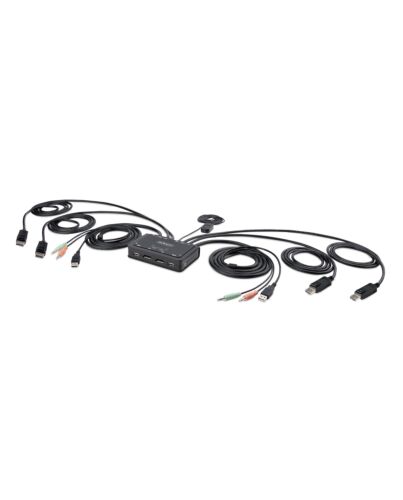
StarTech.com 2-Port Dual-Monitor DisplayPort Cable KVM Switch, 4K 60Hz, Compact KVM with 5ft/1.5m US
£181.49
In stock
- Immediately available
- Discreet Packaging
- Free Shipping
Product Details
Description
Share a mouse, keyboard, and dual 4K 60Hz DisplayPort displays between two DisplayPort enabled computers, using this KVM Switch with built-in cables
This Dual-Monitor KVM Switch enables users to switch between two USB-A and DisplayPort enabled desktops, sharing dual-4K 60Hz DisplayPort monitors, a keyboard and mouse, and audio input/output devices.
Hassle-Free Setup
The KVM switch is bus powered and features built-in dual-DisplayPort, USB-A, and 3.5mm Audio Input/Output cables. This ensures compatibility and performance between the KVM switch, monitors, and peripherals - without the need to select and purchase the cables required for those connections.
Compatibility
The 2-port KVM switch is compatible with all operating systems, including Windows, macOS, CheOS, and Linux. The KVM works with all hardware platforms including Intel, AMD, and Apple M1/M2.
Intuitive Control
The KVM switch offers two options to switch between hosts - a remote push button or hotkey commands, using the software. The remote push button includes a 1.5m cable for optimal placement in the setup. Independent audio switching can be achieved through the software, utilizing keyboard shortcuts (i.e., hotkeys), ensuring uninterrupted audio when switching between host devices.
Enhance Productivity and Device Management with the StarTech.com Connectivity Tools Application
Developed to improve performance and security, StarTech.com Connectivity Tools is the only software suite on the market that works with a wide range of IT connectivity accessories. The software suite includes:
• Advanced Windows Layout Utility: Setup and save custom windows layouts.
• MAC Address Pass-Through Utility: Improve network security.
• USB Event Monitoring Utility: Track and log connected USB devices.
• Wi-Fi Auto Switch Utility: Enable users to quickly access faster network speeds via wired LAN.
For more information and to download the StarTech.com Connectivity Tools application, please visit: www.startech.com/connectivity-tools
The StarTech.com Advantage
This Dual-Monitor KVM Switch enables users to switch between two USB-A and DisplayPort enabled desktops, sharing dual-4K 60Hz DisplayPort monitors, a keyboard and mouse, and audio input/output devices.
Hassle-Free Setup
The KVM switch is bus powered and features built-in dual-DisplayPort, USB-A, and 3.5mm Audio Input/Output cables. This ensures compatibility and performance between the KVM switch, monitors, and peripherals - without the need to select and purchase the cables required for those connections.
Compatibility
The 2-port KVM switch is compatible with all operating systems, including Windows, macOS, CheOS, and Linux. The KVM works with all hardware platforms including Intel, AMD, and Apple M1/M2.
Intuitive Control
The KVM switch offers two options to switch between hosts - a remote push button or hotkey commands, using the software. The remote push button includes a 1.5m cable for optimal placement in the setup. Independent audio switching can be achieved through the software, utilizing keyboard shortcuts (i.e., hotkeys), ensuring uninterrupted audio when switching between host devices.
Enhance Productivity and Device Management with the StarTech.com Connectivity Tools Application
Developed to improve performance and security, StarTech.com Connectivity Tools is the only software suite on the market that works with a wide range of IT connectivity accessories. The software suite includes:
• Advanced Windows Layout Utility: Setup and save custom windows layouts.
• MAC Address Pass-Through Utility: Improve network security.
• USB Event Monitoring Utility: Track and log connected USB devices.
• Wi-Fi Auto Switch Utility: Enable users to quickly access faster network speeds via wired LAN.
For more information and to download the StarTech.com Connectivity Tools application, please visit: www.startech.com/connectivity-tools
The StarTech.com Advantage
Key Features
- DUAL 4K 60HZ MONITOR KVM SWITCH: Enables switching between two USB-A and DisplayPort-enabled desktops to share a mouse, keyboard, audio, and dual-4K 60Hz DisplayPort displays
- READY-TO-USE: Small form factor, integrated cables, and no external power adapter enable rapid deployment; Bus-powered KVM switch features integrated 5ft/1.5m host cables to allow for extended reach, reducing port and connector strain
- SWITCHING OPTIONS: Remote Push Button and Hotkey Commands enable switching between hosts; Remote push button has a 1.5m cable for ideal placement in the setup; software allows listening to audio f one computer, while controlling the other
- COMPATIBILITY: 2-Port Dual-Monitor KVM Switch works with any operating system including Windows, macOS, Linux, and CheOS; Compatible with all hardware platforms such as Intel and AMD
- OUR ADVANTAGE: Included connectivity tools for IT Pro's and IT help-desk support teams with USB Event Monitoring for logging USB device connections with timestamps, and Windows Layout to restore windows locations upon switching hosts
Specifications
Ports & interfaces
Number of computers controlled*
2
Keyboard port type*
USB
Mouse port type*
USB
Video port type*
DisplayPort
DisplayPorts quantity
4
DisplayPort version
1.2
Console ports*
3.5mm headphone, 3.5mm mic, DisplayPort, USB A
Console USB ports quantity
2
Console DisplayPorts ports quantity
2
USB version
2.0
Audio connections
Yes
Headphone outputs
2
Number of microphone inputs
2
Performance
HD type*
4K Ultra HD
Maximum resolution*
4096 x 2160 pixels
Video bandwidth
60 Hz
Data transfer rate (max)
0.48 Gbit/s
Scan interval
10,20,30,40,50,60 s
Chipset
SN8P2202SG
Audio channels
2.0
Design
Rack mounting*
No
Product colour*
Black
Housing material
Acrylonitrile butadiene styrene (ABS)
Cable length
1.5 m
LED indicators
Yes
Push button
Yes
Hot keys
Yes
Mean time between failures (MTBF)
419293 h
Display
Built-in display*
No
Power
Power source
USB
System requirements
Windows operating systems supported
Windows 10, Windows 10 Education, Windows 10 Education x64, Windows 10 Enterprise, Windows 10 Enterprise x64, Windows 10 Home, Windows 10 Home x64, Windows 10 IOT Core, Windows 10 IoT Enterprise, Windows 10 Pro, Windows 10 Pro x64, Windows 10 x64, Windows 11, Windows 11 Enterprise, Windows 11 Enterprise x64, Windows 11 Home, Windows 11 Pro, Windows 11 x64, Windows 7, Windows 7 Enterprise, Windows 7 Enterprise x64, Windows 7 Home Basic, Windows 7 Home Basic x64, Windows 7 Home Premium, Windows 7 Home Premium x64, Windows 7 Professional, Windows 7 Professional x64, Windows 7 Starter, Windows 7 Starter x64, Windows 7 Ultimate, Windows 7 Ultimate x64, Windows 7 x64, Windows 8, Windows 8 Enterprise, Windows 8 Enterprise x64, Windows 8 Pro, Windows 8 Pro x64, Windows 8 x64, Windows 8.1, Windows 8.1 Enterprise, Windows 8.1 Enterprise x64, Windows 8.1 Pro, Windows 8.1 Pro x64, Windows 8.1 x64
Mac operating systems supported
Mac OS X 10.12 Sierra, Mac OS X 10.13 High Sierra, Mac OS X 10.14 Mojave, Mac OS X 10.15 Catalina, Mac OS X 10.15.3 Catalina, Mac OS X 11.0 Big Sur, Mac OS X 12.0 Monterey
Other operating systems supported
CheOS
Sustainability
Sustainability compliance
Yes
Compliance certificates
RoHS
Operational conditions
Operating temperature (T-T)
0 - 40 °C
Storage temperature (T-T)
-20 - 60 °C
Operating relative humidity (H-H)
0 - 90%
Weight & dimensions
Width
90 mm
Depth
125 mm
Height
25 mm
Weight
600 g
Packaging data
Package width
160 mm
Package depth
100 mm
Package height
210 mm
Package weight
700 g
Packaging content
Quick installation guide
Yes
Other features
Display resolution at frequency
4096x2160 @60Hz
3840x2160 @60Hz
5120x1440 @60Hz
3440x1440 @60Hz
2560x1440 @60Hz
2560x1080 @60Hz
1920x1200 @60Hz
1920x1080 @60Hz
Logistics data
Master (outer) case width
440 mm
Master (outer) case length
320 mm
Master (outer) case height
345 mm
Products per master (outer) case
12 pc(s)
Additional Information
| EAN/UPC | 0065030899215 |
|---|---|
| MPN | C2-DD46-UA2-CBL-KVM |
| BRAND | STARTECH |