Data Input Devices
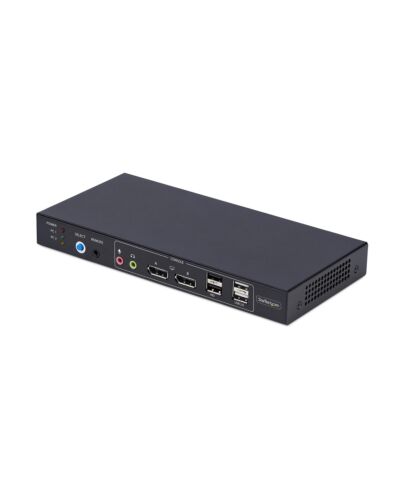
StarTech.com 2-Port Dual-Monitor DisplayPort KVM Switch with Dual View Video Matrix, 4K 60Hz, 4x USB
£344.20
In stock
- Immediately available
- Discreet Packaging
- Free Shipping
Product Details
Description
Share a mouse, keyboard, USB hub, and dual 4K 60Hz DisplayPort monitors, between two DisplayPort-enabled computers, featuring dual-view video matrix capabilities
The Video Matrix KVM Switch allows you to view one display f each connected computer and switch the keyboard, mouse, and audio device between the selected displays using hotkeys. You can also switch all connected peripherals and both monitors like a standard KVM.
Universal Compatibility
The TAA-Compliant KVM Switch provides BIOS/UEFI control and works with any operating system, including Windows, macOS, and Linux. No software is required, and it is compatible with all hardware platforms such as Intel, AMD, and Apple Silicon.
Customizable Switching
Switching KVM ports is easy with the front-facing push button, hotkeys, or the included remote selector cable. An audible buzzer provides confirmation, and LEDs offer quick visual port selection status.
Reliable Performance
The durable design features a steel housing that helps prevent Electro-Magnetic Interference (EMI), enhancing the stability and reliability of the KVM. Its sturdy construction makes it ideal for installation in a variety of environments, and it offers 8kV Air/6kV Contact ESD protection.
USB Audio
Eliminate the need to connect 3.5mm cables f the computers to the KVM by using this KVM switch's built-in USB audio device, which provides 3.5mm audio jacks for both microphone and speakers. This setup simplifies your workspace by integrating audio management directly into the KVM switch.
Enhance Productivity and Device Management with the StarTech.com Connectivity Tools Application
Developed to improve performance and security, StarTech.com Connectivity Tools is the only software suite on the market that works with a wide range of IT connectivity accessories. The software suite includes:
• Advanced Windows Layout Utility: Setup and save custom windows layouts.
• USB Event Monitoring Utility: Track and log connected USB devices.
For more information and to download the StarTech.com Connectivity Tools application, please visit: www.startech.com/connectivity-tools
The Video Matrix KVM Switch allows you to view one display f each connected computer and switch the keyboard, mouse, and audio device between the selected displays using hotkeys. You can also switch all connected peripherals and both monitors like a standard KVM.
Universal Compatibility
The TAA-Compliant KVM Switch provides BIOS/UEFI control and works with any operating system, including Windows, macOS, and Linux. No software is required, and it is compatible with all hardware platforms such as Intel, AMD, and Apple Silicon.
Customizable Switching
Switching KVM ports is easy with the front-facing push button, hotkeys, or the included remote selector cable. An audible buzzer provides confirmation, and LEDs offer quick visual port selection status.
Reliable Performance
The durable design features a steel housing that helps prevent Electro-Magnetic Interference (EMI), enhancing the stability and reliability of the KVM. Its sturdy construction makes it ideal for installation in a variety of environments, and it offers 8kV Air/6kV Contact ESD protection.
USB Audio
Eliminate the need to connect 3.5mm cables f the computers to the KVM by using this KVM switch's built-in USB audio device, which provides 3.5mm audio jacks for both microphone and speakers. This setup simplifies your workspace by integrating audio management directly into the KVM switch.
Enhance Productivity and Device Management with the StarTech.com Connectivity Tools Application
Developed to improve performance and security, StarTech.com Connectivity Tools is the only software suite on the market that works with a wide range of IT connectivity accessories. The software suite includes:
• Advanced Windows Layout Utility: Setup and save custom windows layouts.
• USB Event Monitoring Utility: Track and log connected USB devices.
For more information and to download the StarTech.com Connectivity Tools application, please visit: www.startech.com/connectivity-tools
Key Features
- VIDEO MATRIX KVM SWITCH: Functions as a KM-only or full KVM switch: view one screen f each computer and switch keyboard, mouse, and USB audio between them (KM only), or control both displays and peripherals f a single PC (KVM)
- MULTIPLE SWITCHING OPTIONS: Easy to switch KVM ports using the front-facing pushbutton, hotkeys, or the included remote selector cable, with an audible buzzer providing confirmation; LEDs provide quick visual port selection status
- UNIVERSAL COMPATIBILITY: TAA-Compliant KVM Switch provides BIOS/UEFI control and works with any operating system including Windows, macOS, and Linux; No software required; Compatible with all hardware platforms such as Intel, AMD, and Apple Silicon
- DURABLE DESIGN: Steel housing helps prevent Electro-Magnetic Interference (EMI) enhancing stability and reliability of the KVM; Sturdy construction makes it ideal for installation in a variety of environments; 8kV Air/6kV Contact ESD protection
- OUR ADVANTAGE: Included connectivity tools for IT Pro's and IT help-desk support teams with USB Event Monitoring for logging USB device connections with timestamps, and Windows Layout to restore windows locations upon switching hosts
Specifications
Ports & interfaces
Number of computers controlled*
2
Keyboard port type*
USB
Mouse port type*
USB
Video port type*
DisplayPort
DisplayPorts quantity
4
DisplayPort version
1.2
USB 2.0 Type-B ports quantity
2
Console ports*
3.5mm headphone, 3.5mm mic, DisplayPort, USB A
Console USB ports quantity
4
Console DisplayPorts ports quantity
2
USB hub
Yes
USB 2.0 Type-A hub ports quantity
2
Audio connections
Yes
Headphone outputs
1
Number of microphone inputs
1
DC-in jack
Yes
Performance
HD type*
4K Ultra HD
Maximum resolution*
3840 x 2160 pixels
Data transfer rate (max)
0.48 Gbit/s
Scan interval
10,20,30,40,50,60 s
Daisy chain
No
Audio channels
2.0
Design
Rack mounting*
No
Product colour*
Black
Housing material
Aluminium, Steel
Wired remote switch
Yes
LED indicators
Yes
Push button
Yes
Hot keys
Yes
Mean time between failures (MTBF)
87298 h
Display
Built-in display*
No
On Screen Display (OSD)
No
Power
Power source
DC
Input voltage
100 - 240 V
Input current
1 A
Output voltage
12 V
Output current
3 A
Power consumption (typical)
36 W
Power plug type
Type M
Compatible power plug types
AU, EU, UK, US
Sustainability
Compliance certificates
Federal Communications Commission (FCC), RoHS, Trade Agreements Act (TAA)
Operational conditions
Operating temperature (T-T)
0 - 40 °C
Storage temperature (T-T)
-20 - 60 °C
Operating relative humidity (H-H)
0 - 90%
Weight & dimensions
Width
105 mm
Depth
221 mm
Height
26 mm
Weight
626 g
Packaging data
Package width
250 mm
Package depth
292 mm
Package height
78 mm
Package weight
1.5 kg
Packaging content
Quick installation guide
Yes
AC adapter included
Yes
Other features
IP control
No
Logistics data
Master (outer) case width
539 mm
Master (outer) case length
419 mm
Master (outer) case height
333 mm
Products per master (outer) case
10 pc(s)
Additional Information
| EAN/UPC | 0065030904346 |
|---|---|
| MPN | P2ADD121D-KVM-SWITCH |
| BRAND | STARTECH |