Industrial
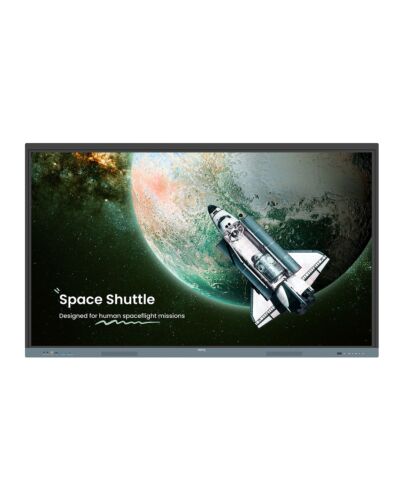
BenQ RE7504 Interactive flat panel 190.5 cm (75") 450 cd/m² 4K Ultra HD Black, Grey Touchscreen Buil
£2,269.76
BenQ RE7504, Interactive flat panel, 190.5 cm (75"), 3840 x 2160 pixels
Out of stock
- Immediately available
- Discreet Packaging
- Free Shipping
Product Details
Description
BenQ Board Essential
The essence of education
Have all the essential tools you need for effective interactive lessons.
Harness the power of Google
The EDLA- BenQ Board combines Google services with ever-reliable BenQ hardware and software.
Expansive app liby
Install education apps directly f Google Play for more interactive lessons.
Go-to Google services
Access essential Google Core Services such as Google Drive and Meet.
Google Docs editors
Quickly open lesson files with any Google app on a large touchscreen display.
Direct file access
Google Drive integration lets you access and save files to your cloud storage directly f the board.
Built-in data security
Keep your boards safe against security and privacy threats with Google Play Protect and Safe Browsing.
A whiteboard like no other
Do more than just write or draw. EZWrite’s expandable canvas offers limitless possibilities with its rich collection of lesson tools and helpful AI features.
Use your own files
Import a variety of lesson files, interact with its contents on the whiteboard, and then export the session as an editable file for a future class.
A tool for every need
Pull up any of EZWrite’s built-in tools that are designed to engage students, and meet a wide variety of lesson activities and subjects.
Take lessons to the cloud
Extend the whiteboard so that others can participate and interact with the board whether they’re joining f their seats or f home.
Built-in AI tools for more inclusive lessons
Text-to-speech
Have displayed text read aloud
Multilingual translation
Translate text with a tap
OCR
Edit text f imported images
Essential tools for every teacher
The RE04 uncomplicates your teaching experience by giving you everything you need on one board.
Your own space and data
All accounts are secure and separate—allowing you to have your own teaching space while preventing others f accessing your data.
Organise with ease
Save time by having all your most-used apps, files, and widgets arranged and accessible directly f your home screen.
Snap. Record. Write.
The Floating Tool lets you take snapshots, record your screen, and annotate over any app, file, webpage, or video displayed on the board.
Sidebar access
Expand the sidebar for convenient access to recent apps, files, and input sources, as well as a shortcut to the home screen.*Available in Q2.
Expanded search
Use BenQ Search to quickly query related content f the internet or sort through your lessons files stored on the board or your cloud.
Enhance your lesson flow
Increase teaching efficiency with the multi-window e, allowing you to whiteboard while using other apps on the side. *Available in Q3.
5-in-1 connectivity
The multipurpose USB-C port allows for quick data transmission, clear audio/video playback, touchback controls, and 65-watt charging.
Full vibrant audio
Experience enhanced audio with the board’s built-in 20-watt speakers that offer crisp, room-filling sound.
All hands on board
The BenQ Board Essential’s large interactive screen is designed for whole-class participation, letting you boost engagement and liven up your lessons.
40 touch points
Get everyone actively participating in class with the RE04’s 40 touch points.
Gap-free writing
No gaps and an 8ms response time ensure a natural writing experience every time.
Precise touch
You’re guaranteed smooth interactions with the board’s Precision IR technology.
Everyone can share
InstaShare 2 lets everyone share ideas freely. Wirelessly cast lesson content and interact with any device f anywhere in the room.
Beyond screen sharing
Do more than just cast your screen. Media sharing makes lessons more dynamic. Share photos, videos, or even a live camera feed f your device directly to the board.
erate sessions with ease
Host controls allow you to effectively manage your sessions. Accept or reject sharing requests and show or hide screens, while the AI Guardian automatically blocks content.
Management made easy
BenQ takes out the complexity f device and user list management, significantly reducing IT workload so they can focus on other tasks.
Effortless user list syncing
Simplify identity management by syncing any of your existing Google Workspace, Entra ID (formerly Azure Active Directory), ClassLink, LDAP, or SAML-based user lists.
Centralised management
Remotely manage all your BenQ devices on an all-in-one console that lets you install, update, and delete apps, push updates, and automate tasks such as startup and shutdown.
Enhanced data security
Safeguard your data through the RE04’s secure login options and access controls, regular system updates, and built-in Google Play Protect and Safe Browsing measures.
Data-driven efficiency
Generate specific and comprehensive device analytics so you can monitor how your boards are being utilised and adjust usage guidelines to maximise efficiency.
School-wide announcements
With X-Sign Broadcast, you can send out timely announcements to all your BenQ displays. Inform your school about upcoming events, important reminders, and emergencies.
ClassroomCare®
Bridging health and learning
ClassroomCare features are essential in helping schools create healthier learning spaces for students and teachers.
Easy on the eyes
Eye care technologies, such as the RE04’s low blue light filter and flicker-free screen, help reduce eye strain in class, while its anti-glare 4K screen ensures clear images every time.
IP5X dust protection
The IEC 60529-complaint RE04 screen prevents dust accumulation even in the most dust-prone environments.
The essence of education
Have all the essential tools you need for effective interactive lessons.
Harness the power of Google
The EDLA- BenQ Board combines Google services with ever-reliable BenQ hardware and software.
Expansive app liby
Install education apps directly f Google Play for more interactive lessons.
Go-to Google services
Access essential Google Core Services such as Google Drive and Meet.
Google Docs editors
Quickly open lesson files with any Google app on a large touchscreen display.
Direct file access
Google Drive integration lets you access and save files to your cloud storage directly f the board.
Built-in data security
Keep your boards safe against security and privacy threats with Google Play Protect and Safe Browsing.
A whiteboard like no other
Do more than just write or draw. EZWrite’s expandable canvas offers limitless possibilities with its rich collection of lesson tools and helpful AI features.
Use your own files
Import a variety of lesson files, interact with its contents on the whiteboard, and then export the session as an editable file for a future class.
A tool for every need
Pull up any of EZWrite’s built-in tools that are designed to engage students, and meet a wide variety of lesson activities and subjects.
Take lessons to the cloud
Extend the whiteboard so that others can participate and interact with the board whether they’re joining f their seats or f home.
Built-in AI tools for more inclusive lessons
Text-to-speech
Have displayed text read aloud
Multilingual translation
Translate text with a tap
OCR
Edit text f imported images
Essential tools for every teacher
The RE04 uncomplicates your teaching experience by giving you everything you need on one board.
Your own space and data
All accounts are secure and separate—allowing you to have your own teaching space while preventing others f accessing your data.
Organise with ease
Save time by having all your most-used apps, files, and widgets arranged and accessible directly f your home screen.
Snap. Record. Write.
The Floating Tool lets you take snapshots, record your screen, and annotate over any app, file, webpage, or video displayed on the board.
Sidebar access
Expand the sidebar for convenient access to recent apps, files, and input sources, as well as a shortcut to the home screen.*Available in Q2.
Expanded search
Use BenQ Search to quickly query related content f the internet or sort through your lessons files stored on the board or your cloud.
Enhance your lesson flow
Increase teaching efficiency with the multi-window e, allowing you to whiteboard while using other apps on the side. *Available in Q3.
5-in-1 connectivity
The multipurpose USB-C port allows for quick data transmission, clear audio/video playback, touchback controls, and 65-watt charging.
Full vibrant audio
Experience enhanced audio with the board’s built-in 20-watt speakers that offer crisp, room-filling sound.
All hands on board
The BenQ Board Essential’s large interactive screen is designed for whole-class participation, letting you boost engagement and liven up your lessons.
40 touch points
Get everyone actively participating in class with the RE04’s 40 touch points.
Gap-free writing
No gaps and an 8ms response time ensure a natural writing experience every time.
Precise touch
You’re guaranteed smooth interactions with the board’s Precision IR technology.
Everyone can share
InstaShare 2 lets everyone share ideas freely. Wirelessly cast lesson content and interact with any device f anywhere in the room.
Beyond screen sharing
Do more than just cast your screen. Media sharing makes lessons more dynamic. Share photos, videos, or even a live camera feed f your device directly to the board.
erate sessions with ease
Host controls allow you to effectively manage your sessions. Accept or reject sharing requests and show or hide screens, while the AI Guardian automatically blocks content.
Management made easy
BenQ takes out the complexity f device and user list management, significantly reducing IT workload so they can focus on other tasks.
Effortless user list syncing
Simplify identity management by syncing any of your existing Google Workspace, Entra ID (formerly Azure Active Directory), ClassLink, LDAP, or SAML-based user lists.
Centralised management
Remotely manage all your BenQ devices on an all-in-one console that lets you install, update, and delete apps, push updates, and automate tasks such as startup and shutdown.
Enhanced data security
Safeguard your data through the RE04’s secure login options and access controls, regular system updates, and built-in Google Play Protect and Safe Browsing measures.
Data-driven efficiency
Generate specific and comprehensive device analytics so you can monitor how your boards are being utilised and adjust usage guidelines to maximise efficiency.
School-wide announcements
With X-Sign Broadcast, you can send out timely announcements to all your BenQ displays. Inform your school about upcoming events, important reminders, and emergencies.
ClassroomCare®
Bridging health and learning
ClassroomCare features are essential in helping schools create healthier learning spaces for students and teachers.
Easy on the eyes
Eye care technologies, such as the RE04’s low blue light filter and flicker-free screen, help reduce eye strain in class, while its anti-glare 4K screen ensures clear images every time.
IP5X dust protection
The IEC 60529-complaint RE04 screen prevents dust accumulation even in the most dust-prone environments.
Specifications
Display
Panel type
IPS
Display diagonal*
190.5 cm (75")
Display resolution*
3840 x 2160 pixels
Display brightness*
450 cd/m²
HD type*
4K Ultra HD
Touchscreen*
Yes
Touchscreen technology
Infed
Number of simultaneous touchpoints
40
Native aspect ratio
16:9
Response time
8 ms
Contrast ratio (typical)
1200:1
Contrast ratio (dynamic)
30000:1
Active display area (W x H)
1649.7 x 927.9 mm
Panel life
50000 h
Surface hardness
9H
RGB colour space
NTSC
Ports & interfaces
HDMI ports quantity*
4
HDMI version
2.0
HDMI input ports quantity
3
HDMI output ports quantity
1
VGA (D-Sub) input ports
1
DisplayPorts quantity*
1
DisplayPorts in
1
DisplayPort version
1.2
USB port*
Yes
USB ports quantity
8
USB version
2.0/3.2 Gen 1 (3.1 Gen 1)
USB connector type
USB Type-A, USB Type-B, USB Type-C
Ethernet LAN (RJ-45) ports
2
Microphone in
Yes
RS-232 interface
Yes
Card reader integrated
Yes
Compatible memory cards
MicroSD (TransFlash)
OPS ule slot
Yes
Audio
Built-in speaker(s)*
Yes
Number of built-in speakers
2
RMS rated power
40 W
Design
Product design*
Interactive flat panel
Placement supported*
Indoor
Orientation
Horizontal
Product colour*
Black, Grey
Screen shape
Flat
VESA mounting*
Yes
Panel mounting interface
800 x 400 mm
Anti-glare screen
Yes
Performance
Purpose*
Education
Power
Power consumption (typical)*
73.9 W
Power consumption (standby)*
0.5 W
AC input voltage
100 - 240 V
AC input frequency
50 - 60 Hz
Computer system
Computer system*
Yes
Built-in processor*
Yes
Processor architecture
ARM Cortex-A53+Cortex-A73
Processor cores
4
Internal memory
4 GB
On-board graphics card el
ARM Mali-G52
Internal storage capacity
64 GB
Operating system installed
Android
Operating system version
Android 13.0
Weight & dimensions
Display width
1716.5 mm
Display depth
87.7 mm
Display height
1041.6 mm
Display weight
50 kg
Packaging data
Package width
180 mm
Package depth
1860 mm
Package height
1120 mm
Package weight
65 kg
Packaging content
Remote control included
Yes
Stylus pen
Yes
Number of stylus pens
2
Cables included
HDMI, USB, VGA
Mounting kit
Yes
Operational conditions
Operating temperature (T-T)
0 - 40 °C
Operating relative humidity (H-H)
20 - 80%
Storage temperature (T-T)
-10 - 60 °C
Storage relative humidity (H-H)
10 - 80%
Logistics data
Country of origin
China
Products per pallet
6 pc(s)
Harmonized System (HS) code
8528521000
Sensors
Ambient light sensor
Yes
Network
Ethernet LAN*
Yes
Ethernet LAN data rates
10,100,1000 Mbit/s
Wi-Fi*
No
Additional Information
| EAN/UPC | 4718755093852 |
|---|---|
| MPN | 9H.F9FTK.DE4 |