
Computers
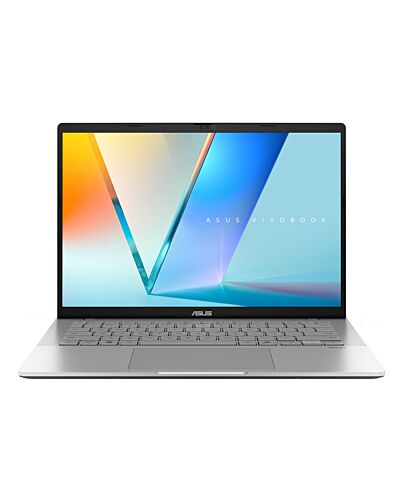
ASUS Vivobook S14 M3407HA-LY014W AMD Ryzen™ 7 260 Laptop 35.6 cm (14") WUXGA 16 GB DDR5-SDRAM 1 TB S
£612.36
ASUS Vivobook S14 M3407HA-LY014W, AMD Ryzen™ 7, 3.8 GHz, 35.6 cm (14"), 1920 x 1200 pixels, 16 GB, 1 TB
In stock
- Immediately available
- Discreet Packaging
- Free Shipping
Product Details
Description
More Intelligent, More Productive, More Secure
Experience effortless productivity with the ASUS Vivobook S14, your ideal companion for everyday life. Whether for work, study, or play, this laptop helps you power through any task, designed to be more productive, intelligent, and secure. Its sleek metallic design is both practical and stylish, with up to AMD Ryzen™ 7 260 processor and up to 20 hours of battery life* ensure all-day productivity. Enjoy stunning visuals on the vibrant 16:10 FHD OLED* or IPS display and immersive sound for better video calls and streaming. Built for a balanced lifestyle, the ASUS Vivobook S14 does more for you, giving you back time to enjoy life’s everyday moments.
Experience effortless productivity with the ASUS Vivobook S14, your ideal companion for everyday life. Whether for work, study, or play, this laptop helps you power through any task, designed to be more productive, intelligent, and secure. Its sleek metallic design is both practical and stylish, with up to AMD Ryzen™ 7 260 processor and up to 20 hours of battery life* ensure all-day productivity. Enjoy stunning visuals on the vibrant 16:10 FHD OLED* or IPS display and immersive sound for better video calls and streaming. Built for a balanced lifestyle, the ASUS Vivobook S14 does more for you, giving you back time to enjoy life’s everyday moments.
Key Features
- Windows 11 Home 64-bit
- AMD Ryzen 7 260 (24MB Cache, 3.8GHz)
- 35.6 cm (14") WUXGA 1920 x 1200
- 16GB DDR5-SDRAM & 1000GB SSD
Specifications
Design
Colour name
Cool Silver
Product type*
Laptop
Product colour*
Silver
Form factor*
Clamshell
Housing material
Aluminium, Plastic
Introduction year
2025
Display
Display diagonal*
35.6 cm (14")
Display resolution*
1920 x 1200 pixels
Touchscreen*
No
HD type
WUXGA
LED backlight
Yes
Native aspect ratio
16:10
Anti-glare screen
Yes
Display brightness
300 cd/m²
RGB colour space
NTSC
Colour gamut
45%
Maximum refresh rate
60 Hz
Processor
Processor manufacturer*
AMD
Processor family*
AMD Ryzen™ 7
Processor el*
260
Processor cores
8
Processor threads
16
Processor boost frequency
5.1 GHz
Processor frequency*
3.8 GHz
Processor cache
24 MB
Processor cache type
L2 & L3
Neural processor unit (NPU)
Neural processor unit (NPU)
AMD Ryzen AI
Total processor performance up to
38 TOPs
NPU performance up to
16 TOPs
Memory
Internal memory*
16 GB
Internal memory type
DDR5-SDRAM
Memory form factor
On-board
Memory slots
1x SO-DIMM
Maximum internal memory*
32 GB
Storage
Total storage capacity*
1 TB
Storage media*
SSD
Total SSDs capacity
1 TB
Number of SSDs installed
1
SSD capacity
1 TB
SSD interface
PCI Express 4.0
NVMe
Yes
SSD form factor
M.2
Optical drive type*
No
Card reader integrated
No
Graphics
Discrete graphics card el*
Not available
On-board graphics card*
Yes
On-board GPU manufacturer
AMD
Discrete graphics card*
No
On-board graphics card family
AMD Radeon Graphics
On-board graphics card el*
AMD Radeon 780M
Audio
Built-in microphone
Yes
Camera
Front camera
Yes
Camera
Front camera HD type
Full HD
Infed (IR) camera
Yes
Privacy camera
Yes
Privacy type
Privacy shutter
Network
Top Wi-Fi standard*
Wi-Fi 6 (802.11ax)
Wi-Fi standards
Wi-Fi 6 (802.11ax)
Mobile network connection*
No
Antenna type
2x2
Ethernet LAN
No
Bluetooth
Yes
Bluetooth version
5.3
Ports & interfaces
USB 3.2 Gen 1 (3.1 Gen 1) Type-A ports quantity*
2
USB 3.2 Gen 1 (3.1 Gen 1) Type-C ports quantity*
2
HDMI ports quantity*
1
HDMI version
2.1
Combo headphone/mic port
Yes
USB Type-C DisplayPort Alternate e
Yes
Keyboard
Pointing device
Touchpad
Numeric keypad*
No
Keyboard backlit
Yes
Copilot key
Yes
Software
Operating system architecture
64-bit
Microsoft Copilot
Yes
Operating system installed*
Windows 11 Home
Battery
Battery technology
Lithium-Ion (Li-Ion)
Number of battery cells
4
Battery capacity*
70 Wh
Power
AC adapter power
65 W
AC adapter frequency
50 - 60 Hz
AC adapter input voltage
100 - 240 V
AC adapter output current
3.25 A
AC adapter output voltage
20 V
USB Type-C charging port*
Yes
USB Power Delivery (USB PD)
Yes
Security
Face recognition
Yes
Windows Hello
Yes
Trusted Platform ule (TPM)
Yes
Password protection
Yes
Password protection type
BIOS, User
Certificates
Compliance certificates
REACH
Sustainability
Sustainability certificates
ENERGY STAR, EPEAT Silver
Weight & dimensions
Width
315.2 mm
Depth
223.4 mm
Height (front)
1.59 cm
Height (rear)
1.79 cm
Weight*
1.4 kg
Packaging content
AC adapter included*
Yes
Additional Information
| EAN/UPC | 4711387869659 |
|---|---|
| MPN | M3407HA-LY014W |
| BRAND | ASUS |
Disclaimer
The el shown is for reference purposes only. Actual els may differ.
el and specification configurations are subject to availability and may vary by region.
Screen simulated, subject to change. Copilot in Windows (in preview) is available in select global markets and will be rolled out to additional markets over time. The Copilot key will be available on many new Windows PCs starting in early 2024. When Copilot in Windows is not enabled on the device, pressing the Copilot key will launch Windows Search See aka.ms/WindowsAIFeatures.
Battery tests conducted by ASUS on March, 2025 using the 1080p Video Playback scenario. Test configuration: Vivobook S14 (M3407HA), FHD IPS panel, AMD Ryzen™ 5 220, 512GB SSD, 16GB RAM, 70WHrs battery. Test settings: Wi-Fi disabled, Keyboard backlight disabled, Windows Power e set to Balance e, display brightness set to 150cd/m2 with headset, default earbud volume. Actual battery life may vary depending on product configuration, usage, operational conditions, and power management settings. Battery life will decrease over the lifetime of the battery.
The visual appearance of OLED displays may change over the product’s lifetime. This is expected behavior that can include image persistence or burn-in, where the display shows a faint remnant of an image even after a new image appears on the screen. This tends to occur only in extreme use cases, such as when a static, high-contrast image is continuously displayed for prolonged periods of time. ASUS laptops with an OLED display minimize this risk by setting Windows’s Dark e as default, as well as shortening the idle time before the screen is turned off — both on mains (AC) and battery (DC) power. This dual approach minimizes the potential for burn-in to maximize the lifespan of your OLED display lifespan, and also reduces unnecessary power draw for optimal battery life. We also recommended adjust the brightness of your OLED display to complement the ambient lighting in your environment, rather than keeping the screen at maximum brightness at all times. You should also ensure that you have an animated, dark-background screensaver enabled in the Windows Settings tool.
Thickness might vary according to specifications.
Weight may vary by specifications.
The figures are based on theoretical performance. Actual performance may vary in -world situations.
This data is derived f ASUS laboratory testing, which involves simulating daily charging frequency as the testing standard. The actual lifespan of the battery may differ depending on factors such as product configuration, usage patterns, operational conditions, and power management settings. Over time, the battery’s longevity will naturally decrease. For more comprehensive information, please refer to the provided link.
The screen-to-body ratio is calculated based on the visible body area of the display when the laptop is opened to 90° and the active display area.
The testing regime includes the requirements of both military-grade standards and ASUS quality tests, and varies depending on device. MIL-STD-810H testing is conducted on selected ASUS products only. Note that the MIL-STD-810H testing helps to ensure the quality of ASUS products but does not indicate a particular fitness for military use. The test is performed under laboratory conditions. Any damage caused by attempts to te these test conditions would be considered accidental, and would not be covered by the standard ASUS warranty. Additional coverage is available with ASUS Premium Care.
el and specification configurations are subject to availability and may vary by region.
Screen simulated, subject to change. Copilot in Windows (in preview) is available in select global markets and will be rolled out to additional markets over time. The Copilot key will be available on many new Windows PCs starting in early 2024. When Copilot in Windows is not enabled on the device, pressing the Copilot key will launch Windows Search See aka.ms/WindowsAIFeatures.
Battery tests conducted by ASUS on March, 2025 using the 1080p Video Playback scenario. Test configuration: Vivobook S14 (M3407HA), FHD IPS panel, AMD Ryzen™ 5 220, 512GB SSD, 16GB RAM, 70WHrs battery. Test settings: Wi-Fi disabled, Keyboard backlight disabled, Windows Power e set to Balance e, display brightness set to 150cd/m2 with headset, default earbud volume. Actual battery life may vary depending on product configuration, usage, operational conditions, and power management settings. Battery life will decrease over the lifetime of the battery.
The visual appearance of OLED displays may change over the product’s lifetime. This is expected behavior that can include image persistence or burn-in, where the display shows a faint remnant of an image even after a new image appears on the screen. This tends to occur only in extreme use cases, such as when a static, high-contrast image is continuously displayed for prolonged periods of time. ASUS laptops with an OLED display minimize this risk by setting Windows’s Dark e as default, as well as shortening the idle time before the screen is turned off — both on mains (AC) and battery (DC) power. This dual approach minimizes the potential for burn-in to maximize the lifespan of your OLED display lifespan, and also reduces unnecessary power draw for optimal battery life. We also recommended adjust the brightness of your OLED display to complement the ambient lighting in your environment, rather than keeping the screen at maximum brightness at all times. You should also ensure that you have an animated, dark-background screensaver enabled in the Windows Settings tool.
Thickness might vary according to specifications.
Weight may vary by specifications.
The figures are based on theoretical performance. Actual performance may vary in -world situations.
This data is derived f ASUS laboratory testing, which involves simulating daily charging frequency as the testing standard. The actual lifespan of the battery may differ depending on factors such as product configuration, usage patterns, operational conditions, and power management settings. Over time, the battery’s longevity will naturally decrease. For more comprehensive information, please refer to the provided link.
The screen-to-body ratio is calculated based on the visible body area of the display when the laptop is opened to 90° and the active display area.
The testing regime includes the requirements of both military-grade standards and ASUS quality tests, and varies depending on device. MIL-STD-810H testing is conducted on selected ASUS products only. Note that the MIL-STD-810H testing helps to ensure the quality of ASUS products but does not indicate a particular fitness for military use. The test is performed under laboratory conditions. Any damage caused by attempts to te these test conditions would be considered accidental, and would not be covered by the standard ASUS warranty. Additional coverage is available with ASUS Premium Care.