Computers
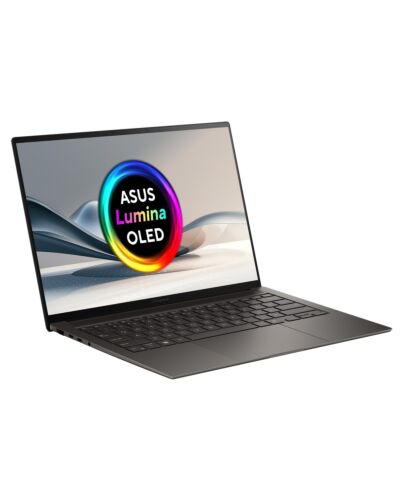
ASUS Zenbook S14 UX5406SA-PZ040W Copilot+ PC Intel Core Ultra 7 256V Laptop 35.6 cm (14") Touchscree
£1,010.20
ASUS Zenbook S14 UX5406SA-PZ040W, Intel Core Ultra 7, 35.6 cm (14"), 2880 x 1800 pixels, 16 GB, 1 TB, Windows 11 Home
Out of stock
- Immediately available
- Discreet Packaging
- Free Shipping
Product Details
Description
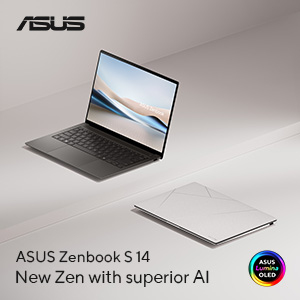
New Zen with superior AI
Experience the world-changing power of AI with Zenbook S 14, a new-era ASUS AI PC that combines an exceptional 1.2 cm-slim1 design with cutting-edge technology. Its all-metal body — with a unique Ceraluminum™ high-tech ceramic lid and nature-inspired colours — houses next-level AI capabilities, driven by the latest Intel® Core™ Ultra 7 processor (Series 2) with ambient cooling minimise noise. Immerse yourself in a visual feast with the stunning 3K ASUS Lumina OLED2 display, complemented by rich and powerful sound f the four-speaker audio system. Zenbook S 14 brings you elegance, power, and innovation in a slim and sophisticated package.
Experience the world-changing power of AI with Zenbook S 14, a new-era ASUS AI PC that combines an exceptional 1.2 cm-slim1 design with cutting-edge technology. Its all-metal body — with a unique Ceraluminum™ high-tech ceramic lid and nature-inspired colours — houses next-level AI capabilities, driven by the latest Intel® Core™ Ultra 7 processor (Series 2) with ambient cooling minimise noise. Immerse yourself in a visual feast with the stunning 3K ASUS Lumina OLED2 display, complemented by rich and powerful sound f the four-speaker audio system. Zenbook S 14 brings you elegance, power, and innovation in a slim and sophisticated package.
Key Features
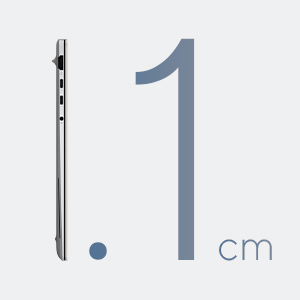
- 1.2 cm thin and 1.2 kg light design
- Intel® Core™ Ultra 7 processor (Series 2), Intel® Arc™ Graphics
- High-tech Ceramic: Ceraluminum™
- 72 Wh battery with extended charging cycles
- Stunning 3K 120Hz 16:10 OLED display
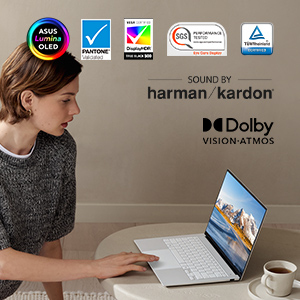
- 4 Harman Kardon speakers with Dolby Atmos support for immersive sound experiences
- Full I/O ports with 2 Thunderbolt™ 4 USB-C®, an USB 3.2 Type-A, a standard HDMI® port, alongside an audio jack
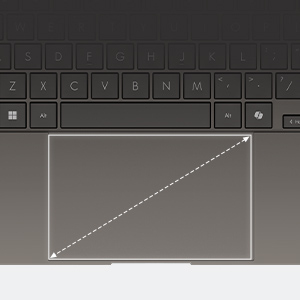
- Enlarged seamless touchpad with smart gestures to adjust display brightness and sound volume
- Privacy protection: Face login with the IR camera, Windows passkeys, and Windows Pluton
- Best online meeting experience: ASUS AiSense camera with AI Noise Cancelation systems
- 1 TB PCIe® 4.0 SSD
- 16 GB LPDDR5x 8533 MHz RAM
- US military-grade laptop durability
Reasons To Buy
New Zen with superior AI
High-tech Ceramic

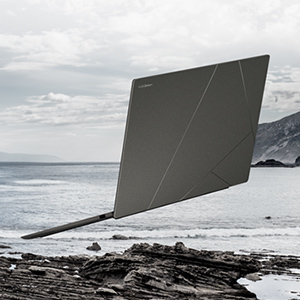
Inspired by nature
Designed to go places
More than a great PC, it’s an AI PC

The new ASUS AI PCs

Delivers answers, and generates or summarizes content instantly.
Superior video calls

Caption in time
Generate -time subtitles for videos as you watch.Remove backgrounds

Video generator

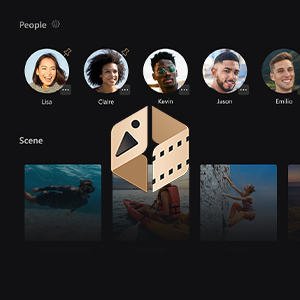
Media hub
3K OLED & 4 Speakers
F dawn to dusk

72 Wh battery
Up to 27 hrs battery life5
Up to 1.2x battery lifespan6
60% in 49 mins fast charging technology
Enlarged ergonomic touchpad
Protect your privacy
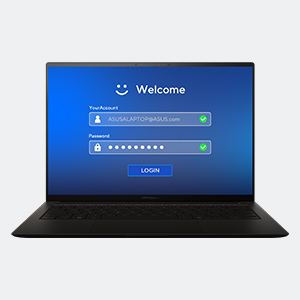
Seamless secure access
Secure your password via Windows Hello, making the ation process fast and secure with facial recognition.
Microsoft Pluton
Passkeys built in CPU. Sensitive data securely stored on device.
Convenient connections

USB 3.2 Gen 2 Type-A
HDMI® 2.1
Thunderbolt™ 4 USB-C®
Thunderbolt™ 4 USB-C®
Audio combo jack
Specifications
Design
Colour name
Zumaia Gray
Product type*
Laptop
Product colour*
Grey
Form factor*
Clamshell
Housing material
Aluminium
Market positioning
Home
Introduction year
2024
Display
Display diagonal*
35.6 cm (14")
Display resolution*
2880 x 1800 pixels
Touchscreen*
Yes
HD type
3K
Panel type
OLED
Display number of colours
1.073 billion colours
Native aspect ratio
16:10
Display surface
Gloss
Display brightness
400 cd/m²
Maximum display brightness (HDR)
550 cd/m²
RGB colour space
DCI-P3
Colour gamut
100%
Display response rise/fall
0.2 ms
Maximum refresh rate
120 Hz
Contrast ratio (typical)
1000000:1
High Dynamic Range (HDR) supported
Yes
High Dynamic Range (HDR) technology
HDR True Black 500
Processor
Processor manufacturer*
Intel
Processor family*
Intel Core Ultra 7
Processor generation
Intel Core Ultra (Series 2)
Processor el*
256V
Processor cores
8
Processor threads
8
Processor boost frequency
4.8 GHz
Performance cores
4
Low Power Efficient-cores
4
Performance-core Max Turbo Frequency
4.8 GHz
Low Power Efficient-core Max Turbo Frequency
3.7 GHz
Performance-core base frequency
2.2 GHz
Low Power Efficient-core Base Frequency
2200 MHz
Processor cache
12 MB
Processor cache type
Smart Cache
Processor base power
17 W
Maximum turbo power
37 W
Neural processor unit (NPU)
Copilot+ PC
Yes
Neural processor unit (NPU)
Intel AI Boost
Sparsity support
Yes
Windows Studio effects support
Yes
AI software frameworks supported by NPU
DirectML, OpenVINO, Windows ML, ONNX RT, WebNN
Total processor performance up to
115 TOPs
NPU performance up to
47 TOPs
GPU performance up to
64 TOPs
Memory
Internal memory*
16 GB
Internal memory type
LPDDR5x-SDRAM
Memory form factor
On-board
Maximum internal memory*
16 GB
Storage
Total storage capacity*
1 TB
Storage media*
SSD
Total SSDs capacity
1 TB
Number of SSDs installed
1
SSD capacity
1 TB
SSD interface
PCI Express 4.0
NVMe
Yes
SSD form factor
M.2
Optical drive type*
No
Graphics
Discrete graphics card el*
Not available
On-board graphics card*
Yes
On-board GPU manufacturer
Intel
Graphics
Discrete graphics card*
No
On-board graphics card family
Intel Arc Graphics
On-board graphics card el*
Intel Arc Graphics 140V
Audio
Audio system
Smart Amp
Speakers manufacturer
Harman Kardon
Built-in microphone
Yes
Camera
Front camera
Yes
Front camera resolution
1920 x 1080 pixels
Front camera HD type
Full HD
Infed (IR) camera
Yes
Network
Top Wi-Fi standard*
Wi-Fi 7 (802.11be)
Wi-Fi standards
Wi-Fi 7 (802.11be)
Mobile network connection*
No
Antenna type
2x2
Ethernet LAN
No
Bluetooth
Yes
Bluetooth version
5.4
Ports & interfaces
USB 3.2 Gen 2 (3.1 Gen 2) Type-A ports quantity
1
HDMI ports quantity*
1
HDMI version
2.1
Thunderbolt 4 ports quantity
2
Intel® Thunderbolt 4
Yes
Combo headphone/mic port
Yes
USB Type-C DisplayPort Alternate e
Yes
Performance
Repairability index
9.4
Keyboard
Pointing device
Touchpad
Numeric keypad*
No
Keyboard backlit
Yes
Copilot key
Yes
Software
Operating system architecture
64-bit
Microsoft Copilot
Yes
Trial software
1-month trial for new Microsoft 365 customers. Credit card required, Three-Month Membership of Adobe Creative Cloud All Apps, Individual. The redemption duration f September 15, 2021 to August 31, 2024.
Operating system installed*
Windows 11 Home
Battery
Battery technology
Lithium-Ion (Li-Ion)
Number of battery cells
4
Battery capacity*
72 Wh
Power
AC adapter power
65 W
AC adapter frequency
50 - 60 Hz
AC adapter input voltage
100 - 240 V
AC adapter output current
3.25 A
AC adapter output voltage
20 V
USB Type-C charging port*
Yes
USB Power Delivery (USB PD)
Yes
Security
Face recognition
Yes
Windows Hello
Yes
Trusted Platform ule (TPM)
Yes
Password protection
Yes
Certificates
Compliance certificates
REACH
Sustainability
Sustainability certificates
ENERGY STAR
Weight & dimensions
Width
310.3 mm
Depth
214.7 mm
Height (front)
1.19 cm
Height (rear)
1.29 cm
Weight*
1.2 kg
Packaging content
AC adapter included*
Yes
Additional Information
| EAN/UPC | 4711387615386 |
|---|---|
| MPN | UX5406SA-PZ040W |
| BRAND | ASUS |
Disclaimer
1.Thickness might vary according to specifications.
2.The visual appearance of OLED displays may change over the product’s lifetime. This is expected behaviour that can include image persistence or burn-in, where the display shows a faint remnant of an image even after a new image appears on the screen. This tends to occur only in extreme use cases, such as when a static, high-contrast image is continuously displayed for prolonged periods of time. ASUS laptops with an OLED display minimize this risk by setting Windows’s Dark e as default, as well as shortening the idle time before the screen is turned off — both on mains (AC) and battery (DC) power. This dual approach minimizes the potential for burn-in to maximize the lifespan of your OLED display, and also reduces unnecessary power draw for optimal battery life. We also recommend adjusting the brightness of your OLED display to complement the ambient lighting in your environment, rather than keeping the screen at maximum brightness at all times. You should also ensure that you have an animated, dark-background screensaver enabled in Windows Settings tool.
3.May require additional purchase or specific compatibility requirements. See intel.com/performanceindex for details. AI features may require software purchase, subscription or enablement by a software or platform provider, or may have specific configuration or compatibility requirements. Details at intel.com/AIPC. Results may vary.
4.Refers to Intel® Core™ Ultra processor (Series 2) compared to prior generation. See intel.com/performanceindex for details. Results may vary.
5.Battery tests conducted by ASUS on August 7th, 2024 using the 1080p Video Playback scenario. Test configuration: Zenbook UX5406SA, OLED touch panel, Intel U9-288V, 1 TB SSD, 32 GB RAM. Test settings: WiFi enabled but disconnected (not connected to any access point), Windows Power Plan set to Balanced, display brightness set to 150 cd/m2. Actual battery life may vary depending on product configuration, usage, operational conditions and power management settings. Battery life will decrease over the lifetime of the battery
6.This data is derived f ASUS laboratory testing, which involves simulating daily charging frequency as the testing standard. The actual lifespan of the battery may differ depending on factors such as product configuration, usage patterns, operational conditions, and power management settings. Over time, the battery’s longevity will naturally decrease. For more comprehensive information, please refer to the provided link.
2.The visual appearance of OLED displays may change over the product’s lifetime. This is expected behaviour that can include image persistence or burn-in, where the display shows a faint remnant of an image even after a new image appears on the screen. This tends to occur only in extreme use cases, such as when a static, high-contrast image is continuously displayed for prolonged periods of time. ASUS laptops with an OLED display minimize this risk by setting Windows’s Dark e as default, as well as shortening the idle time before the screen is turned off — both on mains (AC) and battery (DC) power. This dual approach minimizes the potential for burn-in to maximize the lifespan of your OLED display, and also reduces unnecessary power draw for optimal battery life. We also recommend adjusting the brightness of your OLED display to complement the ambient lighting in your environment, rather than keeping the screen at maximum brightness at all times. You should also ensure that you have an animated, dark-background screensaver enabled in Windows Settings tool.
3.May require additional purchase or specific compatibility requirements. See intel.com/performanceindex for details. AI features may require software purchase, subscription or enablement by a software or platform provider, or may have specific configuration or compatibility requirements. Details at intel.com/AIPC. Results may vary.
4.Refers to Intel® Core™ Ultra processor (Series 2) compared to prior generation. See intel.com/performanceindex for details. Results may vary.
5.Battery tests conducted by ASUS on August 7th, 2024 using the 1080p Video Playback scenario. Test configuration: Zenbook UX5406SA, OLED touch panel, Intel U9-288V, 1 TB SSD, 32 GB RAM. Test settings: WiFi enabled but disconnected (not connected to any access point), Windows Power Plan set to Balanced, display brightness set to 150 cd/m2. Actual battery life may vary depending on product configuration, usage, operational conditions and power management settings. Battery life will decrease over the lifetime of the battery
6.This data is derived f ASUS laboratory testing, which involves simulating daily charging frequency as the testing standard. The actual lifespan of the battery may differ depending on factors such as product configuration, usage patterns, operational conditions, and power management settings. Over time, the battery’s longevity will naturally decrease. For more comprehensive information, please refer to the provided link.