Computers
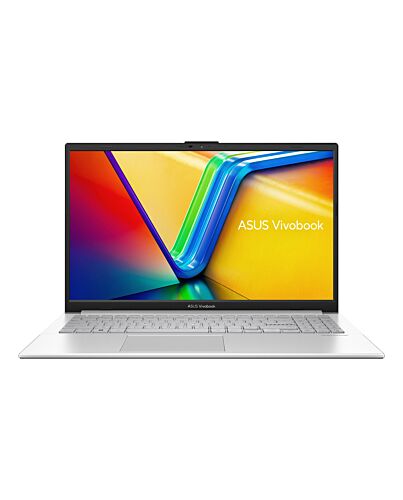
ASUS Vivobook Go 15 E1504GA-NJ096W Intel Core i3 N-series i3-N305 Laptop 39.6 cm (15.6") Full HD 8 G
£403.42
ASUS Vivobook Go 15 E1504GA-NJ096W, Intel Core i3 N-series, 39.6 cm (15.6"), 1920 x 1080 pixels, 8 GB, 128 GB, Windows 11 Home
Out of stock
- Immediately available
- Discreet Packaging
- Free Shipping
Product Details
Key Features
- Windows 11 Home 64-bit
- Intel Core i3-N305 (6MB Cache)
- 39.6 cm (15.6") Full HD 1920 x 1080
- 8GB DDR4-SDRAM, 128GB UFS 2.1
Specifications
Design
Colour name
Cool Silver
Product type*
Laptop
Product colour*
Silver
Form factor*
Clamshell
Market positioning
Home
Display
Display diagonal*
39.6 cm (15.6")
Display resolution*
1920 x 1080 pixels
Touchscreen*
No
HD type
Full HD
LED backlight
Yes
Native aspect ratio
16:9
Anti-glare screen
Yes
Display brightness
250 cd/m²
RGB colour space
NTSC
Colour gamut
45%
Maximum refresh rate
60 Hz
Processor
Processor manufacturer*
Intel
Processor family*
Intel Core i3 N-series
Processor generation
Intel Core i3-N
Processor el*
i3-N305
Processor cores
8
Processor threads
8
Processor boost frequency
3.8 GHz
Processor cache
6 MB
Processor cache type
Smart Cache
Memory
Internal memory*
8 GB
Internal memory type
DDR4-SDRAM
Memory form factor
On-board
Maximum internal memory*
8 GB
Storage
Total storage capacity*
128 GB
Storage media*
UFS
Flash memory
128 GB
Optical drive type*
No
Card reader integrated
No
Graphics
Discrete graphics card el*
Not available
On-board graphics card*
Yes
On-board GPU manufacturer
Intel
Discrete graphics card*
No
On-board graphics card family
Intel® UHD Graphics
On-board graphics card el*
Intel® UHD Graphics
Audio
Built-in microphone
Yes
Camera
Front camera
Yes
Camera
Front camera resolution
1280 x 720 pixels
Front camera HD type
HD
Privacy camera
Yes
Privacy type
Privacy shutter
Network
Top Wi-Fi standard*
Wi-Fi 6E (802.11ax)
Wi-Fi standards
Wi-Fi 6E (802.11ax)
Mobile network connection*
No
Antenna type
1x1
Ethernet LAN
No
Bluetooth
Yes
Bluetooth version
5.3
Ports & interfaces
USB 2.0 ports quantity*
1
USB 3.2 Gen 1 (3.1 Gen 1) Type-A ports quantity*
1
USB 3.2 Gen 1 (3.1 Gen 1) Type-C ports quantity*
1
HDMI ports quantity*
1
HDMI version
1.4
Combo headphone/mic port
Yes
Power adapter barrel connector
4.5 mm
Performance
Repairability index
8.8
Keyboard
Pointing device
Touchpad
Numeric keypad*
Yes
Software
Operating system architecture
64-bit
Operating system installed*
Windows 11 Home
Battery
Battery technology
Lithium-Ion (Li-Ion)
Number of battery cells
3
Power
AC adapter frequency
50 - 60 Hz
AC adapter input voltage
100 - 240 V
AC adapter output voltage
19 V
DC-in jack
Yes
Security
Trusted Platform ule (TPM)
Yes
Password protection
Yes
Password protection type
BIOS, User
Certificates
Compliance certificates
REACH
Weight & dimensions
Width
360.3 mm
Depth
232.5 mm
Height
17.9 mm
Weight*
1.63 kg
Additional Information
| EAN/UPC | 4711387615331 |
|---|---|
| MPN | E1504GA-NJ096W |
| BRAND | ASUS |
Disclaimer
Please note that the appearance of the underside of the laptop and the thermal may varify according to the processor used.
The devices referred to on this web page are the most highly-specified els available. Some els and configurations may not have an display option. Please check the product specifications to ensure that the correct type of display is configured before purchasing in-store or online.
1. The visual appearance of OLED displays may change over the product’s lifetime. This is expected behavior that can include image persistence or burn-in, where the display shows a faint remnant of an image even after a new image appears on the screen. This tends to occur only in extreme use cases, such as when a static, high-contrast image is continuously displayed for prolonged periods of time. ASUS laptops with an OLED display minimize this risk by setting Windows’s Dark e as default, as well as shortening the idle time before the screen is turned off — both on mains (AC) and battery (DC) power. This dual approach minimizes the potential for burn-in to maximize the lifespan of your OLED display lifespan, and also reduces unnecessary power draw for optimal battery life. We also recommended adjust the brightness of your OLED display to complement the ambient lighting in your environment, rather than keeping the screen at maximum brightness at all times. You should also ensure that you have an animated, dark-background screensaver enabled in the Windows Settings tool. It is recommended that during heavy usage, the laptop lid is opened by more than 90°, in order to minimize any effects on OLED screen quality and longevity.
2. Maximum RAM capacity may vary according to device configuration.
3. Maximum SSD capacity may vary according to device configuration.
4. Charges the battery to up to 60% within 49 minutes when the system is off or in Standby e. Power adapter with a minimum capacity of 45 watts is required. After charging has reached 60% capacity, charging will resume at normal rate. Charging time may vary +/-10% due to system tolerance.
5. Backlit keyboard and integrated fingerprint sensor are optional.
6. WiFi 6E is backwards-compatible with legacy 802.11 specs. Actual performance of WiFi 6E may vary in -world situations.
7. The testing regime includes the requirements of both military-grade standards and ASUS quality tests, and varies depending on device. MIL-STD-810 testing is conducted on selected ASUS products only. Note that the MIL-STD-810 testing helps to ensure the quality of ASUS products but does not indicate a particular fitness for military use. The test is performed under laboratory conditions. Any damage caused by attempts to te these test conditions would be considered accidental, and would not be covered by the standard ASUS warranty. Additional coverage is available with ASUS Premium Care.
8. The screen-to-body ratio is calculated based on the visible body area of the display when the laptop is opened to 90° and the active display area.
9. Average test results: Delta-E < 1.5, +/- 0.5. Over time, the Delta-E value of the display may change. It is recommended to recalibrate the color to ensure color accuracy.
10. Compared to average LCD displays in the market, measuring energy emission of blue light in between 415-455 nm wavelength.
11. Compared to average LCD laptop panel. Average LCD display has 10 ms response time.
12. This amendment defines standardized ifications to both the IEEE 802.11 physical layers (PHY) and the IEEE 802.11 Medium Access Control layer (MAC) that enable at least one e of operation capable of supporting at least four times improvement in the average throughput per station (measured at the MAC data service access point) in a dense deployment scenario, while maintaining or improving the power efficiency per station. For additional details visit:
13. 802.11ax 2x2 160 MHz enables 2402 Mbps maximum theoretical data rate, ~3x faster than standard 802.11ac 2x2 80 MHz (867 Mbps) and nearly 6x faster than baseline 1x1ac (433 Mbps) Wi-Fi as documented in IEEE 802.11 wireless standard specifications, and require the use of similarly configured 802.11ax wireless network routers.
14. “Up to 75% lower latency” is based on Intel simulation data of 802.11ax with and without OFDMA using 9 clients. Average latency without OFDM is 36 ms, with OFDMA average latency is reduced to 7.6 ms. Latency improvement requires that the AP and all clients support OFDMA.
15. Selected products are tested using enhanced military-grade MIL-STD-810H durability standards, with 12 test methods and 26 test procedures, to ensure extraordinary toughness. Based on ASUS internal market research using available information and testing reports f main laptop brand websites on Oct 28, 2022, ASUS consumer laptops use a regime consisting of 26 test procedures, which is the consumer laptop industry’s strictest and most extensive test regime for the MIL-STD-810H standard.
The devices referred to on this web page are the most highly-specified els available. Some els and configurations may not have an display option. Please check the product specifications to ensure that the correct type of display is configured before purchasing in-store or online.
1. The visual appearance of OLED displays may change over the product’s lifetime. This is expected behavior that can include image persistence or burn-in, where the display shows a faint remnant of an image even after a new image appears on the screen. This tends to occur only in extreme use cases, such as when a static, high-contrast image is continuously displayed for prolonged periods of time. ASUS laptops with an OLED display minimize this risk by setting Windows’s Dark e as default, as well as shortening the idle time before the screen is turned off — both on mains (AC) and battery (DC) power. This dual approach minimizes the potential for burn-in to maximize the lifespan of your OLED display lifespan, and also reduces unnecessary power draw for optimal battery life. We also recommended adjust the brightness of your OLED display to complement the ambient lighting in your environment, rather than keeping the screen at maximum brightness at all times. You should also ensure that you have an animated, dark-background screensaver enabled in the Windows Settings tool. It is recommended that during heavy usage, the laptop lid is opened by more than 90°, in order to minimize any effects on OLED screen quality and longevity.
2. Maximum RAM capacity may vary according to device configuration.
3. Maximum SSD capacity may vary according to device configuration.
4. Charges the battery to up to 60% within 49 minutes when the system is off or in Standby e. Power adapter with a minimum capacity of 45 watts is required. After charging has reached 60% capacity, charging will resume at normal rate. Charging time may vary +/-10% due to system tolerance.
5. Backlit keyboard and integrated fingerprint sensor are optional.
6. WiFi 6E is backwards-compatible with legacy 802.11 specs. Actual performance of WiFi 6E may vary in -world situations.
7. The testing regime includes the requirements of both military-grade standards and ASUS quality tests, and varies depending on device. MIL-STD-810 testing is conducted on selected ASUS products only. Note that the MIL-STD-810 testing helps to ensure the quality of ASUS products but does not indicate a particular fitness for military use. The test is performed under laboratory conditions. Any damage caused by attempts to te these test conditions would be considered accidental, and would not be covered by the standard ASUS warranty. Additional coverage is available with ASUS Premium Care.
8. The screen-to-body ratio is calculated based on the visible body area of the display when the laptop is opened to 90° and the active display area.
9. Average test results: Delta-E < 1.5, +/- 0.5. Over time, the Delta-E value of the display may change. It is recommended to recalibrate the color to ensure color accuracy.
10. Compared to average LCD displays in the market, measuring energy emission of blue light in between 415-455 nm wavelength.
11. Compared to average LCD laptop panel. Average LCD display has 10 ms response time.
12. This amendment defines standardized ifications to both the IEEE 802.11 physical layers (PHY) and the IEEE 802.11 Medium Access Control layer (MAC) that enable at least one e of operation capable of supporting at least four times improvement in the average throughput per station (measured at the MAC data service access point) in a dense deployment scenario, while maintaining or improving the power efficiency per station. For additional details visit:
13. 802.11ax 2x2 160 MHz enables 2402 Mbps maximum theoretical data rate, ~3x faster than standard 802.11ac 2x2 80 MHz (867 Mbps) and nearly 6x faster than baseline 1x1ac (433 Mbps) Wi-Fi as documented in IEEE 802.11 wireless standard specifications, and require the use of similarly configured 802.11ax wireless network routers.
14. “Up to 75% lower latency” is based on Intel simulation data of 802.11ax with and without OFDMA using 9 clients. Average latency without OFDM is 36 ms, with OFDMA average latency is reduced to 7.6 ms. Latency improvement requires that the AP and all clients support OFDMA.
15. Selected products are tested using enhanced military-grade MIL-STD-810H durability standards, with 12 test methods and 26 test procedures, to ensure extraordinary toughness. Based on ASUS internal market research using available information and testing reports f main laptop brand websites on Oct 28, 2022, ASUS consumer laptops use a regime consisting of 26 test procedures, which is the consumer laptop industry’s strictest and most extensive test regime for the MIL-STD-810H standard.