Communication
DELL P2724DEB 68.6 cm (27") LCD 2560 x 1440 pixels Quad HD
£334.31
In stock
- Immediately available
- Discreet Packaging
- Free Shipping
Product Details
Description
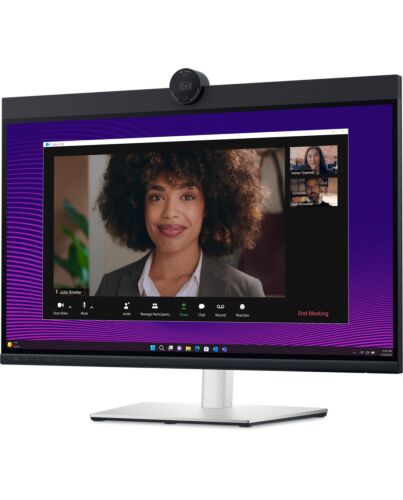
Connect like you're there with a 27-inch QHD IPS display built for effortless collaboration.
Key Features
- 68.6cm (27") Quad HD 2560 x 1440 LED IPS
- 8ms, 16:9, 350cd/m², 1000:1
- USB, HDMI, DisplayPort
Reasons To Buy
Effortless collaboration
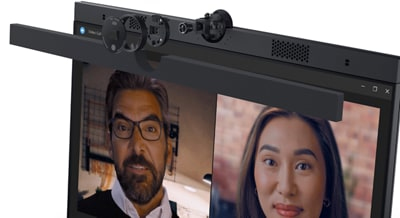
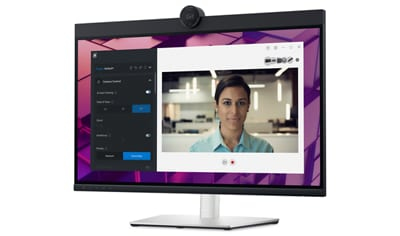
Look great in low light: Temporal (3D) and Spatial (2D) Noise Reduction automatically eliminates motion blur and grainy images in low light, while AI Auto Framing keeps you in the middle of the frame even as you move around.
Loud and clear: Collaborate like you're there with built-in, dual echo cancellation mics and dual 5W speakers, strategically positioned at the top of the monitor for an immersive audio experience.
Interaction secured: The manual webcam shutter and convenient microphone mute button on this Zoom- monitor helps ensure that you're only communicating what you want to share, when you want to share it.
Easier connections: Launch Teams meetings effortlessly with the quick access touch control on this for Microsoft Teams monitor.
Seamless access
Easy on the eyes

Comfort is key
Your productivity hub
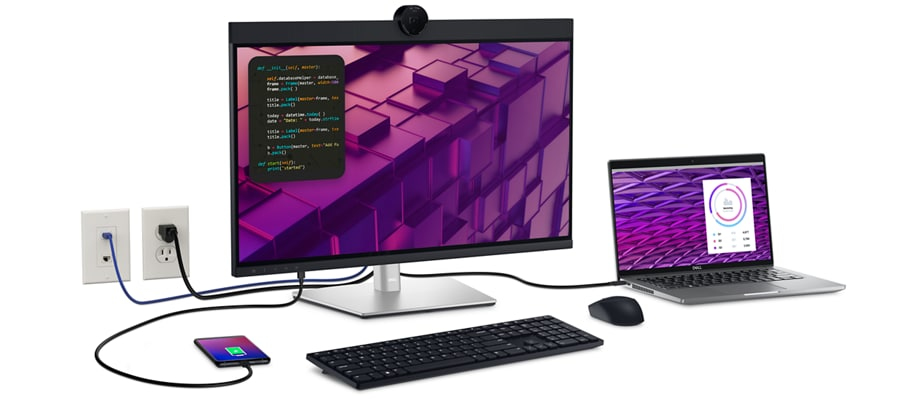
The power of USB-C: Get up to 90W of power delivery via USB-C, and charge your laptop (even when the monitor is off) with the Always On Power Delivery feature. This single-cable solution also reduces cable clutter and transmits power, data and audio—all at once.
Quick convenience: Plug in whatever you need and keep it in reach with the two, super speed USB 5Gbps (USB 3.2 Gen1) quick-access ports. There’s even space to charge your mobile phone (up to 15W power charging) with the USB-C quick-access port.
Enhanced manageability: Managing your monitor is easy with MAC Address pass-through , PXE Boot, and Wake-on-LAN conveniently built in.
Multitask efficiently: Connect two PC sources to the monitor—our intelligent Auto KVM feature detects the second connected PC and seamlessly switches controls over. KVM (keyboard, video and mouse) allows you to control both PCs with a single keyboard and mouse. Plus, you can enhance efficiency by adding a second monitor via the daisy chain feature.
Improved Dell Display Manager
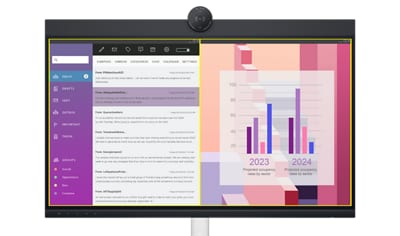
Improved multitasking: Organise your screen with Easy Arrange and save profiles with Easy Arrange Memory.
Easy navigation: Share a single keyboard, mouse and monitor between multiple PCs with USB KVM wizard. Quickly switch between PCs with the quick-access menu or hot keys.
Smooth deployment: Manage your fleet of monitors with features that are automatic, comprehensive and compatible with several tools.
Convenient customisation: Quickly access your favorite features and functions with the menu launcher and hot keys.
Stay updated: Get automatic notifications anytime there's new updates on monitor and software.
Dell Peripheral Manager
Green thinking. For today and tomorrow.
Eco-conscious packaging: Dell monitors ship in boxes made with 100% renewable content that is also 100% recyclable.
Energy conservation: Save energy when your monitor’s not in use with PowerNap , a feature that dims or puts your monitor to sleep when it’s not in use.
Advanced sustainability: Dell Technologies is committed to reducing environmental impact throughout the product lifecycle.
Features
Dell 27 Video Conferencing Monitor - P2724DEB
Connect like you're there with a 27-inch QHD IPS display built for effortless collaboration.
Diagonal Size
27.0"
Resolution / Refresh Rate
QHD (2560 x 1440) at 60 Hz
Panel Technology
In-Plane Switching (IPS) technology
Adjustability
Height
tilt
swivel
and pivot
Ports
1x HDMI (HDCP 1.4)
1x DP 1.4 (HDCP 1.4)
1x DP-out with MST
1x RJ45
1x 3.5mm combo headphone with microphone jack
1x USB 3.2 Gen1 Type-C (Alt e with DP 1.4 upstream, up to 90W power delivery)
1x USB 3.2 Gen1 Type-B upstream
2x USB 3.2 Gen1 Type-A downstream
1x USB 3.2 Gen1 Type-C downstream with up to 15W power delivery
1x USB 3.2 Gen1 Type-A downstream with BC1.2 (2A max)
Cables
1x Power cable
1x DP-to-DP cable (1.8m)
1x USB 3.2 Gen2 Type C-to-C cable (1.0m)
1x USB 3.2 Gen1 Type A-to-B upstream cable (1.8m)
Connect like you're there
Effortless collaboration
Powerful webcam: Take center stage with a 2K QHD webcam that packs a punch. The large Sony STARVIS™ sensor is 29.5% larger than the previous el, takes in substantial light to give you vibrant picture clarity and a vivid image.Look great in low light: Temporal (3D) and Spatial (2D) Noise Reduction automatically eliminates motion blur and grainy images in low light, while AI Auto Framing keeps you in the middle of the frame even as you move around.
Loud and clear: Collaborate like you're there with built-in, dual echo cancellation mics and dual 5W speakers, strategically positioned at the top of the monitor for an immersive audio experience.
Interaction secured: The manual webcam shutter and convenient microphone mute button on this Zoom- monitor helps ensure that you're only communicating what you want to share, when you want to share it.
Easier connections: Launch Teams meetings effortlessly with the quick access touch control on this for Microsoft Teams monitor.
Seamless access
Get to work fast with Dell Express Sign-in, featuring a proximity sensor that detects your presence when you are close and uses Windows Hello™ to automatically log you in. When you walk away, it locks your system for increased security.Easy on the eyes
Work without straining your eyes with the always-on, built-in ComfortView Plus, which reduces low blue light without compising colour.Comfort is key
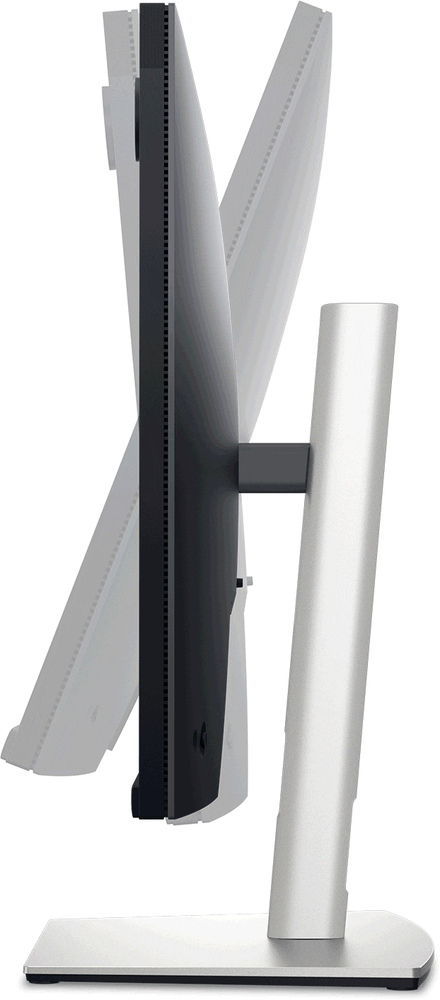
Tilt, swivel, pivot and adjust the height of your monitor up to a maximum of 150mm.Your productivity hub
Connect to productivity: With wired connectivity options like RJ45 and USB-C®, your monitor delivers reliable Ethernet, power, audio and video—all in a clutter-free setup.
The power of USB-C: Get up to 90W of power delivery via USB-C, and charge your laptop (even when the monitor is off) with the Always On Power Delivery feature. This single-cable solution also reduces cable clutter and transmits power, data and audio—all at once.
Quick convenience: Plug in whatever you need and keep it in reach with the two, super speed USB 5Gbps (USB 3.2 Gen1) quick-access ports. There’s even space to charge your mobile phone (up to 15W power charging) with the USB-C quick-access port.
Enhanced manageability: Managing your monitor is easy with MAC Address pass-through, PXE Boot, and Wake-on-LAN conveniently built in.
Multitask efficiently: Connect two PC sources to the monitor—our intelligent Auto KVM feature detects the second connected PC and seamlessly switches controls over. KVM (keyboard, video and mouse) allows you to control both PCs with a single keyboard and mouse. Plus, you can enhance efficiency by adding a second monitor via the daisy chain feature.
Improved Dell Display Manager
Easy management. Next-level productivity.Improved multitasking: Organise your screen with Easy Arrange and save profiles with Easy Arrange Memory.
Easy navigation: Share a single keyboard, mouse and monitor between multiple PCs with USB KVM wizard. Quickly switch between PCs with the quick-access menu or hot keys.
Smooth deployment: Manage your fleet of monitors with features that are automatic, comprehensive and compatible with several tools.
Convenient customisation: Quickly access your favorite features and functions with the menu launcher and hot keys.
Stay updated: Get automatic notifications anytime there's new updates on monitor and software.
Dell Peripheral Manager
Design how they see you: Dell Peripheral Manager offers an amazing range of features like HDR, AI Auto Framing, different Field of Views and Presets - allowing you to easily customise settings based on your preferences.Green thinking. For today and tomorrow.
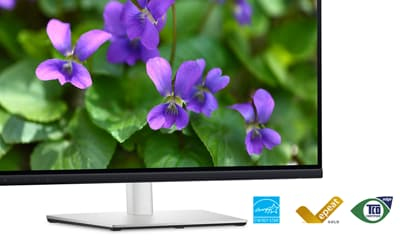
Environmental standards: Dell monitor uses 85% PCR (Post-consumer Recyclable) plastic in the design, 90% recycled aluminum, and meets the latest environmental standards such as EnergyStar®, and TCO Edge, and is EPEAT® Gold registered.Eco-conscious packaging: Dell monitors ship in boxes made with 100% renewable content that is also 100% recyclable.
Energy conservation: Save energy when your monitor’s not in use with PowerNap, a feature that dims or puts your monitor to sleep when it’s not in use.
Advanced sustainability: Dell Technologies is committed to reducing environmental impact throughout the product lifecycle.
Operating system
This monitor is compatible with multiple operating systems including Windows and macOS®.
Connectivity options
Ports and slots:1. Security lock slot (based on Kensington Security Slot™)
2. Power connector
3. HDMI
4. DisplayPort 1.4
5. USB 3.2 Gen1 Type-C (Alt e with DP 1.4 upstream, up to 90W power delivery)
6. DisplayPort (out)
7. USB 3.2 Gen1 Type-B upstream
8. 2 USB 3.2 Gen1 Type-A downstream
9. RJ45
10. USB 3.2 Gen1 Type-A downstream (with BC 1.2)
11. 3.5 mm combo headphone with microphone jack
12. USB 3.2 Gen1 Type-C downstream (PD of up to 15W)
13. Stand lock feature
Cables included:
Power cord
DisplayPort to DisplayPort, 1.8m
USB 3.2 Gen2 Type C-to-C, 1.0m
USB 3.2 Gen1 Type A-to-B upstream, 1.8m
Specifications
Display
Display diagonal*
68.6 cm (27")
Display technology*
LCD
Panel type
IPS
LED backlight
Yes
Display resolution*
2560 x 1440 pixels
Display brightness
350 cd/m²
HD type*
Quad HD
Touchscreen*
No
Native aspect ratio*
16:9
Response time
8 ms
Contrast ratio (typical)
1000:1
Viewing angle, horizontal
178°
Viewing angle, vertical
178°
Display number of colours
16.78 million colours
sRGB coverage (typical)
99%
Pixel pitch
0.2331 x 0.2331 mm
Display diagonal (metric)
68.47 cm
Surface hardness
3H
Anti-glare screen
Yes
Camera
Built-in camera
Yes
Megapixel (approx.)
4 MP
Maximum frame rate
60 fps
Audio
Built-in speaker(s)
Yes
Number of built-in speakers
2
RMS rated power
10 W
Design
Product colour*
Black, Silver
Screen shape
Flat
VESA mounting*
Yes
Panel mounting interface
100 x 100 mm
Bezel width (bottom)
1.72 cm
Bezel width (side)
7.52 mm
Bezel width (top)
3.84 cm
Height adjustment
Yes
Height adjustment
15 cm
Pivot
Yes
Pivot angle
-90 - 90°
Swivelling
Yes
Swivel angle range
-45 - 45°
Tilt angle range
-5 - 21°
Ports & interfaces
HDMI ports quantity*
1
HDMI version
1.4
DVI port*
No
DisplayPorts quantity
1
USB ports quantity
6
USB version
3.2 Gen 1 (3.1 Gen 1)
USB 2.0 Type-B ports quantity
1
USB 3.2 Gen 1 (3.1 Gen 1) Type-A ports quantity
3
USB 3.2 Gen 1 (3.1 Gen 1) Type-C ports quantity
1
Number of USB Type-B upstream ports quantity
1
Number of USB Type-C upstream ports quantity
1
USB Type-A downstream ports quantity
3
USB Type-C downstream ports quantity
1
Microphone in
Yes
USB port*
Yes
USB Type-C DisplayPort Alternate e
Yes
Ports & interfaces
USB Power Delivery (USB PD)
Yes
USB Power Delivery up to
90 W
Computer system
Computer system*
No
Windows operating systems supported
Windows 10, Windows 11
Mac operating systems supported
MacOS
Performance
On Screen Display (OSD)
Yes
HDCP
Yes
HDCP version
1.4
Power
Power consumption (typical)
26 W
Power consumption (max)
210 W
Power consumption (standby)
0.3 W
AC input voltage
100 - 240 V
AC input frequency
50/60 Hz
Energy efficiency scale
A to G
Energy efficiency class (SDR)*
F
Energy consumption (SDR) per 1000 hours*
26 kWh
Power supply type
Internal
Operational conditions
Operating temperature (T-T)
0 - 40 °C
Storage temperature (T-T)
-20 - 60 °C
Operating relative humidity (H-H)
10 - 80%
Storage relative humidity (H-H)
5 - 90%
Weight & dimensions
Display width
611.8 mm
Display depth
59.6 mm
Display height
415.8 mm
Display weight
5.65 kg
Width (with stand)
611.8 mm
Depth (with stand)
230 mm
Height (with stand)
440.8 mm
Weight (with stand)
8.27 kg
Packaging data
Package weight
11.3 kg
Packaging content
Stand included
Yes
Remote control included
No
Stylus pen
No
Power adapter included
Yes
Cables included
DisplayPort, USB Type-A to USB Type-B, USB Type-C
Sustainability
Sustainability certificates
ENERGY STAR, TCO
Network
Ethernet LAN*
Yes
Ethernet LAN (RJ-45) ports
1
Wi-Fi*
No
Technical details
Compliance certificates
RoHS
Carbon footprint
Total carbon footprint (kg of CO2e)
604
Total carbon emissions, standard deviation (kg of CO2e)
157
Carbon emissions, manufacturing (kg of CO2e)
333.67
Carbon emissions, logistics (kg of CO2e)
57.97
Carbon emissions, energy usage (kg of CO2e)
205.823
Carbon emissions, end-of-life (kg of CO2e)
6.89
PAIA version
1.3.2, 2022
Additional Information
| EAN/UPC | 5397184657065 |
|---|---|
| MPN | DELL-P2724DEB |
| BRAND | DELL |
Disclaimer
Actual configuration might differ f illustration
Product Carbon Footprint (PCF)
1. Dell calculates the Product Carbon Footprint using one of two methodologies, depending on the product: the Dell PCF calculator (GaBi version , YYYY) or the Product Attribute to Impact Algorithm (PAIA, X.X.X, YYYY). The methodology used is indicated in the "Version of PCF tool used" column.
2. PAIA (Product Attribute Impact Algorithm) is a streamlined LCA tool developed by MIT ‘s Materials System Laboratory. PAIA estimates the product’s carbon footprint using limited system attributes of the product such as component dimension, screen size, system weight, and annual energy consumption.
3. Please note the emission estimate in this report is calculated using the mean value along with the standard deviation for that product el.
4. Use of default inputs (i.e. not primary data) and assumptions on location of use and other fields can introduce a standard deviation which must be taken into account while completing the calculations. For more information refer to the PCF pages on Dell.com.
5. For the PAIA PCF methodology, the transportation f assembly to customer includes the emissions generated during air, ocean and land transportation of finished or semi-finished Dell products between Dell facilities and between Dell facilities to customers.
6. For the Dell PCF calculator and methodology, the transportation phase the default delivery assumptions are 90% of transport happening by sea and 10% happening by air. Trucking distances don’t contribute as much to the PCF impact compared to more influential by sea or by air distances es.
7. Please note, PAIA uses the ecoinvent Database ( whenever primary data is not made available for calculations.
8. For client and commercial end user computing products, minimum configurations were assumed for calculations. For Server and Storage products, typical configurations or ENERGY STAR ( configurations were used for calculations.
9. Use Phase emissions were calculated based on the location of use as "Europe" i.e. the Use Phase emissions are not specific to a single country / location.The Dell PCF Calculator also estimates Use Phase emissions for the U.S. and China, which are available in the PCF PDF documents on Dell.com.
10. The report provides the total emissions separated by the 4 lifecycle phases: manufacturing, transport, use, and end of life to understand the impact of each phase.
11. The Dell PCF Calculator lifetime usage assumption at the product family level is as follows: Desktop, Notebook - 5 years, Display - 6 years and Servers/Storage - 4 years.
* Blanks indicate we do not have the corresponding metric calculated or data is currently unavailable for the specific product at this time.
Product Carbon Footprint (PCF)
1. Dell calculates the Product Carbon Footprint using one of two methodologies, depending on the product: the Dell PCF calculator (GaBi version , YYYY) or the Product Attribute to Impact Algorithm (PAIA, X.X.X, YYYY). The methodology used is indicated in the "Version of PCF tool used" column.
2. PAIA (Product Attribute Impact Algorithm) is a streamlined LCA tool developed by MIT ‘s Materials System Laboratory. PAIA estimates the product’s carbon footprint using limited system attributes of the product such as component dimension, screen size, system weight, and annual energy consumption.
3. Please note the emission estimate in this report is calculated using the mean value along with the standard deviation for that product el.
4. Use of default inputs (i.e. not primary data) and assumptions on location of use and other fields can introduce a standard deviation which must be taken into account while completing the calculations. For more information refer to the PCF pages on Dell.com.
5. For the PAIA PCF methodology, the transportation f assembly to customer includes the emissions generated during air, ocean and land transportation of finished or semi-finished Dell products between Dell facilities and between Dell facilities to customers.
6. For the Dell PCF calculator and methodology, the transportation phase the default delivery assumptions are 90% of transport happening by sea and 10% happening by air. Trucking distances don’t contribute as much to the PCF impact compared to more influential by sea or by air distances es.
7. Please note, PAIA uses the ecoinvent Database ( whenever primary data is not made available for calculations.
8. For client and commercial end user computing products, minimum configurations were assumed for calculations. For Server and Storage products, typical configurations or ENERGY STAR ( configurations were used for calculations.
9. Use Phase emissions were calculated based on the location of use as "Europe" i.e. the Use Phase emissions are not specific to a single country / location.The Dell PCF Calculator also estimates Use Phase emissions for the U.S. and China, which are available in the PCF PDF documents on Dell.com.
10. The report provides the total emissions separated by the 4 lifecycle phases: manufacturing, transport, use, and end of life to understand the impact of each phase.
11. The Dell PCF Calculator lifetime usage assumption at the product family level is as follows: Desktop, Notebook - 5 years, Display - 6 years and Servers/Storage - 4 years.
* Blanks indicate we do not have the corresponding metric calculated or data is currently unavailable for the specific product at this time.