Computers
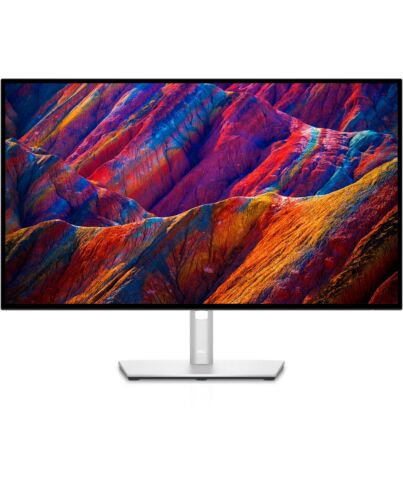
DELL UltraSharp 27 4K USB-C Hub Monitor - U2723QE
£526.99
Out of stock
- Immediately available
- Discreet Packaging
- Free Shipping
Product Details
Description
Be your most productive on a 27 inch monitor with brilliant color and contrast that features the industry’s first IPS Black technology and a connectivity hub.
Key Features
- 68.6cm (27") 4K Ultra HD 3840 x 2160 LED IPS
- 8ms, 16:9, 400cd/m², 2000:1
- USB, HDMI, DisplayPort
Reasons To Buy
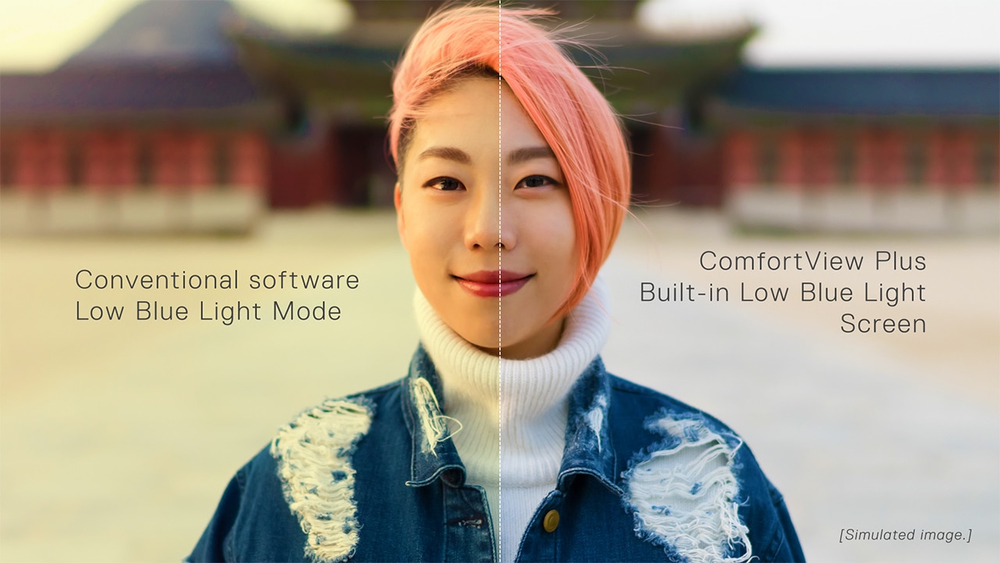
Enhanced eye comfort
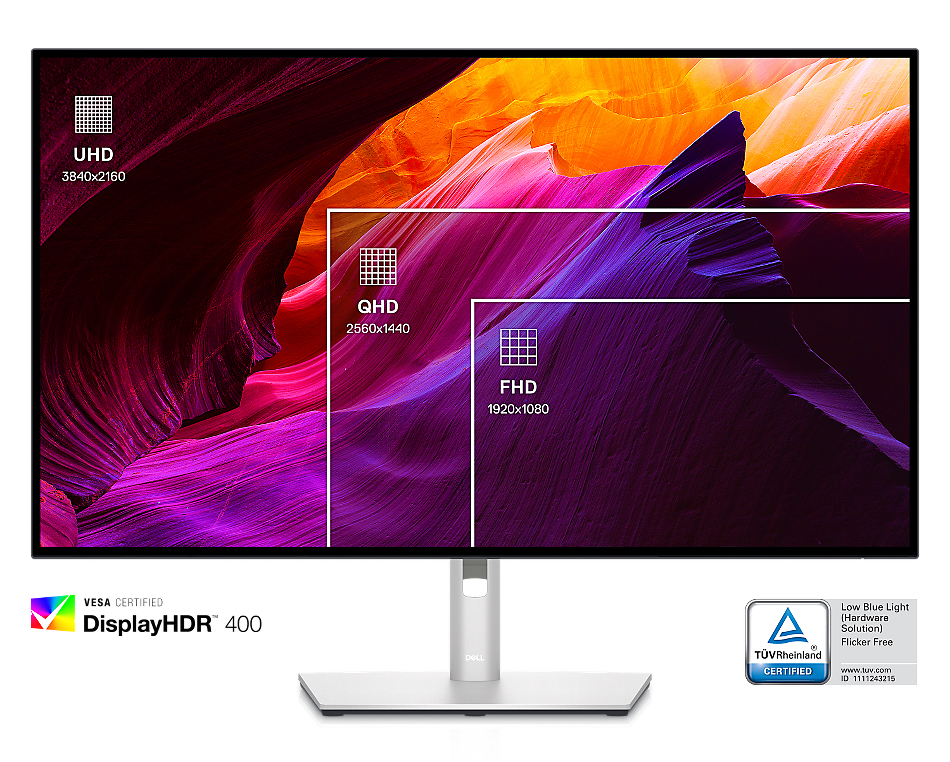
True brilliance
Your hub for connectivity
Wake up and power on your laptop with the Power Sync feature.
Enhanced connectivity:
Streamline your workspace with extensive connectivity ports including USB-C (up to 90W power delivery), RJ45 (Ethernet), DP1.4, and HDMI. Quick-access USB-C (up to 15W of power charging) and super speed USB 10Gpbs ports enable easy connections and fast data transfers.
A more organized workspace:
Single cable USB-C connectivity offers the flexibility of connecting to multi-vendor USB-C systems, reducing cable clutter and enabling quick transitions f the desk.
Network ready:
Get enhanced manageability with MAC Address pass-through, PXE Boot, and Wake-on-LAN conveniently built in.
Productivity ed
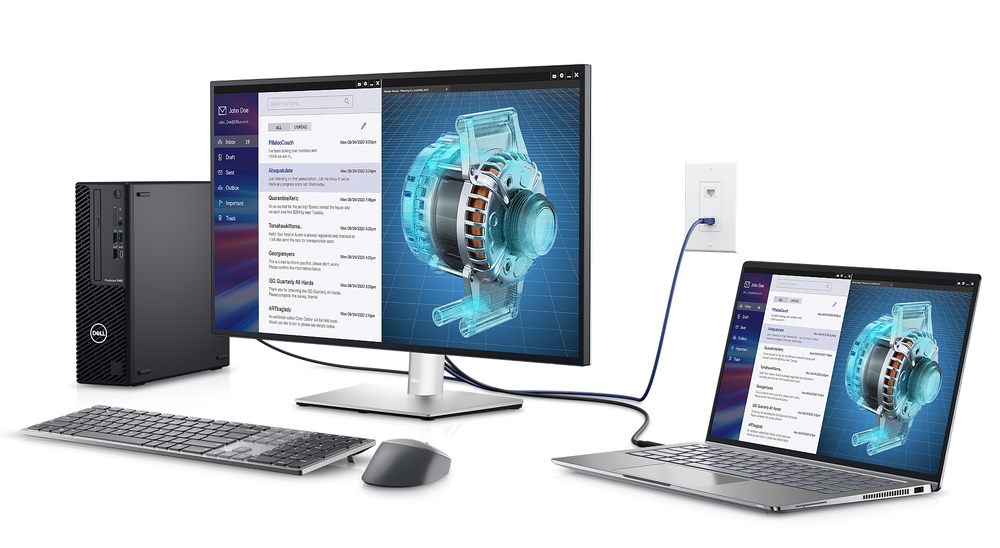
Connect to two PC sources and Auto KVM will seamlessly switch controls over to the second connected PC. Use KVM (keyboard, video and mouse) feature to control both PCs with a single mouse and keyboard.
See more on one screen:
View content f two PC sources with Picture-in-Picture (PiP) and Picture-by-Picture (PbP).
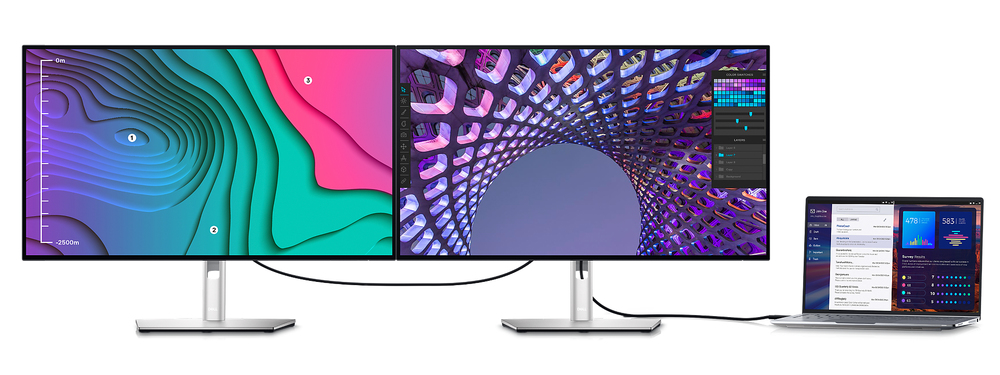
Expand your productivity: Experience uncompised picture quality by daisy chaining two 4K monitors. U2723QE is the world’s first 27" 4K monitor which allow daisy chaining of an additional 4K monitor at full resolution via USB-C—enabled by Display Stream Compression (DSC).
Skillfully crafted
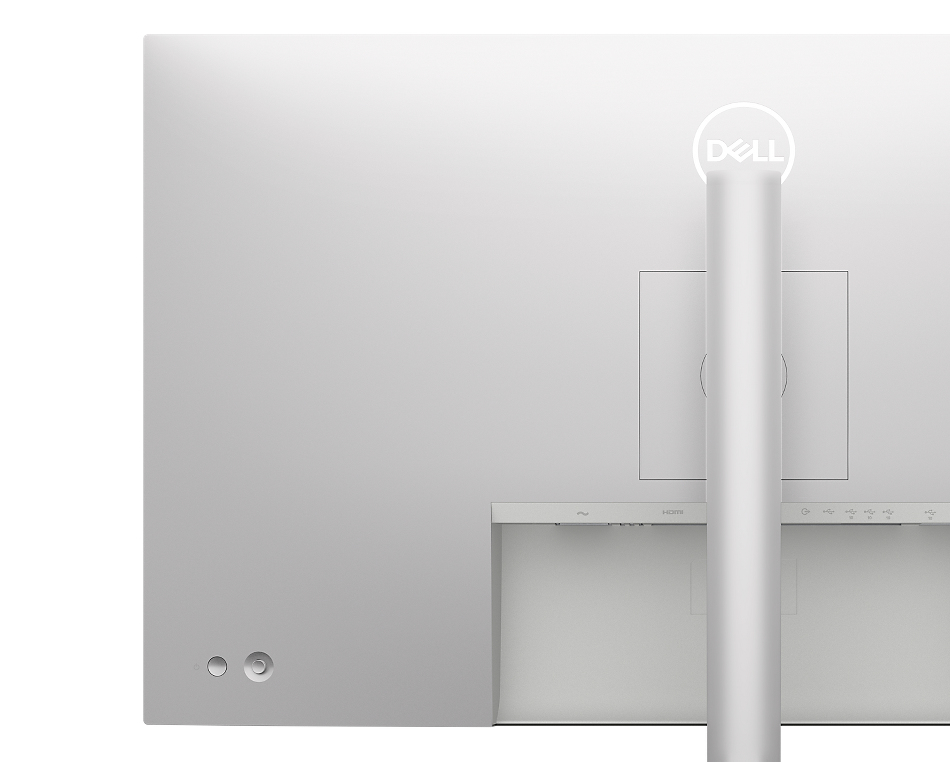
With a premium platinum silver finish and an elegant cable management system made to reduce clutter, it’s the monitor built to match any workspace.
Easy to use:
Navigate the menu and adjust screen settings with a convenient joystick control.
Built for comfort
Dell Display Manager
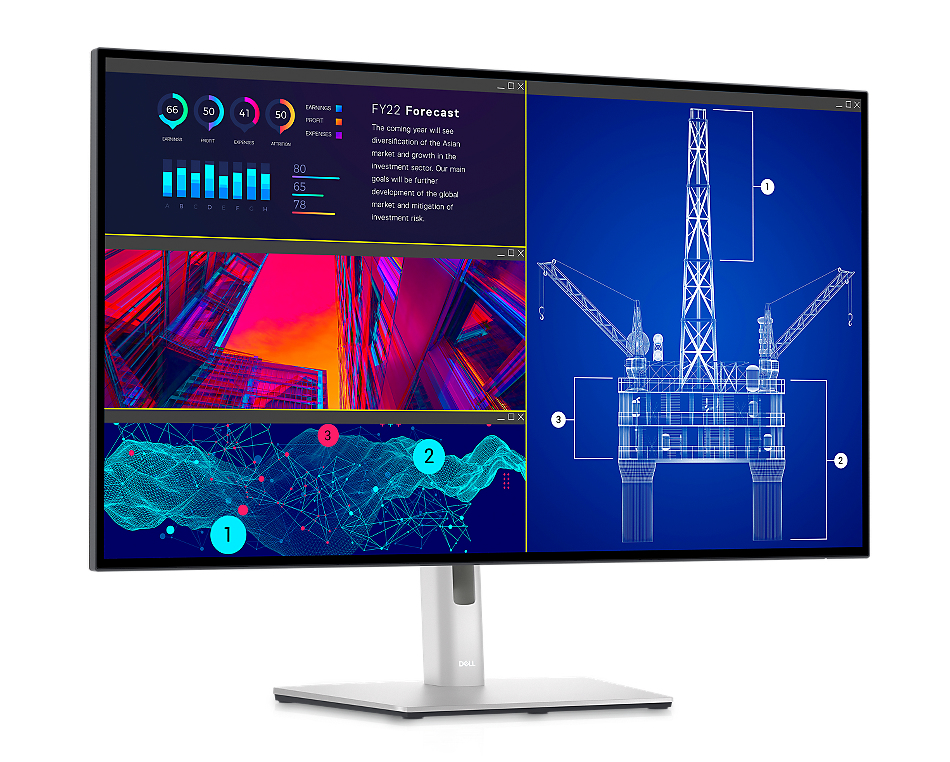
Easy Arrange allows you to easily tile multiple applications across one or more screens with 38 pre-set window partitions and the ability to personalize up to five windows, giving you improved multitasking abilities.
Seamless transitions:
The auto-restore feature remembers where you left off, so applications will go back to where you left them, even after you’ve unplugged.
The key to convenience:
Shortcut keys can save you even more time, letting you easily configure your display management settings so you can get to work faster.
More ways to manage:
Asset management reports allow IT managers to quickly capture and track monitor information as well as configure multiple monitors at once through a single setup.
Expanded compatibility:
With support for multiple operating systems, Dell Display Manager helps you can stay productive however you work.
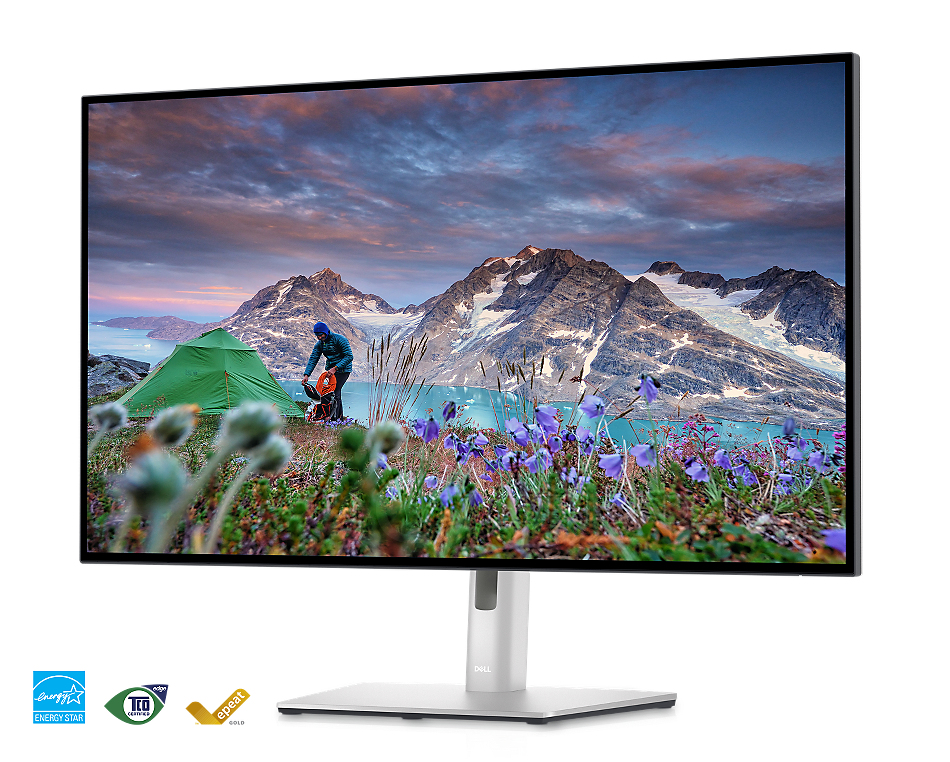
This monitor uses 85% PCR (Post-consumer Recyclable) plastic in the design and meets the latest environmental standards such as EnergyStar® and TCO Edge, and is EPEAT® Gold.
Eco-conscious packaging:
Designed with the environment in mind, Dell commercial monitors come in 100% recyclable cardboard packaging.
Energy conservation:
Save energy with PowerNap, a feature that dims or puts your monitor to sleep when it’s not in use.
Features
Dell UltraSharp 27 4K USB-C Hub Monitor - U2723QE
Be your most productive on a 27 inch monitor with brilliant color and contrast that features the industry’s first IPS Black technology and a connectivity hub.
Brilliant visuals
Exceptional contrast:
Experience incredible color and superior black performance with a contrast ratio of 2000:1 on the world’s first 27" 4K monitor with IPS Black technology.
Enhanced eye comfort
ComfortView Plus—an always-on, built-in low blue light screen—reduces potentially harmful blue light emissions without compising color.True brilliance
See fine details on this 4K monitor and enjoy truer-to-life color with 98% DCI-P3 and VESA DisplayHDR™ 400.Your hub for connectivity
Jumpstart productivity:
Wake up and power on your laptop with the Power Sync feature.
Enhanced connectivity:
Streamline your workspace with extensive connectivity ports including USB-C (up to 90W power delivery), RJ45 (Ethernet), DP1.4, and HDMI. Quick-access USB-C (up to 15W of power charging) and super speed USB 10Gpbs ports enable easy connections and fast data transfers.
A more organized workspace:
Single cable USB-C connectivity offers the flexibility of connecting to multi-vendor USB-C systems, reducing cable clutter and enabling quick transitions f the desk.
Network ready:
Get enhanced manageability with MAC Address pass-through, PXE Boot, and Wake-on-LAN conveniently built in.
Productivity ed
Multitask better:
Connect to two PC sources and Auto KVM will seamlessly switch controls over to the second connected PC. Use KVM (keyboard, video and mouse) feature to control both PCs with a single mouse and keyboard.
See more on one screen:
View content f two PC sources with Picture-in-Picture (PiP) and Picture-by-Picture (PbP).
Expand your productivity:
Experience uncompised picture quality by daisy chaining two 4K monitors. U2723QE is the world’s first 27" 4K monitor which allow daisy chaining of an additional 4K monitor at full resolution via USB-C—enabled by Display Stream Compression (DSC).
Experience uncompised picture quality by daisy chaining two 4K monitors. U2723QE is the world’s first 27" 4K monitor which allow daisy chaining of an additional 4K monitor at full resolution via USB-C—enabled by Display Stream Compression (DSC).
Skillfully crafted
Designed with purpose:With a premium platinum silver finish and an elegant cable management system made to reduce clutter, it’s the monitor built to match any workspace.
Easy to use:
Navigate the menu and adjust screen settings with a convenient joystick control.
Built for comfort
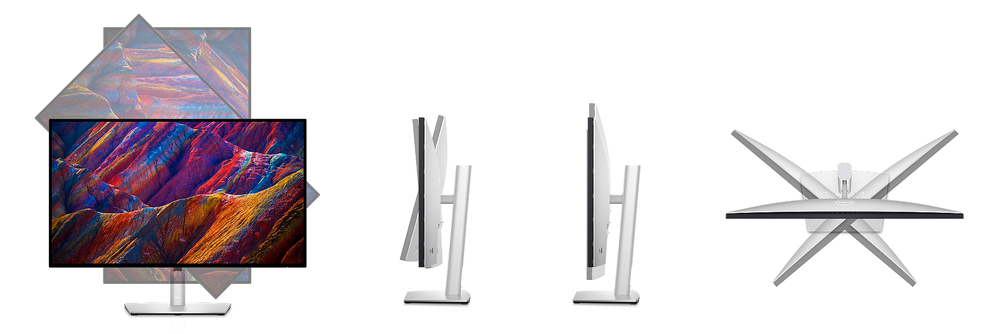
Tilt, swivel, pivot and adjust the height of your monitor so you can work however you’re most comfortable.
Dell Display Manager
Productive at every level:Easy Arrange allows you to easily tile multiple applications across one or more screens with 38 pre-set window partitions and the ability to personalize up to five windows, giving you improved multitasking abilities.
Seamless transitions:
The auto-restore feature remembers where you left off, so applications will go back to where you left them, even after you’ve unplugged.
The key to convenience:
Shortcut keys can save you even more time, letting you easily configure your display management settings so you can get to work faster.
More ways to manage:
Asset management reports allow IT managers to quickly capture and track monitor information as well as configure multiple monitors at once through a single setup.
Expanded compatibility:
With support for multiple operating systems, Dell Display Manager helps you can stay productive however you work.
Green thinking for today and tomorrow
Environmental standards:This monitor uses 85% PCR (Post-consumer Recyclable) plastic in the design and meets the latest environmental standards such as EnergyStar® and TCO Edge, and is EPEAT® Gold.
Eco-conscious packaging:
Designed with the environment in mind, Dell commercial monitors come in 100% recyclable cardboard packaging.
Energy conservation:
Save energy with PowerNap, a feature that dims or puts your monitor to sleep when it’s not in use.
Advancing sustainability:
Dell Technologies is committed to reducing environmental impact throughout the product lifecycle.
Connectivity Options
Ports & Slots1. Security lock slot (based on Kensington Security SlotTM)
2. Power connector
3. HDMI port
4. DisplayPort in
5. USB-C port
6. DP port (out)
7. Audio line-out port
8. USB-C upstream port
9. (3) Super speed USB 10Gbps (USB 3.2 Gen2)
10. Super speed USB 10Gbps (USB 3.2 Gen2)
11. RJ45
12. Super speed USB 10Gbps (USB 3.2 Gen2)
13. USB-C downstream port
Cables Included
1. Power cable2. DisplayPort 1.8 M cable (DisplayPort to DisplayPort)
3. USB-C Gen2 1.0 M cable (A to C)
A brand you can rely on
As the No. 1 monitor company worldwide, we take pride in our unyielding commitment to quality and the utmost customer satisfactionSpecifications
Display
Display diagonal*
68.6 cm (27")
Display resolution*
3840 x 2160 pixels
HD type*
4K Ultra HD
Native aspect ratio*
16:9
Display technology*
LCD
Panel type*
IPS
Backlight type
LED
Touchscreen*
No
Display brightness (typical)
400 cd/m²
Response time*
8 ms
Anti-glare screen
Yes
Screen shape*
Flat
Supported video es
480p, 576p, 720p, 1080i, 1080p
Contrast ratio (typical)*
2000:1
Maximum refresh rate*
60 Hz
Viewing angle, horizontal
178°
Viewing angle, vertical
178°
Display number of colours*
1.07 billion colours
Response time (fast)
5 ms
Pixel pitch
0.1554 x 0.1554 mm
Pixel density
163.18 ppi
Horizontal scan range
15 - 140 kHz
Vertical scan range
23 - 86 Hz
Viewable size, horizontal
59.7 cm
Viewable size, vertical
33.6 cm
Display diagonal (metric)
68.47 cm
High Dynamic Range (HDR) supported
Yes
DDC/CI
Yes
Surface hardness
3H
Colour gamut standard
sRGB
sRGB coverage (typical)
100%
DCI-P3 coverage
98%
Heat dissipation (typical)
98.27 BTU/h
Performance
NVIDIA G-SYNC*
No
AMD FreeSync*
No
Flicker-free technology
Yes
Low Blue Light technology
Yes
Multimedia
Built-in speaker(s)*
No
Built-in camera*
No
Design
Market positioning*
Office
Product colour*
Silver
Front bezel colour
Black
Feet colour
Silver
Ports & interfaces
Built-in USB hub*
Yes
USB hub version
3.2 Gen 2 (3.1 Gen 2)
USB upstream port type
USB Type-C
Number of upstream ports
2
Number of USB Type-C upstream ports quantity
1
USB Type-A downstream ports quantity
5
USB Power Delivery (USB PD)
Yes
USB Power Delivery up to
90 W
HDMI*
Yes
HDMI ports quantity
1
HDMI version
2.0
DisplayPorts quantity
2
Audio output
Yes
Headphone out*
Yes
Headphone outputs
1
Headphone connectivity
3.5 mm
HDCP
Yes
Network
Wi-Fi
No
Ergonomics
VESA mounting*
Yes
Panel mounting interface
100 x 100 mm
Cable lock slot*
Yes
Height adjustment*
Yes
Ergonomics
Adjustable height (max)
15 cm
Pivot
Yes
Pivot angle
-90 - 90°
Swivelling
Yes
Swivel angle range
-45 - 45°
Tilt adjustment
Yes
Tilt angle range
-5 - 21°
On Screen Display (OSD)
Yes
Plug and Play
Yes
Power
Energy efficiency class (SDR)*
F
Energy efficiency class (HDR)*
G
Energy consumption (SDR) per 1000 hours*
26 kWh
Energy consumption (HDR) per 1000 hours*
38 kWh
Power consumption (typical)*
25.9 W
Power consumption (standby)*
0.3 W
Power consumption (max)
220 W
Power consumption (off)
0.2 W
AC input voltage
100 - 240 V
AC input frequency
50 - 60 Hz
Input current
2.7 A
Power supply type
Internal
Energy efficiency scale
A to G
Operational conditions
Operating temperature (T-T)
0 - 40 °C
Storage temperature (T-T)
-20 - 60 °C
Operating relative humidity (H-H)
10 - 80%
Storage relative humidity (H-H)
5 - 90%
Operating altitude
0 - 5000 m
Non-operating altitude
0 - 12192 m
Weight & dimensions
Width (with stand)
611.4 mm
Depth (with stand)
185 mm
Height (with stand)
385.2 mm
Weight (with stand)
6.27 kg
Width (without stand)
611.4 mm
Depth (without stand)
54.3 mm
Height (without stand)
353 mm
Weight (without stand)
4.48 kg
Bezel width (side)
7.35 mm
Bezel width (top)
7.35 mm
Bezel width (bottom)
1 cm
Stand weight
1.79 kg
Packaging data
Package weight
9.53 kg
Packaging content
Stand included
Yes
Cables included
AC, DisplayPort, USB Type-C to USB Type-A, USB Type-C to USB Type-C
Quick start guide
Yes
Sustainability
Sustainability certificates
ENERGY STAR, EPEAT Gold, TCO
Doesn't contain
Arsenic, PVC/BFR
Carbon footprint
Total carbon footprint (kg of CO2e)
815
Total carbon emissions, standard deviation (kg of CO2e)
203
Carbon emissions, manufacturing (kg of CO2e)
411.27
Carbon emissions, logistics (kg of CO2e)
85.3
Carbon emissions, energy usage (kg of CO2e)
313
Carbon emissions, end-of-life (kg of CO2e)
5.35
PAIA version
1.3.0, 2021
Other features
Picture-by-Picture (PbP)
Yes
Maximum resolution
3840 x 2160 pixels
RJ-45 ports quantity
1
Heavy metals free
Hg (mercury)
Compliance certificates
RoHS
Power management
Yes
Compliance industry standards
ENERGY STAR Monitor.
EPEAT registered where applicable.
TCO & TCO Edge.
RoHS Compliant.
BFR/PVC Free monitor
Meets NFPA 99 leakage current requirements.
Arsenic-Free glass and Mercury-Free for the panel only.
Logistics data
Harmonized System (HS) code
85285210
Additional Information
| EAN/UPC | 5397184567753 |
|---|---|
| MPN | DELL-U2723QE |
| BRAND | DELL |
Disclaimer
Actual configuration might differ f illustration
Product Carbon Footprint (PCF)
1. Dell calculates the Product Carbon Footprint using one of two methodologies, depending on the product: the Dell PCF calculator (GaBi version , YYYY) or the Product Attribute to Impact Algorithm (PAIA, X.X.X, YYYY). The methodology used is indicated in the "Version of PCF tool used" column.
2. PAIA (Product Attribute Impact Algorithm) is a streamlined LCA tool developed by MIT ‘s Materials System Laboratory. PAIA estimates the product’s carbon footprint using limited system attributes of the product such as component dimension, screen size, system weight, and annual energy consumption.
3. Please note the emission estimate in this report is calculated using the mean value along with the standard deviation for that product el.
4. Use of default inputs (i.e. not primary data) and assumptions on location of use and other fields can introduce a standard deviation which must be taken into account while completing the calculations. For more information refer to the PCF pages on Dell.com.
5. For the PAIA PCF methodology, the transportation f assembly to customer includes the emissions generated during air, ocean and land transportation of finished or semi-finished Dell products between Dell facilities and between Dell facilities to customers.
6. For the Dell PCF calculator and methodology, the transportation phase the default delivery assumptions are 90% of transport happening by sea and 10% happening by air. Trucking distances don’t contribute as much to the PCF impact compared to more influential by sea or by air distances es.
7. Please note, PAIA uses the ecoinvent Database ( whenever primary data is not made available for calculations.
8. For client and commercial end user computing products, minimum configurations were assumed for calculations. For Server and Storage products, typical configurations or ENERGY STAR ( configurations were used for calculations.
9. Use Phase emissions were calculated based on the location of use as "Europe" i.e. the Use Phase emissions are not specific to a single country / location.The Dell PCF Calculator also estimates Use Phase emissions for the U.S. and China, which are available in the PCF PDF documents on Dell.com.
10. The report provides the total emissions separated by the 4 lifecycle phases: manufacturing, transport, use, and end of life to understand the impact of each phase.
11. The Dell PCF Calculator lifetime usage assumption at the product family level is as follows: Desktop, Notebook - 5 years, Display - 6 years and Servers/Storage - 4 years.
* Blanks indicate we do not have the corresponding metric calculated or data is currently unavailable for the specific product at this time.
Product Carbon Footprint (PCF)
1. Dell calculates the Product Carbon Footprint using one of two methodologies, depending on the product: the Dell PCF calculator (GaBi version , YYYY) or the Product Attribute to Impact Algorithm (PAIA, X.X.X, YYYY). The methodology used is indicated in the "Version of PCF tool used" column.
2. PAIA (Product Attribute Impact Algorithm) is a streamlined LCA tool developed by MIT ‘s Materials System Laboratory. PAIA estimates the product’s carbon footprint using limited system attributes of the product such as component dimension, screen size, system weight, and annual energy consumption.
3. Please note the emission estimate in this report is calculated using the mean value along with the standard deviation for that product el.
4. Use of default inputs (i.e. not primary data) and assumptions on location of use and other fields can introduce a standard deviation which must be taken into account while completing the calculations. For more information refer to the PCF pages on Dell.com.
5. For the PAIA PCF methodology, the transportation f assembly to customer includes the emissions generated during air, ocean and land transportation of finished or semi-finished Dell products between Dell facilities and between Dell facilities to customers.
6. For the Dell PCF calculator and methodology, the transportation phase the default delivery assumptions are 90% of transport happening by sea and 10% happening by air. Trucking distances don’t contribute as much to the PCF impact compared to more influential by sea or by air distances es.
7. Please note, PAIA uses the ecoinvent Database ( whenever primary data is not made available for calculations.
8. For client and commercial end user computing products, minimum configurations were assumed for calculations. For Server and Storage products, typical configurations or ENERGY STAR ( configurations were used for calculations.
9. Use Phase emissions were calculated based on the location of use as "Europe" i.e. the Use Phase emissions are not specific to a single country / location.The Dell PCF Calculator also estimates Use Phase emissions for the U.S. and China, which are available in the PCF PDF documents on Dell.com.
10. The report provides the total emissions separated by the 4 lifecycle phases: manufacturing, transport, use, and end of life to understand the impact of each phase.
11. The Dell PCF Calculator lifetime usage assumption at the product family level is as follows: Desktop, Notebook - 5 years, Display - 6 years and Servers/Storage - 4 years.
* Blanks indicate we do not have the corresponding metric calculated or data is currently unavailable for the specific product at this time.