Laptop Parts & Accessories
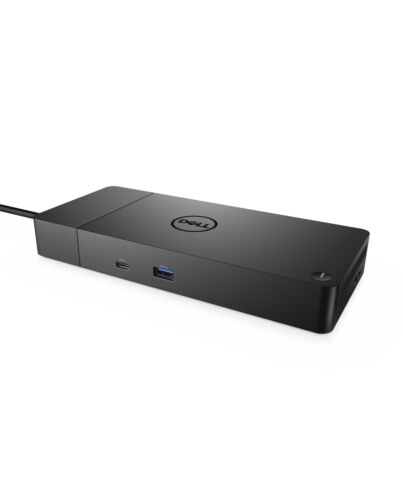
DELL WD19S-180W Wired USB 3.2 Gen 2 (3.1 Gen 2) Type-C Black
£237.70
DELL WD19S-180W, Wired, USB 3.2 Gen 2 (3.1 Gen 2) Type-C, 10,100,1000 Mbit/s, Black, 5120 x 2880 pixels, DC
Out of stock
- Immediately available
- Discreet Packaging
- Free Shipping
Product Details
Description
Boost your PC’s power on the world’s most powerful and first ular dock with a future-ready design. WD19S 180W is a simplified version of WD19 180W without 3.5mm ports.
Key Features
- Power Delivery (Power Provided)
- Up to 4K - 60 Hz (Dual Displays)
- Up to QHD - 60 Hz (Three Displays)
- Red Hat Enterprise Linux
Reasons To Buy
Power your connections
Energize your workload: Get more done, even faster with Dell ExpressCharge Boost – a feature that provides up to a 35% charge in just 20 minutes.
Unmatched charging: Increase your power delivery by up to 30% more than standard USB-C on our fastest charging family of docks, delivering 130W of power with the 180W adapter.
Built for the future
Ultimate connectivity: USB-C connectivity makes it easier than ever to deliver power, data, audio and video in one convenient cable, no matter what system you use. Plus, with support for dual FHD or a single QuadHD monitor, you can connect to everything you need.
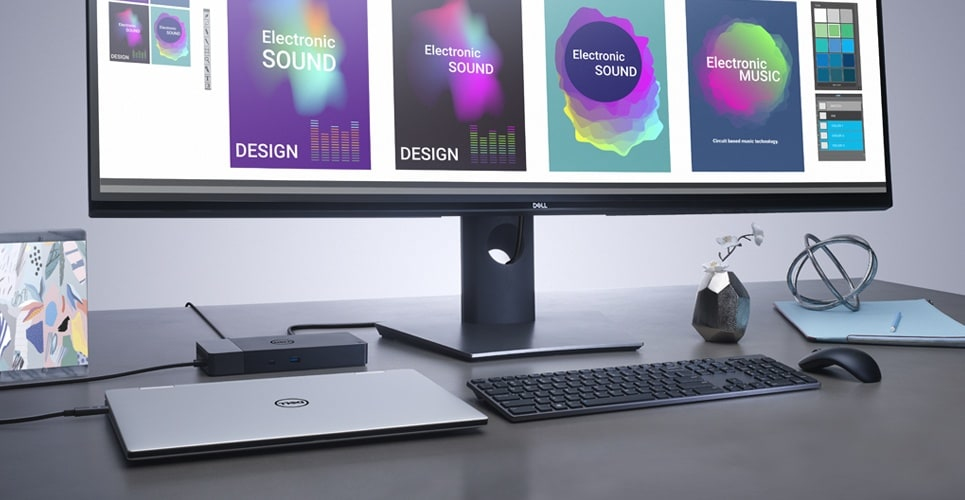
Clean and clutter-free: Stay productive by mounting your dock behind your monitor or under your desk with the optional, secure VESA mount, that offers the complete flexibility with the built-in one-meter cable.
Information in a flash: With data transfer speeds of up to 10Gbps, you can stay productive when connected to all your devices.
Optimize your workspace
Secure manageability: Keep your information safe with MAC Address pass-thru and remote port-disablement. Plus, with features like PXE Boot, Wake-on-LAN and more, it’s easier than ever to stay productive while managing your dock.
Features
Dell Docking Station - WD19S 180W


Boost your PC’s power on the world’s most powerful and first ular dock with a future-ready design. WD19S 180W is a simplified version of WD19 180W without 3.5mm ports.

Power your connections
Power your day: Dell ExpressCharge allows you to charge up to 80% in one hour, making it the most efficient way to manage the workday.Energize your workload: Get more done, even faster with Dell ExpressCharge Boost – a feature that provides up to a 35% charge in just 20 minutes.
Unmatched charging: Increase your power delivery by up to 30% more than standard USB-C on our fastest charging family of docks, delivering 130W of power with the 180W adapter.


Built for the future
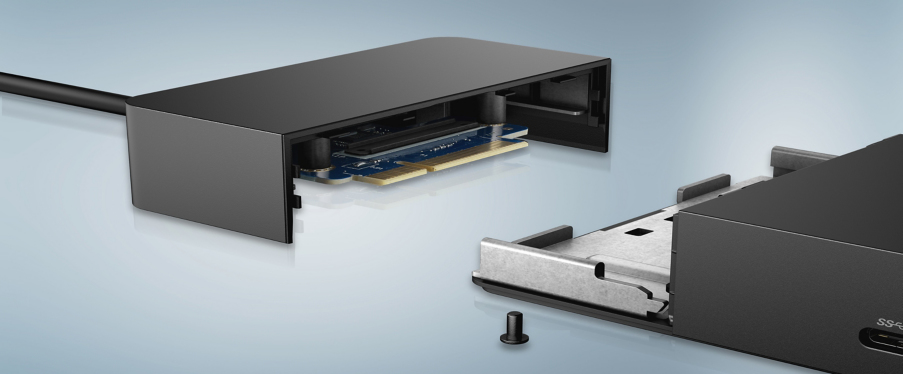
Mix and match: Evolve as your needs change with our most versatile dock. The future-ready design lets you swap out ules with ease if you need to do field replacements or upgrade your systems.Ultimate connectivity: USB-C connectivity makes it easier than ever to deliver power, data, audio and video in one convenient cable, no matter what system you use. Plus, with support for dual FHD or a single QuadHD monitor, you can connect to everything you need.
Clean and clutter-free: Stay productive by mounting your dock behind your monitor or under your desk with the optional, secure VESA mount, that offers the complete flexibility with the built-in one-meter cable.
Information in a flash: With data transfer speeds of up to 10Gbps, you can stay productive when connected to all your devices.

Optimize your workspace
Smooth and seamless: Work without disruptions utilizing a single on our most manageable docks ever. Plus, with Dell Client Command Suite and Microsoft System Center Configuration Manager, you can quickly and easily update your without rebooting your dock.Secure manageability: Keep your information safe with MAC Address pass-thru and remote port-disablement. Plus, with features like PXE Boot, Wake-on-LAN and more, it’s easier than ever to stay productive while managing your dock.

Connectivity Options
Ports & Slots:1. USB-C 3.1 Gen 2 | 2. USB-A 3.1 Gen 1 with PowerShare | 3. DisplayPort 1.4 | 4. HDMI 2.0b | 5. USB-C Multifunction DisplayPort | 6. Dual USB-A 3.1 Gen 1 | 7. Gigabit Ethernet RJ45 | 8. Power In
Specifications
Ports & interfaces
Connectivity technology*
Wired
Host interface*
USB 3.2 Gen 2 (3.1 Gen 2) Type-C
USB 3.2 Gen 1 (3.1 Gen 1) Type-A ports quantity*
3
USB 3.2 Gen 2 (3.1 Gen 2) Type-C ports quantity
2
HDMI ports quantity*
1
HDMI version
2.0
DisplayPorts quantity
2
DisplayPort version
1.4
Microphone in*
No
DC-in jack
Yes
Network
Ethernet LAN*
Yes
Ethernet LAN (RJ-45) ports
1
Ethernet LAN data rates
10,100,1000 Mbit/s
Performance
Card reader integrated*
No
Maximum digital resolution
5120 x 2880 pixels
VESA mounting
Yes
Product colour*
Black
On/off switch
Yes
LED indicators
Yes
Power
Power source type
DC
AC input voltage
120 - 230 V
AC input frequency
50 - 60 Hz
Power supply
180 W
Power cable length
1 m
Software
Windows operating systems supported
Windows 10, Windows 10 Education, Windows 10 Education x64, Windows 10 Enterprise, Windows 10 Enterprise x64, Windows 10 Home, Windows 10 Home x64, Windows 10 IOT Core, Windows 10 IoT Enterprise, Windows 10 Pro, Windows 10 Pro x64, Windows 10 x64
Linux operating systems supported
Yes
Operational conditions
Operating temperature (T-T)
0 - 35 °C
Storage temperature (T-T)
-20 - 60 °C
Operating relative humidity (H-H)
10 - 80%
Storage relative humidity (H-H)
5 - 90%
Weight & dimensions
Width
205 mm
Depth
90 mm
Height
29 mm
Weight
585 g
Packaging data
Quantity per pack
1 pc(s)
Package width
300 mm
Package depth
290 mm
Package height
62 mm
Carbon footprint
Total carbon footprint (kg of CO2e)
35.74
Carbon emissions, manufacturing (kg of CO2e)
25.6
Carbon emissions, logistics (kg of CO2e)
6.61
Carbon emissions, energy usage (kg of CO2e)
5.95
Carbon emissions, end-of-life (kg of CO2e)
-2.42
PAIA version
PAIA/GaBi not used
Logistics data
Harmonized System (HS) code
84733020
Additional Information
| EAN/UPC | 5397184513989 |
|---|---|
| MPN | DELL-WD19S180W |
| BRAND | DELL |
Disclaimer
Actual configuration might differ f illustration
Product Carbon Footprint (PCF)
1. Dell calculates the Product Carbon Footprint using one of two methodologies, depending on the product: the Dell PCF calculator (GaBi version , YYYY) or the Product Attribute to Impact Algorithm (PAIA, X.X.X, YYYY). The methodology used is indicated in the "Version of PCF tool used" column.
2. PAIA (Product Attribute Impact Algorithm) is a streamlined LCA tool developed by MIT ‘s Materials System Laboratory. PAIA estimates the product’s carbon footprint using limited system attributes of the product such as component dimension, screen size, system weight, and annual energy consumption.
3. Please note the emission estimate in this report is calculated using the mean value along with the standard deviation for that product el.
4. Use of default inputs (i.e. not primary data) and assumptions on location of use and other fields can introduce a standard deviation which must be taken into account while completing the calculations. For more information refer to the PCF pages on Dell.com.
5. For the PAIA PCF methodology, the transportation f assembly to customer includes the emissions generated during air, ocean and land transportation of finished or semi-finished Dell products between Dell facilities and between Dell facilities to customers.
6. For the Dell PCF calculator and methodology, the transportation phase the default delivery assumptions are 90% of transport happening by sea and 10% happening by air. Trucking distances don’t contribute as much to the PCF impact compared to more influential by sea or by air distances es.
7. Please note, PAIA uses the ecoinvent Database ( whenever primary data is not made available for calculations.
8. For client and commercial end user computing products, minimum configurations were assumed for calculations. For Server and Storage products, typical configurations or ENERGY STAR ( configurations were used for calculations.
9. Use Phase emissions were calculated based on the location of use as "Europe" i.e. the Use Phase emissions are not specific to a single country / location.The Dell PCF Calculator also estimates Use Phase emissions for the U.S. and China, which are available in the PCF PDF documents on Dell.com.
10. The report provides the total emissions separated by the 4 lifecycle phases: manufacturing, transport, use, and end of life to understand the impact of each phase.
11. The Dell PCF Calculator lifetime usage assumption at the product family level is as follows: Desktop, Notebook - 5 years, Display - 6 years and Servers/Storage - 4 years.
* Blanks indicate we do not have the corresponding metric calculated or data is currently unavailable for the specific product at this time.
Product Carbon Footprint (PCF)
1. Dell calculates the Product Carbon Footprint using one of two methodologies, depending on the product: the Dell PCF calculator (GaBi version , YYYY) or the Product Attribute to Impact Algorithm (PAIA, X.X.X, YYYY). The methodology used is indicated in the "Version of PCF tool used" column.
2. PAIA (Product Attribute Impact Algorithm) is a streamlined LCA tool developed by MIT ‘s Materials System Laboratory. PAIA estimates the product’s carbon footprint using limited system attributes of the product such as component dimension, screen size, system weight, and annual energy consumption.
3. Please note the emission estimate in this report is calculated using the mean value along with the standard deviation for that product el.
4. Use of default inputs (i.e. not primary data) and assumptions on location of use and other fields can introduce a standard deviation which must be taken into account while completing the calculations. For more information refer to the PCF pages on Dell.com.
5. For the PAIA PCF methodology, the transportation f assembly to customer includes the emissions generated during air, ocean and land transportation of finished or semi-finished Dell products between Dell facilities and between Dell facilities to customers.
6. For the Dell PCF calculator and methodology, the transportation phase the default delivery assumptions are 90% of transport happening by sea and 10% happening by air. Trucking distances don’t contribute as much to the PCF impact compared to more influential by sea or by air distances es.
7. Please note, PAIA uses the ecoinvent Database ( whenever primary data is not made available for calculations.
8. For client and commercial end user computing products, minimum configurations were assumed for calculations. For Server and Storage products, typical configurations or ENERGY STAR ( configurations were used for calculations.
9. Use Phase emissions were calculated based on the location of use as "Europe" i.e. the Use Phase emissions are not specific to a single country / location.The Dell PCF Calculator also estimates Use Phase emissions for the U.S. and China, which are available in the PCF PDF documents on Dell.com.
10. The report provides the total emissions separated by the 4 lifecycle phases: manufacturing, transport, use, and end of life to understand the impact of each phase.
11. The Dell PCF Calculator lifetime usage assumption at the product family level is as follows: Desktop, Notebook - 5 years, Display - 6 years and Servers/Storage - 4 years.
* Blanks indicate we do not have the corresponding metric calculated or data is currently unavailable for the specific product at this time.