Computers
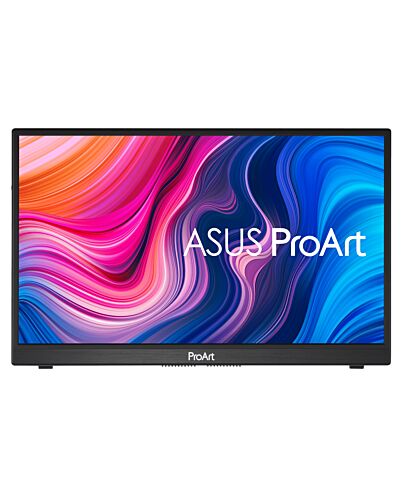
ASUS PA148CTV computer monitor 35.6 cm (14") 1920 x 1080 pixels Full HD LED Touchscreen Tabletop Bla
£409.67
In stock
- Immediately available
- Discreet Packaging
- Free Shipping
Product Details
Description
A Shortcut to Creators’ Workflow
ASUS ProArt PA148CTV is a 14-inch FHD portable monitor designed for creators. Its ASUS Dial and Virtual Control Panel streamlines the creative process with shortcuts and programmable hotkeys that work seamlessly with Adobe creative tools. PA148CTV delivers exceptional color thanks to 100% sRGB and 100% Rec. 709 color spaces, and it is world’s 1st portable monitor that reach Calman Verified certification and factory pre-calibrated to provide a Delta E < 2 color difference. The anti-glare IPS panel features wide viewing angles with minimal color shift, even when viewed f off-center positions.
Built for Creators
PA148CTV offers a host of features to help you get the most out of creative pursuits. The ASUS Dial and the Virtual Control Panel provide shortcuts and hotkeys to popular Adobe software, allowing you to work more efficiently. The Calman Verified PA148CTV has a Delta E < 2 color value and wide color gamut to ensure the colors you see are true to life. ProArt Preset software lets you quickly adjust color gamut, while ProArt Palette lets you adjust various color settings.
Creativity with a Spin
ASUS Dial is a physical dial at the rear of the display that works seamlessly with compatible Adobe software and Microsoft Surface Dial controls, allowing you to make adjustments while keeping focused on the task at hand. The integrated on screen display (OSD) controller allows you to make monitor adjustments quickly and easily.
Works with
Adobe Software
ASUS Dial is designed to work with compatible Adobe software* (for example, Adobe Photoshop, Photoshop Lightroom Classic, Premiere Pro and After Effects). Turning the dial gives you access to customized shortcuts for tasks such as zooming in and out of images and adjusting brush size or brightness settings. You can even tailor the default interface to suit your own work style.
*Support for additional Adobe software will be available in the future. ProArt Creator Hub is required and will be available in Q2 2021
**Adobe, Adobe Premiere, After Effects, Lightroom, Photoshop, and the Photoshop logo are either registered trademarks or trademarks of Adobe in the United States and/or other countries.
Supports Windows
Surface Dial Features
ASUS Dial works seamlessly with Microsoft Surface Dial features. Simply turn ASUS Dial to adjust volume, scroll through web pages, or to perform other functions.
Intuitive Control at Your Fingertips
The Virtual Control Panel provides an intuitive interface that’s unique to each supported Adobe software* (for example, Adobe Photoshop, Photoshop Lightroom Classic, Premiere Pro and After Effects), so the controls and shortcuts you need are right in front of you. Tweak image exposure or contrast when working with Photoshop, or slide through video time bars on Premiere – it’s all neatly laid out so you can work more quickly and efficiently.
*Support for additional Adobe software will be available in the future. ProArt Creator Hub is required and will be available in Q2 2021
**Adobe, Adobe Premiere, After Effects, Lightroom, Photoshop, and the Photoshop logo are either registered trademarks or trademarks of Adobe in the United States and/or other countries.
Experience Full Color
Wide 100% sRGB and 100% Rec. 709 color gamut offers more vivid colors, ensuring deeper primary colors like red, green and blue, and richer secondary colors.
Revel in pure, expressive hues — thanks to accurate, true-to-life color reproduction. Delta E < 2 color accuracy means your images are accurately reproduced on screen, so you can see exactly how they’ll turn out.
Pre-Calibrated for
Out-of-the-Box Accuracy
Color professionals rely on color-accurate displays to ensure that their creations render as intended. PA148CTV is pre-calibrated at the factory and Calman Verified to guarantee industry-leading color accuracy. Every ProArt display undergoes meticulous testing to ensure smooth color gradation and to guarantee the very best visuals.
Quick Color Gamut Adjustment
ASUS-exclusive ProArt Preset provides multiple es for quick color-gamut adjustment. Whether you're grading colors, editing videos or manipulating photos, you can switch and match your needs easily.
Personalized Editing Experience
ASUS ProArt Palette lets you customize numerous display parameters, including color hue, temperature and gamma adjustments, via intuitive on-screen menus. With two-point grayscale sliders for all six colors, it provides greater color-adjustment flexibility than many competing monitors. ProArt Palette empowers you to produce quickly and consistently, and makes it easy to keep your color management in check.
Rich Connectivity
PA148CTV offers a host of ports to cater to your creative needs. The two USB-C ports deliver audio / video signals, touch and plus power input over a single cable*. The micro HDMI port provides a connection to various input sources, while the tripod socket allows you to mount PA148CTV onto a tripod.
*Connected device requires USB Type-C (DisplayPort Alt e and at least 10W power output.)
Effortless Mobility
PA148CTV fits into a travel bag or backpack, so you can easily take it on location. An integrated adjustable metal kickstand props it up to provide comfortable viewing angles and working positions, anywhere.
Caring for Your Eyes
ASUS Flicker-Free technology ensures a more comfortable viewing experience by reducing on-screen flicker to minimize eye strain, headaches and eye fatigue that can occur when spending long hours in front of a display. Exclusive ASUS Ultra-Low Blue Light technology protects your eyes f harmful blue light emissions with four blue-light filter settings that are easily accessed through the on-screen menu via the hotkey
ASUS ProArt PA148CTV is a 14-inch FHD portable monitor designed for creators. Its ASUS Dial and Virtual Control Panel streamlines the creative process with shortcuts and programmable hotkeys that work seamlessly with Adobe creative tools. PA148CTV delivers exceptional color thanks to 100% sRGB and 100% Rec. 709 color spaces, and it is world’s 1st portable monitor that reach Calman Verified certification and factory pre-calibrated to provide a Delta E < 2 color difference. The anti-glare IPS panel features wide viewing angles with minimal color shift, even when viewed f off-center positions.
Built for Creators
PA148CTV offers a host of features to help you get the most out of creative pursuits. The ASUS Dial and the Virtual Control Panel provide shortcuts and hotkeys to popular Adobe software, allowing you to work more efficiently. The Calman Verified PA148CTV has a Delta E < 2 color value and wide color gamut to ensure the colors you see are true to life. ProArt Preset software lets you quickly adjust color gamut, while ProArt Palette lets you adjust various color settings.
Creativity with a Spin
ASUS Dial is a physical dial at the rear of the display that works seamlessly with compatible Adobe software and Microsoft Surface Dial controls, allowing you to make adjustments while keeping focused on the task at hand. The integrated on screen display (OSD) controller allows you to make monitor adjustments quickly and easily.
Works with
Adobe Software
ASUS Dial is designed to work with compatible Adobe software* (for example, Adobe Photoshop, Photoshop Lightroom Classic, Premiere Pro and After Effects). Turning the dial gives you access to customized shortcuts for tasks such as zooming in and out of images and adjusting brush size or brightness settings. You can even tailor the default interface to suit your own work style.
*Support for additional Adobe software will be available in the future. ProArt Creator Hub is required and will be available in Q2 2021
**Adobe, Adobe Premiere, After Effects, Lightroom, Photoshop, and the Photoshop logo are either registered trademarks or trademarks of Adobe in the United States and/or other countries.
Supports Windows
Surface Dial Features
ASUS Dial works seamlessly with Microsoft Surface Dial features. Simply turn ASUS Dial to adjust volume, scroll through web pages, or to perform other functions.
Intuitive Control at Your Fingertips
The Virtual Control Panel provides an intuitive interface that’s unique to each supported Adobe software* (for example, Adobe Photoshop, Photoshop Lightroom Classic, Premiere Pro and After Effects), so the controls and shortcuts you need are right in front of you. Tweak image exposure or contrast when working with Photoshop, or slide through video time bars on Premiere – it’s all neatly laid out so you can work more quickly and efficiently.
*Support for additional Adobe software will be available in the future. ProArt Creator Hub is required and will be available in Q2 2021
**Adobe, Adobe Premiere, After Effects, Lightroom, Photoshop, and the Photoshop logo are either registered trademarks or trademarks of Adobe in the United States and/or other countries.
Experience Full Color
Wide 100% sRGB and 100% Rec. 709 color gamut offers more vivid colors, ensuring deeper primary colors like red, green and blue, and richer secondary colors.
Revel in pure, expressive hues — thanks to accurate, true-to-life color reproduction. Delta E < 2 color accuracy means your images are accurately reproduced on screen, so you can see exactly how they’ll turn out.
Pre-Calibrated for
Out-of-the-Box Accuracy
Color professionals rely on color-accurate displays to ensure that their creations render as intended. PA148CTV is pre-calibrated at the factory and Calman Verified to guarantee industry-leading color accuracy. Every ProArt display undergoes meticulous testing to ensure smooth color gradation and to guarantee the very best visuals.
Quick Color Gamut Adjustment
ASUS-exclusive ProArt Preset provides multiple es for quick color-gamut adjustment. Whether you're grading colors, editing videos or manipulating photos, you can switch and match your needs easily.
Personalized Editing Experience
ASUS ProArt Palette lets you customize numerous display parameters, including color hue, temperature and gamma adjustments, via intuitive on-screen menus. With two-point grayscale sliders for all six colors, it provides greater color-adjustment flexibility than many competing monitors. ProArt Palette empowers you to produce quickly and consistently, and makes it easy to keep your color management in check.
Rich Connectivity
PA148CTV offers a host of ports to cater to your creative needs. The two USB-C ports deliver audio / video signals, touch and plus power input over a single cable*. The micro HDMI port provides a connection to various input sources, while the tripod socket allows you to mount PA148CTV onto a tripod.
*Connected device requires USB Type-C (DisplayPort Alt e and at least 10W power output.)
Effortless Mobility
PA148CTV fits into a travel bag or backpack, so you can easily take it on location. An integrated adjustable metal kickstand props it up to provide comfortable viewing angles and working positions, anywhere.
Caring for Your Eyes
ASUS Flicker-Free technology ensures a more comfortable viewing experience by reducing on-screen flicker to minimize eye strain, headaches and eye fatigue that can occur when spending long hours in front of a display. Exclusive ASUS Ultra-Low Blue Light technology protects your eyes f harmful blue light emissions with four blue-light filter settings that are easily accessed through the on-screen menu via the hotkey
Key Features
- 14-inch Full HD IPS anti-glare panel with capacitive 10-point multitouch
- ASUS Dial and Virtual Control Panel provide productivity-enhancing shortcuts and programmable hotkeys for compatible Adobe software (for example, Adobe Photoshop, Photoshop Lightroom Classic, Premiere Pro and After Effects)
- 100% sRGB and 100% Rec. 709 color gamut, and Calman Verified with factory pre-calibrated Delta E < 2 for exceptional color accuracy
- User-friendly design with Intuitive OSD control via ASUS Dial, metal kickstand and tripod socket
- I/O ports include two USB Type-C® ports (DP Alt e) and one Micro HDMI for variety devices connection
- ASUS Eye Care monitors feature TÜV Rheinland- Flicker-free and Low Blue Light technologies to ensure a comfortable viewing experience
Specifications
Display
Display diagonal*
35.6 cm (14")
Display resolution*
1920 x 1080 pixels
HD type*
Full HD
Native aspect ratio*
16:9
Display technology*
LED
Panel type*
IPS
Touchscreen*
Yes
Touchscreen type
Tabletop
Touchscreen technology
Projected capacitive system
Touch technology
Multi-touch
Display brightness
300 cd/m²
Response time*
5 ms
Screen shape*
Flat
Supported graphics resolutions
1920 x 1080 (HD 1080)
Contrast ratio (typical)*
700:1
Viewing angle, horizontal
178°
Viewing angle, vertical
178°
Display number of colours*
16.7 million colours
Pixel pitch
0.16 x 0.16 mm
Viewable size, horizontal
30.9 cm
Viewable size, vertical
17.4 cm
sRGB coverage (typical)
100%
Performance
NVIDIA G-SYNC*
No
AMD FreeSync*
No
Low Blue Light technology
Yes
Multimedia
Number of speakers
1
RMS rated power
2 W
Built-in speaker(s)*
Yes
Built-in microphone
No
Built-in camera*
No
Design
Product colour*
Black
Ports & interfaces
Built-in USB hub*
Yes
Number of upstream ports
1
USB Type-C DisplayPort Alternate e
Yes
DVI port
No
HDMI*
No
Micro HDMI ports quantity
1
Headphone out*
No
Ergonomics
Cable lock slot*
Yes
Cable lock slot type
Kensington
Height adjustment*
No
Power
Energy efficiency class (SDR)*
E
Energy consumption (SDR) per 1000 hours*
9 kWh
Energy efficiency scale
A to G
Weight & dimensions
Width (with stand)
326.1 mm
Depth (with stand)
12 mm
Height (with stand)
204.4 mm
Weight (with stand)
740 g
Packaging data
Package width
413 mm
Package depth
90 mm
Package height
342 mm
Package weight
2.5 kg
Packaging content
Cables included
Micro-HDMI, USB Type-C to USB Type-A
Additional Information
| EAN/UPC | 4718017862233 |
|---|---|
| MPN | PA148CTV |
| BRAND | ASUS |