
Office
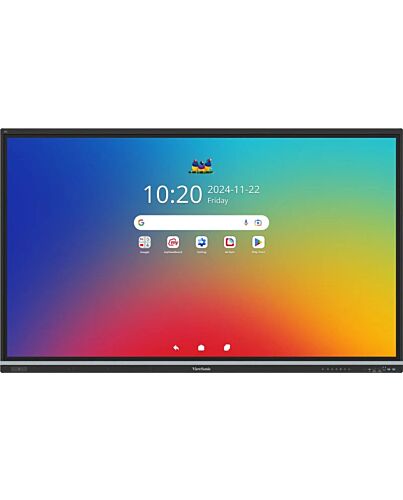
Viewsonic IFP7551-3C interactive whiteboard 190.5 cm (75") 3840 x 2160 pixels Touchscreen Black
£2,990.74
Viewsonic IFP7551-3C, 190.5 cm (75"), 1650.24 x 928.26 mm, 500 cd/m², 1.07 billion colours, 3840 x 2160 pixels, TFT-LCD
In stock
- Immediately available
- Discreet Packaging
- Free Shipping
Product Details
Description
Bring energy-efficient performance to your classroom with the ViewBoard® IFP51 Series, available in sizes f 65” to 86” to suit any setup. Seamless interactivity is at your fingertips, thanks to its ultra-responsive 50-point touch technology and instant 'write away' annotation. Powered by Android 14 and EDLA-, it offers secure access to Google Play apps, while NFC and SSO sign-in ensure instant access to personalized settings. Integrated ViewSonic Education Software completes the experience with tools for whiteboarding, casting, and device management—delivering a more dynamic and efficient teaching experience.
Write with Precision
Keep lessons flowing with ultra-responsive writing that feels as natural as pen on paper. With 50 touch points, advanced palm rejection, and anti-fingerprint coating, every stroke is smooth, clean, and lag-free. And with the floating annotation feature activated, notes stay locked in place as you scroll*, keeping key points always right where you need them.
Tap In and Start Teaching
Step into the classroom and get straight to teaching. With options like NFC one-touch sign-in and SSO, your cloud-stored personalized settings, files, and profiles load instantly—no juggling passwords, no delays, just a seamless start to every lesson.
Advanced Security to Safeguard Your Data
Enjoy peace of mind with built-in advanced security features ed by the EDLA certification—including automatic updates, Google Play Protect, data encryption, and two-way ation—so classroom data stays protected and accessible only to authorized users.
Expand Learning with Google Play
Get native access to fully functional Google apps like Docs and Slides with the familiar interface you know and trust. Plus, Bring lessons to life with hands-on experiences that keep students engaged—f interactive science tools to language apps and music platforms—thanks to thousands of educational resources on the Google Play Store.
Make Every Lesson Interactive
Turn passive learning into active engagement with myViewBoard. Designed to adapt to any teaching style, its intuitive tools—like the infinite canvas, Spotlight, Immersive Reader, split-whiteboard Participation e, and AI-powered handwriting prediction—create a fluid whiteboarding experience where participation feels effortless.
Cast Wirelessly, Share Seamlessly
Take control of screen sharing with AirSync. Cast up to four devices at once for collaborative learning, while eration e lets you decide what goes on the big screen. Plus, with Touchback Control, you’re free to roam the room, interact with students anywhere, and keep lessons dynamic.
Power Through with Fast Performance
Keep lessons flowing with an octa-core processor and 16GB RAM. Jump between apps, multitask, and stream content effortlessly—all with rapid responsiveness.
Streamline Connectivity with Triple USB-C
Power up, plug in, and teach without limits with triple USB-C ports. Delivering up to 65W of power, these ports keep devices charged and connected effortlessly. A top-mounted port makes webcam setup a breeze, while front- and rear-facing ports put quick connections at your fingertips.
Immerse Every Student in Powerful Audio
Keep every voice heard with an advanced 8-mic array featuring noise suppression, echo cancellation, and automatic gain control. Paired with a 70W audio system—dual 25W front-facing speakers and a 20W subwoofer—it delivers immersive sound that keeps lessons engaging.
Teach Brighter, Spend Smarter
Keep every student engaged with a display that stays clear in any lighting. Enhanced brightness ensures crisp, easy-to-read content f every angle, while using 20% less energy than the previous generation. A smarter, brighter way to teach—without the extra cost.
Simplify Display Management
Take full control of device management with ViewSonic Manager. F one intuitive dashboard, you can remotely manage apps, update , and instantly broadcast multimedia messages. Plus, with -time energy monitoring, remote screen on/off control, and ECO e scheduling, optimizing energy usage has never been easier.
Note: The optional Advanced license is required for multimedia broadcasts and ECO e control. -time energy monitoring will be available f H2 2025.
Maximize Learning with Smart Accessories
Equip your classroom with accessories that adapt to every teaching style. Whether ing Windows access with a slot-in PC, hosting hybrid lessons with a webcam, moving freely with a motorized trolley cart, or capturing every detail with a document camera, ViewSonic accessories integrate seamlessly for a flexible and efficient teaching experience.
Write with Precision
Keep lessons flowing with ultra-responsive writing that feels as natural as pen on paper. With 50 touch points, advanced palm rejection, and anti-fingerprint coating, every stroke is smooth, clean, and lag-free. And with the floating annotation feature activated, notes stay locked in place as you scroll*, keeping key points always right where you need them.
Tap In and Start Teaching
Step into the classroom and get straight to teaching. With options like NFC one-touch sign-in and SSO, your cloud-stored personalized settings, files, and profiles load instantly—no juggling passwords, no delays, just a seamless start to every lesson.
Advanced Security to Safeguard Your Data
Enjoy peace of mind with built-in advanced security features ed by the EDLA certification—including automatic updates, Google Play Protect, data encryption, and two-way ation—so classroom data stays protected and accessible only to authorized users.
Expand Learning with Google Play
Get native access to fully functional Google apps like Docs and Slides with the familiar interface you know and trust. Plus, Bring lessons to life with hands-on experiences that keep students engaged—f interactive science tools to language apps and music platforms—thanks to thousands of educational resources on the Google Play Store.
Make Every Lesson Interactive
Turn passive learning into active engagement with myViewBoard. Designed to adapt to any teaching style, its intuitive tools—like the infinite canvas, Spotlight, Immersive Reader, split-whiteboard Participation e, and AI-powered handwriting prediction—create a fluid whiteboarding experience where participation feels effortless.
Cast Wirelessly, Share Seamlessly
Take control of screen sharing with AirSync. Cast up to four devices at once for collaborative learning, while eration e lets you decide what goes on the big screen. Plus, with Touchback Control, you’re free to roam the room, interact with students anywhere, and keep lessons dynamic.
Power Through with Fast Performance
Keep lessons flowing with an octa-core processor and 16GB RAM. Jump between apps, multitask, and stream content effortlessly—all with rapid responsiveness.
Streamline Connectivity with Triple USB-C
Power up, plug in, and teach without limits with triple USB-C ports. Delivering up to 65W of power, these ports keep devices charged and connected effortlessly. A top-mounted port makes webcam setup a breeze, while front- and rear-facing ports put quick connections at your fingertips.
Immerse Every Student in Powerful Audio
Keep every voice heard with an advanced 8-mic array featuring noise suppression, echo cancellation, and automatic gain control. Paired with a 70W audio system—dual 25W front-facing speakers and a 20W subwoofer—it delivers immersive sound that keeps lessons engaging.
Teach Brighter, Spend Smarter
Keep every student engaged with a display that stays clear in any lighting. Enhanced brightness ensures crisp, easy-to-read content f every angle, while using 20% less energy than the previous generation. A smarter, brighter way to teach—without the extra cost.
Simplify Display Management
Take full control of device management with ViewSonic Manager. F one intuitive dashboard, you can remotely manage apps, update , and instantly broadcast multimedia messages. Plus, with -time energy monitoring, remote screen on/off control, and ECO e scheduling, optimizing energy usage has never been easier.
Note: The optional Advanced license is required for multimedia broadcasts and ECO e control. -time energy monitoring will be available f H2 2025.
Maximize Learning with Smart Accessories
Equip your classroom with accessories that adapt to every teaching style. Whether ing Windows access with a slot-in PC, hosting hybrid lessons with a webcam, moving freely with a motorized trolley cart, or capturing every detail with a document camera, ViewSonic accessories integrate seamlessly for a flexible and efficient teaching experience.
Key Features
- Write Away quick-start annotation, enhanced by 50-point touch and palm rejection for precise writing.
- 70W total output power speaker system with built-in 8-microphone array, for rich, immersive audio.
- EDLA- with Android 14, integrated ViewSonic Education Software for seamless functionality.
- NFC and SSO sign-in for swift access to the intuitive launcher and personal settings.
- EPEAT Silver for enhanced energy efficiency and sustainability.
Specifications
Display
Display diagonal*
190.5 cm (75")
Display brightness
500 cd/m²
Display number of colours
1.07 billion colours
Display resolution
3840 x 2160 pixels
Panel type
TFT-LCD
Contrast ratio (typical)
1200:1
Contrast ratio (dynamic)
5000:1
Response time
6.5 ms
Touchscreen*
Yes
Touch technology
Multi-touch
Touchscreen type
Infed
Number of simultaneous touchpoints
50
Touch resolution
32767 x 32767 pixels
Viewing angle, horizontal
178°
Viewing angle, vertical
178°
Working area*
1650.24 x 928.26 mm
Hardness
9H
Palm rejection
Yes
Computer system
Processor cores
8
User memory
128 GB
RAM capacity
8 GB
Audio
Built-in speaker(s)*
Yes
Number of built-in speakers
2
Speaker power
25 W
Built-in subwoofer
Yes
Subwoofer RMS power
20 W
Built-in microphone
Yes
Number of microphone arrays
8
Projector
Built-in projector*
Yes
Service life of lamp
50000 h
Aspect ratio
16:9
Network
Near Field Communication (NFC)
Yes
Ports & interfaces
USB 3.2 Gen 1 (3.1 Gen 1) Type-A ports quantity
4
USB 2.0 ports quantity
1
USB connector type
USB Type-A, USB Type-B, USB Type-C
HDMI ports quantity
4
USB Type-C ports quantity
3
USB Type-C DisplayPort Alternate e
Yes
Ports & interfaces
HDMI version
2.1
HDMI output ports quantity
1
DisplayPorts quantity
1
Ethernet LAN (RJ-45) ports
2
VGA (D-Sub) ports quantity
1
Line-in
Yes
Line-out
Yes
OPS slot
1
S/PDIF out port
Yes
Ergonomics
Product colour
Black
VESA mounting
Yes
Panel mounting interface
800 x 400 mm
Certification
cTUVus, FCC ID/IC ID, FCC SDoC, Energy Star 8.0, EMC/CE, CB/LVD, GOST-R/EAC, UkrSEPRO, EPEAT Silver, UK-EEL, BSMI, BIS, LBL( Low Blue Light Certification), Flicker Free, RoHS, ErP-Eco, REACH, SCIP, WEEE, TPCH , Packing waste, CA65, PAIA
Performance
Ambient light sensor
Yes
Card reader integrated
Yes
Compatible memory cards
MicroSD (TransFlash)
Power
Power consumption (typical)
99.84 W
Power consumption (off)
0.5 W
AC input voltage
100 - 240 V
Operational conditions
Operating temperature (T-T)
0 - 40 °C
Storage temperature (T-T)
20 - 80 °C
Weight & dimensions
Width*
1709.1 mm
Depth
85.5 mm
Height*
1037.5 mm
Weight
46.1 kg
Packaging data
Package width
1863 mm
Package depth
225 mm
Package height
1163 mm
Package weight
57.5 kg
Quantity per pack
1 pc(s)
Packaging content
Cables included
AC, USB, HDMI
Remote control included
Yes
Batteries included
Yes
Stylus included
Yes
Bundled software
Basic Annotation Software: myViewBoard for Android
Pro Annotation Software: myViewBoard for Windows (embedded in VPC)
Wireless Presentation: AirSync
Device Management: Manager
ViewSonic Launcher: Yes
Additional Information
| EAN/UPC | 766907039535 |
|---|---|
| MPN | IFP7551-3C |
| BRAND | VIEWSONIC |