
Office
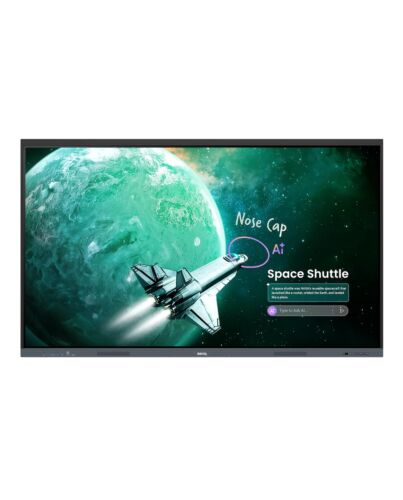
BenQ RE8605E interactive whiteboard 2.18 m (86") 3840 x 2160 pixels Touchscreen Black USB
- Immediately available
- Discreet Packaging
- Free Shipping
Product Details
Description
BenQ Board Essential RE05 Interactive Display
Advanced on-device AI and tier-leading specs at a great value. For everyday classroom use and streamlined device management.
Simplified, secure device and account management
Skip manual account setup with directory sync and manage users f Google, Microsoft, ClassLink, Clever, and other identity providers. Enable single sign-on with existing credentials for fast, secure device access.
Personalized workspace, in every classroom you teach
Log in with single sign-on (SSO) to access your personal workspace safely, complete with app shortcuts, wallpapers, and cloud storage.
Remote device control, centralized
Device, app, and account management is easier than ever, significantly easing the burden on IT.
BenQ AI readies you for every teaching moment
Your do-everything teaching assistant
The most advanced AI built right into your interactive displays. Smart tools. Effortless to teach with.
An expanding suite of practical learning tools
Support familiar teaching methods as well as the changing needs of tomorrow’s classrooms.
EZWrite digital whiteboard
Support teachers every step of the way, f lesson prep and in-class interactions to learning beyond the classroom. Extend the canvas, divide screens for group work, and bring lessons to life with 3D visuals, ready-made templates, and even live camera input.
InstaShare 2 wireless screen sharing
Cast f laptops or mobile devices, including screens, apps, photos, videos, camera feeds, and Office files, while an automatic content filter helps maintain an orderly learning environment.
Flexibility for the unique demands of students and learning spaces
Max compatibility
Supports Android, Windows, MacOS, CheOS, and more
Easy to get started
BenQ Boards are designed for effortless adoption. Teachers and IT teams have access to a variety of resources to help them make the most of the interactive display experience.
Key Features
- BenQ RE8605E: effortless, AI-powered teaching every day
- Secure SSO access to your personal teaching workspace
- Centralized remote management to simplify school IT work
- Teach, share, and collaborate with EZWrite and InstaShare 2
- 4K UHD 86" display built for ern, multi-OS classrooms
Features


Core Plus Education Solution
BenQ Board Essential RE05 Interactive Display
Advanced on-device AI and tier-leading specs at a great value. For everyday classroom use and streamlined device management.

Google EDLA
Google Play support

10 TOPS NPU
On-device AI inference

Built-in AI features
Do-it-all teaching assistant

ClassroomCare
Flicker-free screens with blue light protection

70W sound system
2 x 25W speakers + 20W subwoofer, with 8-mic array

Directory sync
Auto account setup

Android 16
Future upgradeable

Versatile front I/O panel
2 x USB-C 3.0, 4 x USB-A 3.0
Simplified, secure device and account management
Skip manual account setup with directory sync and manage users f Google, Microsoft, ClassLink, Clever, and other identity providers. Enable single sign-on with existing credentials for fast, secure device access.

Personalized workspace, in every classroom you teach
Log in with single sign-on (SSO) to access your personal workspace safely, complete with app shortcuts, wallpapers, and cloud storage.

Remote device control, centralized
Device, app, and account management is easier than ever, significantly easing the burden on IT.
BenQ AI readies you for every teaching moment


Your do-everything teaching assistant
The most advanced AI built right into your interactive displays. Smart tools. Effortless to teach with.

Ask AI
Get answers on the spot

Lasso Search
Circle, search, discover

Circle to Artify
F notes and sketches to art

AI Lessons
Your lesson planning assistant

AI Quiz
Create a quiz in seconds
An expanding suite of practical learning tools
Support familiar teaching methods as well as the changing needs of tomorrow’s classrooms.

EZWrite digital whiteboard
Support teachers every step of the way, f lesson prep and in-class interactions to learning beyond the classroom. Extend the canvas, divide screens for group work, and bring lessons to life with 3D visuals, ready-made templates, and even live camera input.

InstaShare 2 wireless screen sharing
Cast f laptops or mobile devices, including screens, apps, photos, videos, camera feeds, and Office files, while an automatic content filter helps maintain an orderly learning environment.
Flexibility for the unique demands of students and learning spaces

Ink freely
Add notes and highlight on top of any app, document, or screen

Side-by-side drag and drop
Easily move content between Che and EZWrite

Go big
Display-to-projector mirroring for larger environments

50 touchpoints
Seamless multi-user collaboration

Max compatibility
Supports Android, Windows, MacOS, CheOS, and more
Easy to get started
BenQ Boards are designed for effortless adoption. Teachers and IT teams have access to a variety of resources to help them make the most of the interactive display experience.

Onboarding guides

Teacher’s guides

BenQ Academy

Specifications
Display
Computer system
Audio
Projector
Network
Ports & interfaces
Ports & interfaces
Ergonomics
Performance
Power
Operational conditions
Weight & dimensions
Packaging data
Packaging content
Sustainability
Additional Information
| EAN/UPC | 5054444988955 |
|---|---|
| MPN | 9H.FD9TK.DE2 |
| BRAND | BENQ |