
Printers & Scanners
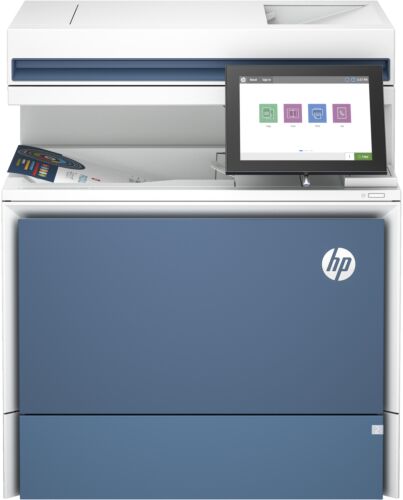
HP LaserJet Color Enterprise MFP 5800dn Printer
£1,957.27
In stock
Product Details
Description
The most customisable HP A4 LaserJet, with advanced workflow solutions optimised for distributed office collaboration. Transform your workflows with advanced capabilities in a compact footprint. F print speeds to colour panels[10], get flexible configurations to meet your needs today and tomorrow. All while protecting your business against evolving cyber threats.
Dynamic security enabled printer Certain HP printers are intended to work only with cartridges that have a new or reused HP chip or electronic circuitry. These printers use dynamic security measures to block cartridges using a non-HP chip or electronic circuitry. Periodic updates will maintain the effectiveness of these measures and block cartridges that previously worked. Reused HP chips and electronic circuitry enable the use of reused, remanufactured, and refilled cartridges.
Key Features
- Automatic document feeder; Optional high-capacity trays; Touchscreen; TerraJet cartridge
- Print, , scan, fax (optional)
- Print speed up to 45 ppm (black) and 45 ppm (colour)
- Up to 1,200 x 1,200 dpi
Reasons To Buy
More than a printer, in a compact footprint
Experience fast scanning speeds and ultimate productivity with up to 94 ipm[1] duplex scan technology.Fast print speeds of up to 43 ppm [2] to help you get everything done faster.
Easily enable workflows with a consistent user experience and intuitive, tablet-like icons on the 8-inch colour touchscreen display.
Maximize your productivity and increase print performance with HP’s powerful tri-core processor for ing, scanning, and printing.
Maintain productivity and stay up-to-date on the latest features across your fleet with upgradeable HP FutureSmart .[3]
Customisable and scalable solutions [8]
Get the functionality you need with unprecedented, flexible configurations built to order. Optimise your device to meet your business needs and your budget.Select the document feeding solution that works best for your team.
Choose built-in storage options including HDD and SSD drives to handle data and documents stored on the device.
Fast and seamless digitisation
Customise your print experience with cloud-connected HP Workpath apps. Access personalised content and integrate paper and digital workflows.[4]Give your team the tools to succeed with the HP Open Extensibility Platform containing hundreds of HP and third-party solutions, and card reader support.
Make colour management simple with HP Custom Color Manager. Match colour output of any document-device combination by simply pulling colour profiles f the cloud. Get high-quality colour profiles without the hassle of expensive colour matching systems .[9]
Always on guard with HP Wolf Security
With HP Sure Start always working behind the scenes, the operating code (BIOS) is automatically checked during start-up and repairs itself if compised.HP Connection Inspector examines network connections. The printer’s outgoing network connections are inspected to stop suspicious requests and thwart malware so you can stay connected and in the clear.
Memory ShieldTM and expanded run-time intrusion detection protects memory and other applications. Common Criteria [6] to continually monitor memory activity, detect and stop zero-day attacks in time [known/unknown] and self-heal.
Minimise exposure with whitelisting checks, that is automatically checked during start-up to determine if it’s code – digitally signed by HP.
Specifications
Printing
Duplex printing e
Auto
Print resolution colour
1200 x 1200 DPI
Print resolution black
1200 x 1200 DPI
Print technology*
Laser
Printing*
Colour printing
Duplex printing*
Yes
Maximum resolution*
1200 x 1200 DPI
Print speed (black, normal quality, A4/US Letter)*
43 ppm
Print speed (colour, normal quality, A4/US Letter)
43 ppm
Warm-up time
140 s
Time to first page (black, normal)
7.2 s
Time to first page (colour, normal)
7.9 s
Watermark printing
Yes
Secure printing
Yes
ing
Duplex ing*
Yes
Duplex ing e
Auto
ing*
Colour ing
Maximum resolution*
600 x 600 DPI
speed (black, normal quality, A4)
45 cpm
speed (colour, normal quality, A4)
43 cpm
Time to first (black, normal)
5.5 s
Time to first (colour, normal)
8.6 s
Maximum number of copies
9999 copies
Copier resize
25 - 400%
N-in-1 function
Yes
Book function
Yes
ID-card function
Yes
Auto fit function
Yes
Edge erase function
Yes
Stamp function
Yes
Watermark ing
Yes
Scanning
Duplex scanning*
Yes
Duplex scanning e
Auto
Scanning*
Colour scanning
Optical scanning resolution*
600 x 600 DPI
Maximum scan resolution
600 x 600 DPI
Maximum scan area
216 x 356 mm
Scanner type*
Flatbed scanner
Scan technology
CIS
Scan to
Network folder, USB
Scan speed (colour)
47 ppm
Scan speed (black)
47 ppm
Image formats supported
JPEG, MTIFF, TIFF
Document formats supported
CSV, DOCX, HTML, PDF, RTF, UNICODE, XLSX, XML, XPS
Input colour depth
24 bit
Greyscale levels
256
Scan drivers
TWAIN
Fax
Fax resolution (black)
300 x 300 DPI
Fax transmission speed
3 sec/page
em speed
33.6 Kbit/s
Fax memory
1000 pages
Auto-redialing
Yes
Speed dialling
Yes
Fax forwarding
Yes
Fax delayed sending
No
Auto reduction
Yes
Features
Recommended duty cycle
2000 - 10000 pages per month
Maximum duty cycle*
80000 pages per month
Duplex functions*
Print
Digital sender
Yes
Ink tank system
No
Number of print cartridges*
4
Printing colours*
Black, Cyan, Magenta, Yellow
Page description languages
PostScript 3, PDF 1.7, PCL 5c, XPS
Printer fonts
Scalable, TrueType, Windows, PCL, PostScript
All-In-One-multitasking
Yes
Country of origin
Mexico
Replacement cartridges
HP 213A Black Original LaserJet Toner Cartridge (~3,500 pages) W2130A; HP 213A Cyan Original LaserJet Toner Cartridge (~3,000 pages) W2131A; HP 213A Yellow Original LaserJet Toner Cartridge (~3,000 pages) W2132A; HP 213A Magenta Original LaserJet Toner Cartridge (~3,000 pages) W2133A; HP 213X High Yield Black Original LaserJet Toner Cartridge (~9,000 pages) W2130X; HP 213X High Yield Cyan Original LaserJet Toner Cartridge (~6,000 pages) W2131X; HP 213X High Yield Yellow Original LaserJet Toner Cartridge (~6,000 pages) W2132X; HP 213X High Yield Magenta Original LaserJet Toner Cartridge (~6,000 pages) W2133X; HP 213Y Extra High Yield Black Original LaserJet Toner Cartridge, (~18,000 pages) W2130Y; HP 213Y Extra High Yield Cyan Original LaserJet Toner Cartridge (~12,000 pages) W2131Y; HP 213Y Extra High Yield Yellow Original LaserJet Toner Cartridge (~12,000 pages) W2132Y; HP 213Y Extra High Yield Magenta Original LaserJet Toner Cartridge (~12,000 pages) W2133Y
HP segment
Business
Input & output capacity
Total number of input trays*
2
Total input capacity*
650 sheets
Total output capacity*
250 sheets
Paper tray 1 input capacity
100 sheets
Paper tray 2 input capacity
550 sheets
Multi-Purpose tray
Yes
Multi-Purpose tray input capacity
100 sheets
Auto document feeder (ADF)
Yes
Auto document feeder (ADF) input capacity
100 sheets
Maximum number of input trays
5
Maximum input capacity
2300 sheets
Maximum output capacity
250 sheets
Paper handling
Maximum A-series paper size*
A4
Maximum print size
207.4 x 1191.4 mm
Paper tray media types*
Plain paper, Glossy paper, Bond paper, Recycled paper, Envelopes, Card stock, Labels, Transparencies, Heavy paper, Lightweight paper, Rough paper, Letterhead
A-series sizes (A0...A9)*
A4, A5, A6
B-series sizes (B0...B9)
B5, B6
C-series sizes (C0...C9)
C5, C6
Non- print media sizes
Oficio, 16K
Envelopes sizes
B5, B6, C5, C6
Photo paper sizes
10x15 cm
Custom media width
64 - 216 mm
Custom media length
127 - 1200 mm
Paper tray media weight
60 - 220 g/m²
Envelope feeder
No
Ports & interfaces
Direct printing*
Yes
USB port
Yes
USB 2.0 ports quantity
1
Ports & interfaces
USB 3.2 Gen 1 (3.1 Gen 1) ports quantity
2
Network
Wi-Fi*
No
Ethernet LAN*
Yes
Cabling technology
10/100/1000Base-T(X)
Ethernet LAN data rates
10,100,1000 Mbit/s
Security algorithms
SNMPv3, SSL/TLS, EAP-PEAP, EAP-TLS, FIPS 140, HTTPS, IPSec
Mobile printing technologies
Mopria Print Service, Apple AirPrint
Performance
Maximum internal memory
6144 MB
Internal storage capacity
32 GB
Storage media
SSD
Internal memory*
6144 MB
Built-in processor
Yes
Processor frequency
1200 MHz
Sound pressure level (printing)
50 dB
Sound pressure level (scanning)
55 dB
Sound power level (printing)
6.3 dB
Design
Product colour*
White
Market positioning*
Business
Built-in display*
Yes
Display
CGD
Display diagonal
20.3 cm (8")
Control type
Touch
Colour display
Yes
Power
Power consumption (printing)
655 W
Power consumption (ing)
655 W
Power consumption (ready)
50.1 W
Power consumption (sleep)
0.9 W
Power consumption (off)
0.09 W
Energy Star Typical Electricity Consumption (TEC)
0.552 kWh/week
AC input voltage
100 - 240 V
AC input frequency
50/60 Hz
Brand-specific features
HP Auto-On/Auto-Off
Yes
HP Dynamic security
Yes
HP Security tools
Identity management: Kerberos ation; LDAP ation; 1000 user PIN codes; optional HP and 3rd party advanced ation solutions (e.g.; badge readers); Network: IPsec/firewall with Certificate; Pre-Shared Key; and Kerberos ation; Supports WJA-10 IPsec configuration Plug-in; 802.1X ation (EAP-PEAP; EAP-TLS); SNMPv3; HTTPS; Certificates; Access Control List; Data: Storage Encryption; Encrypted PDF & Email (uses FIPS 140 validated cryptographic libies f Microsoft); Secure Erase; SSL/TLS (HTTPS); Encrypted Credentials; Device: Security lock slot; USB port disablement; hardware integration pocket for security solutions; Hardware-based Memory ShieldTM with Control Flow Integrity (CFI) in-device monitoring for attacks; SureStart Secure Boot - BIOS Integrity Checking with self-healing capability; Whitelisting - loads only known good code (DLLs, EXEs, ...); Security management: Compatible with Device Security Syslog Messages processed and accessable in Arcsight and Splunk SIEMs
HP GTIN (EAN/UPC) with options
(ABT) 196068721787; (ABY) 196068721794; (ACQ) 196068721831; (B13) 196068721848; (B19) 196068721855; (BAZ) 196068721862
HP GTIN (EAN/UPC)
196068721787, 196068721794, 196068721831, 196068721848, 196068721855, 196068721862
System requirements
Windows operating systems supported
Windows 10, Windows 11
Mac operating systems supported
Mac OS X 10.15 Catalina, Mac OS X 10.15.3 Catalina, Mac OS X 11.0 Big Sur, Mac OS X 12.0 Monterey, MacOS
Other operating systems supported
CheOS, Android, iOS
Operational conditions
Operating relative humidity (H-H)
10 - 80%
Recommended humidity operating range
30 - 70%
Recommended operating temperature range (T-T)
15 - 27 °C
Storage temperature (T-T)
-20 - 40 °C
Operating temperature (T-T)
10 - 32.5 °C
Certificates
Certification
CISPR 22:2008 (International) - Class A; CISPR 32:2015 (International) - Class A; / EN 55032:2015+A11:2020 (EU) - Class A; CISPR 35:2016 (International); EN 55035:2017+A11:2020; EN IEC 61000-3-2:2019; EN 61000-3-3:2013+A1:2019+A2:2021; FCC CFR 47 Part 15 Class A; ICES-003, Issue 7 Class A. Other EMC approvals as required by individual countries.
Sustainability
Sustainability compliance
Yes
Sustainability certificates
Blue Angel, ENERGY STAR, EPEAT Gold
Sustainable technologies and materials
15% post-consumer recycled plastic; ENERGY STAR® ; EPEAT® registered
Carbon footprint
Total carbon footprint (kg of CO2e)
410
Carbon emissions, manufacturing (kg of CO2e)
327
Carbon emissions, logistics (kg of CO2e)
13
Carbon emissions, end-of-life (kg of CO2e)
46
Total carbon emissions, w/o use phase (kg of CO2e)
19
Weight & dimensions
Width
500 mm
Depth
460 mm
Height
583 mm
Weight
38 kg
Packaging data
Package width
598 mm
Package depth
758 mm
Package height
652 mm
Package weight
42.9 kg
Packaging content
Cartridge(s) included
Yes
Included cartridge capacity (black)
7000 pages
Included cartridge capacity (CMY)
3000 pages
Cables included
AC
Logistics data
Pallet gross weight
272.3 kg
Layers per pallet
3 pc(s)
Products per pallet
6 pc(s)
Technical details
Box contents
HP Color LaserJet Multifunction Printer; HP Black Original LaserJet Toner Cartridge (~7,000 yield), HP Cyan, Magenta and Yellow Original LaserJet Toner Cartridges (~3,000 yield each) (toner cartridges installed); Documentation (Hardware Install Guide); Power cord
Master (outer) cases per pallet layer
2 pc(s)
Compliance certificates
CECP, GS mark, CCC, BIS, cUL, UL, CE, BSMI
General Product Safety Regulation (GPSR) URL
;
Other features
Number of users
15 user(s)
Custom media sizes
Tray 1: 64 x 127 to 216 x 1200 mm; Tray 2, optional 1x550-sheet feeders: 101 x 148 to 216 x 356 mm
Pallet dimensions (W x D x H)
800 x 1200 x 2083 mm
Recommended system requirements
2 GB available hard disk space; Internet connection; or USB port; Internet browser.
2 GB available hard drive space; Internet connection; or USB port; Internet browser.
Compatible operating systems
Windows 11; Windows 10; Windows Client OS; Android; iOS; Mobile OS; macOS 10.15 Catalina; macOS 11 Big Sur; macOS 12 Monterey; Linux; Citrix; Che OS
Pallet dimensions (W x D x H) (imperial)
800.1 x 1199.9 x 2083.1 mm (31.5 x 47.2 x 82")
Pallet weight (imperial)
271.8 kg (599.1 lbs)
Acoustic power emissions (ready)
35 dB
Acoustic pressure emissions bystander (ready)
20 dB
Typical electricity consumption (TEC) number
0.552 kWh/week (Energy Star 3.0); 0.551 kWh/week (Blue Angel)
UNSPSC-code
43212110
Processor frequency
1.2 GHz
Manufacturer warranty
One-year, next-business day, onsite warranty. Warranty and support options vary by product, country and local legal requirements.
Electagnetic compatibility
CISPR 22:2008 (International) - Class A; CISPR 32:2015 (International) - Class A; / EN 55032:2015+A11:2020 (EU) - Class A; CISPR 35:2016 (International); EN 55035:2017+A11:2020; EN IEC 61000-3-2:2019; EN 61000-3-3:2013+A1:2019+A2:2021; FCC CFR 47 Part 15 Class A; ICES-003, Issue 7 Class A. Other EMC approvals as required by individual countries.
Additional Information
| EAN/UPC | 7330381182211 |
|---|---|
| MPN | 6QN29A#B19 |
| BRAND | HP |
Disclaimer
[1] Scan speeds measured f ADF. Actual processing speeds may vary depending on scan resolution, network conditions, computer performance, and application software. Measured using standards found at:
[2] Measured using /IEC 24734, excludes first set of test documents. For more information, see Exact speed varies depending on the system configuration, software application, driver, and document complexity.
[3] Some features enabled by future HP FutureSmart upgrades may not be available on older devices, if for example, physical product characteristics limit the functionality of the new feature.
[4] Not all MFPs may be compatible with Workpath apps. To enable HP Workpath, some devices may require optional accessory or to be upgraded. Not all apps may be available in all locations. Subscription may be required. Personalised content and integration functions are applicable to supported HP Workpath apps only.
[6] Third-party certification based on Common Criteria Information Technology Security Evaluation /IEC 15408 Standard requirements as of May 2019-2024. Certification applicable to HP Managed and Enterprise devices running HP FutureSmart version 4.5.1 and later. For more information: Report - HP Intrusion Detection.pdf
[9] Contact your HP or your Partner Representative to learn more about Custom Color Manager.
[10] This product comes with Atmosphere Blue (standard) panels. Panels in other colors (Constellation Yellow, Comet Red, Aurora Purple, Lunar Grey, Cosmic Green) are only available transactionally via HP Configure to Order, or contractually via Managed Print Services. els offered in China have Lunar Grey (standard) instead of Atmosphere Blue. Please contact your HP or partner representative to learn more about customizable color panels.
Technical specification disclaimers
For yield information on the cartridge(s) included with your printer, see values measured in accordance with /IEC 19798 and continuous printing. Actual yields vary considerably based on images printed and other factors.
Declared yields based on /IEC 19798 and continuous printing. Actual yields vary considerably based on images printed and other factors. For details see
EPEAT® registered where applicable. EPEAT registration varies by country. See for registration status by country.
Based on standard ITU-T test image #1 at standard resolution. More complicated pages or higher resolution will take longer and use more memory.
Measured using /IEC 24734 Feature Performance Test, excludes first set of test documents. For more information see Exact speed varies depending on the system configuration, software application, driver, and document complexity..
Measured using /IEC 24734, excludes first set of test documents. For more information see Exact speed varies depending on the system configuration, software application, driver, and document complexity.
Measured using /IEC 17629. For more information see Exact speed varies depending on the system configuration, software application, driver, and document complexity.
Power requirements are based on the country/region where the printer is sold. Do not convert operating voltages. This will damage the printer and void the product warranty. Blue Angel value typically based on measurement of 230V device.
Typical Electricity Consumption (TEC) rating represents the typical electricity consumed by a product during 1 week, measured in kilowatt-hours (kWh).
Scan speeds measured f ADF. Actual processing speeds may vary depending on scan resolution, network conditions, computer performance, and application software.
For Scan software, we support: Windows (JPG, RAW(BMP), PDF, TIFF, PNG, RTF) and Mac (JPG, JPG-2000, TIFF, PNG, PDF, Searchable PDF, RTF, TXT). OCR requires HP FutureSmart 5.8.1.1 or later.
Maximum dimensions means doors, paper trays, and ADF (if applicable) are fully open.
OCR requires HP FutureSmart 5.8.1.1 or later. Scan to Onedrive, scan to Onedrive for Business, and scan to Sharepoint Online requires HP FutureSmart 5.8 or later.