
Printers & Scanners
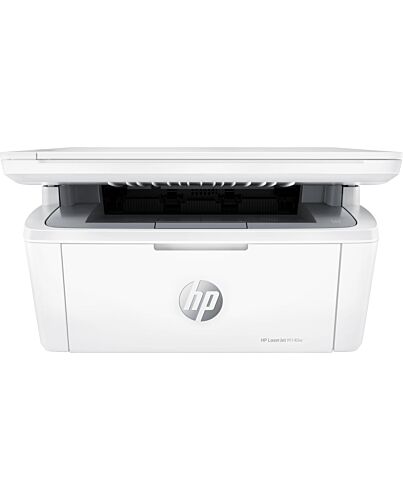
HP LaserJet MFP M140w Printer
£169.93
In stock
Product Details
Description
Works efficiently. Fits anywhere. An efficient, high-quality multifunction printer that fits your space and your budget. Get fast printing f HP's smallest laser, plus the time-saving HP Smart app.[1,2] Count on professional-quality laser printing and seamless setup.
Dynamic security enabled printer Certain HP printers are intended to work only with cartridges that have a new or reused HP chip or electronic circuitry. These printers use dynamic security measures to block cartridges using a non-HP chip or electronic circuitry. Periodic updates will maintain the effectiveness of these measures and block cartridges that previously worked. Reused HP chips and electronic circuitry enable the use of reused, remanufactured, and refilled cartridges.
Key Features
- Scan to email; Scan to PDF; Compact Size
- Print, , scan
- Up to 20 ppm
- Up to 600 x 600 dpi
Reasons To Buy
HP's smallest multifunction LaserJet
Efficient performance f HP's smallest multifunction laser.Business doesn’t need to wait for your printer. Maximise your uptime with print speeds up to 20 ppm in A4.[3]
Smartly and elegantly designed, so it’s simple and intuitive to use.
Easily handle tasks and get a lot f one device – print, scan, and .
Productivity f your phone
Get high-quality scanning, and share to Dropbox, Google Drive or cloud – f your phone with HP Smart app.[1]Access and print documents f your phone with HP Smart app, even f Dropbox and Google Drive.[1]
With HP Smart app, take a photo as a , and send it to your printer f your smartphone.[1]
Eliminate steps in repetitive tasks with Shortcuts.[1] Scan to the cloud, email, and more in just a tap.[1]
Help save resources without sacrificing performance
HP Auto-On/Off Technology – intelligence can turn your printer on when you need it and off when you don’t.[5]This HP LaserJet meets ecolabel requirements, including ENERGY STAR® and BLUE ANGEL.
Tackle the essentials – print, scan,
Easily handle tasks and get a lot f one device – print, scan, and .Legendary laser quality
This surprisingly small laser delivers exceptional quality, page after page.Easy ID ing
Easily both sides of identification cards onto one side of paper.Fast printing
Get print speeds up to 21/20ppm.[3] [3]Seamless setup
Get started fast with simple setup that guides you through each step, with HP Smart app.[1] [1]Amazing scanning, now on your smartphone
Get high-quality scanning, and share to Dropbox, Google Drive, email, or the cloud - with HP Smart app.[1] [1]Printing just got more productive

Extend your printing reach
Get wireless with self-reset to help you stay connected.[7] [7]Connect your printer with USB
Easily connect your printer to your computer with the built-in USB port.[4] [4]On when you need it, off when you don’t
Help save energy with HP Auto-On/Auto-Off Technology.[5] [5]Specifications
Printing
Print resolution black
600 x 600 DPI
Print technology*
Laser
Printing*
Mono printing
Duplex printing*
No
Maximum resolution*
600 x 600 DPI
Print speed (black, normal quality, A4/US Letter)*
20 ppm
Warm-up time
20 s
Time to first page (black, normal)
8.5 s
Print margins (top, bottom, right, left)
2 mm
Secure printing
Yes
ing
Duplex ing*
Yes
ing*
Mono ing
Maximum resolution*
600 x 400 DPI
speed (black, normal quality, A4)
20 cpm
Time to first (black, normal)
11 s
Maximum number of copies
99 copies
Copier resize
25 - 400%
Auto fit function
Yes
Scanning
Duplex scanning*
No
Scanning*
Colour scanning
Optical scanning resolution*
600 x 600 DPI
Maximum scan area
216 x 297 mm
Scanner type*
Flatbed scanner
Scan technology
CIS
Scan to
Software, TWAIN, WIA
Image formats supported
BMP, JPG, PNG, Raw, TIFF
Document formats supported
PDF
Input colour depth
24 bit
Greyscale levels
256
Scan drivers
TWAIN, WIA
TWAIN version
2.1
Fax
Faxing*
No
Features
Recommended duty cycle
100 - 1000 pages per month
Maximum duty cycle*
8000 pages per month
Duplex functions*
Not supported
Number of print cartridges*
1
Printing colours*
Black
Page description languages
PCLmS, PCLm, PWG, URF
All-In-One-multitasking
Yes
Country of origin
Vietnam
Replacement cartridges
HP 142A Black LaserJet Toner Cartridge (~950), W1420A
HP segment
Home office
Input & output capacity
Total number of input trays*
1
Total input capacity*
150 sheets
Total output capacity*
100 sheets
Paper tray 1 input capacity
150 sheets
Maximum number of input trays
1
Maximum input capacity
150 sheets
Maximum output capacity
100 sheets
Paper handling
Maximum A-series paper size*
A4
Maximum print size
216 x 355.6 mm
Paper tray media types*
Plain paper, Envelopes, Labels, Postcard
A-series sizes (A0...A9)*
A4, A5, A6
C-series sizes (C0...C9)
C5
Non- print media sizes
Letter
Envelopes sizes
C5, DL
Custom media width
105 - 216 mm
Custom media length
148 - 355.6 mm
Paper tray media weight
65 - 120 g/m²
Ports & interfaces
Direct printing*
Yes
USB port
Yes
USB 2.0 ports quantity
1
Network
Wi-Fi*
Yes
Ethernet LAN*
Yes
Wi-Fi standards
802.11b, 802.11g, Wi-Fi 4 (802.11n)
Wi-Fi Direct
Yes
Bluetooth
Yes
Security algorithms
SNMP
Mobile printing technologies
Mopria Print Service, Apple AirPrint
Performance
Maximum internal memory
64 MB
Internal memory*
64 MB
Performance
Built-in processor
Yes
Processor frequency
500 MHz
Sound pressure level (printing)
51 dB
Sound power level (printing)
6.2 dB
Design
Product colour*
White
Market positioning*
Home & office
Built-in display*
Yes
Display
LCD
Control type
Buttons
Power
Energy Star Typical Electricity Consumption (TEC)
0.255 kWh/week
AC input voltage
220 - 240 V
AC input frequency
50/60 Hz
Brand-specific features
HP Auto-On/Auto-Off
Yes
HP Dynamic security
Yes
HP Security tools
Password-protected network embedded Web server; enable/disable Network ports; SNMPv1/2/3 community password change
HP Management tools
HP Printer Assistant (UDC), HP Device Toolbox
HP GTIN (EAN/UPC) with options
(ABY) 194850677250; (B19) 194850677267; (BAZ) 194850677274
HP GTIN (EAN/UPC)
194850677250, 194850677267, 194850677274
System requirements
Windows operating systems supported
Windows 10, Windows 11
Mac operating systems supported
Mac OS X 10.14 Mojave, Mac OS X 10.15 Catalina, Mac OS X 10.15.3 Catalina, MacOS
Server operating systems supported
Windows Server 2008 R2 x64, Windows Server 2012 R2 x64, Windows Server 2012 x64, Windows Server 2016 x64
Other operating systems supported
Linux
Operational conditions
Operating relative humidity (H-H)
10 - 80%
Recommended humidity operating range
30 - 70%
Recommended operating temperature range (T-T)
17.5 - 25 °C
Storage temperature (T-T)
-20 - 60 °C
Operating temperature (T-T)
15 - 32.5 °C
Certificates
Certification
CISPR32:2012 & CISPR32:2015 /EN55032:2012 & EN55032:2015+AC:2016 - Class B; EN 61000-3-2:2014; EN 61000-3-3:2013; EN 55035:2017; FCC Title 47 CFR, Part 15 Class B/ICES-003, Issue 6
Sustainability
Sustainability compliance
Yes
Sustainability certificates
ENERGY STAR, Blue Angel, EPEAT Silver
Sustainable technologies and materials
Recyclable through HP Planet Partners; Contains post-consumer recycled plastic
Carbon footprint
Total carbon footprint (kg of CO2e)
80
Carbon emissions, manufacturing (kg of CO2e)
50
Carbon emissions, logistics (kg of CO2e)
2
Carbon emissions, end-of-life (kg of CO2e)
9
Total carbon emissions, w/o use phase (kg of CO2e)
17
Weight & dimensions
Width
360 mm
Depth
264 mm
Height
197 mm
Weight
5.39 kg
Packaging data
Package width
398 mm
Package depth
248 mm
Package height
306 mm
Package weight
6.9 kg
Packaging content
Cartridge(s) included
Yes
Included cartridge capacity (black)
300 pages
Cables included
AC
Warranty card
Yes
Bundled software
No CD in box. Download software f hp.com or 123.hp.com
Logistics data
Harmonized System (HS) code
84433100
Technical details
Box contents
HP LaserJet MFP M140w Printer; Power cord; HP Black LaserJet Toner Cartridge (yield: 300 pages); Setup Poster; Reference Guide; Warranty Guide; Flyer
Master (outer) cases per pallet layer
12 pc(s)
Compliance certificates
GS mark, EAC, Federal Communications Commission (FCC), CE, BSMI
General Product Safety Regulation (GPSR) URL
; ;
Other features
Number of users
3 user(s)
Custom media sizes
105 x 148 to 216 to 355.6mm
Recommended system requirements
Microsoft Windows 11; 10; 2 GB available hard disk space; Internet connection; Microsoft Internet Explorer or Edge.
Apple macOS Catalina (v10.15) macOS Big Sur (v11.0) macOS Monterey (v12.0); 2 GB HD; Internet required.
Compatible operating systems
Windows 11; Windows 10; macOS 10.14 Mojave; macOS 10.15 Catalina; macOS 15 Sequoia; Linux
Acoustic power emissions (ready)
23 dB
Acoustic pressure emissions bystander (ready)
16 dB
Typical electricity consumption (TEC) number
0.255 kWh/Week (Energy Star 3.0); 0.259 kWh/Week (Blue Angel)
UNSPSC-code
43212110
Manufacturer warranty
One-year limited warranty
Electagnetic compatibility
CISPR32:2012 & CISPR32:2015 /EN55032:2012 & EN55032:2015+AC:2016 - Class B; EN 61000-3-2:2014; EN 61000-3-3:2013; EN 55035:2017; FCC Title 47 CFR, Part 15 Class B/ICES-003, Issue 6
Additional Information
| EAN/UPC | 194850677267 |
|---|---|
| MPN | 7MD72F#B19 |
| BRAND | HP |
Disclaimer
[1] Smallest in-class footprint compared only to dimensions of majority of personal monoche laser printers and MFPs. Minimum dimensions used in this analysis. Buyers Lab August 2020 study commissioned by HP, based on a research survey OEM published specifications publicly available information as of 7/31/2020. Per HP, measured footprint for the HP LaserJet Pro M109–112 series is 658.06 square cm (102.0 square inches, and for the HP LaserJet Pro MFP M139–142 series is 949.84 square cm (147.226 square inches). Market share as reported by IDC Quarterly Hard Peripherals Tracker - Final Historical 2020Q1 Worldwide. For details, please see:
[2] Based on internal HP testing. Average timing estimate based on: 1) downloaded HP Smart app on mobile or desktop device, 2) setting up Shortcut, 3) scanning jobs which have more than 2-3 tasks associated with them (scan to email, save and rename, store to cloud, etc.). Average timing savings comparn based on using printer and desktop scan software to complete similar scanning tasks. Requires the HP Smart app download and supported HP printer. For details on local printing requirements see
[3] Measured using /IEC 24734, excludes first set of test documents. For more information see . Exact speed varies depending on the system configuration, host OS, port-monitor, software application, driver, and document complexity.
[4] USB cable not included; purchase separately.
[5] HP Auto-On/Auto-Off Technology capabilities subject to printer and settings; may require a upgrade.
[7] Wireless operations are compatible with 2.4 GHz operations only. Learn more at Internet access required and must be purchased separately.
Technical specification disclaimers
HP Auto-On/Auto-Off Technology capabilities subject to printer and settings; may require a upgrade.
Requires the HP Smart app download. For details on local printing requirements see www.hp.com/go/mobileprinting. Certain features/software are available in English language only, and differ between desktop and mobile applications. Internet access required and must be purchased separately. HP account required for full functionality. List of supported operating systems available in app stores. Fax capabilities are for sending a fax only, and may require additional purchase. For more information, see: www.hpsmart.com/mobile-fax
For yield information on the cartridge included with your printer, see Yield values measured in accordance with /IEC 19752 and continuous printing. Actual yields vary considerably based on images printed and other factors.
Declared yield value in accordance with /IEC 19752 and continuous printing. Actual yields vary considerably based on images printed and other factors. For details see
Declared yield value in accordance with /IEC 19752 and continuous printing. Actual yields vary considerably based on images printed and other factors. For details see
Wi-Fi® is a registered trademark of Wi-Fi Alliance®. Wireless operations are compatible with 2.4 GHz operations only. Learn more at www.hp.com/go/mobileprinting. Wireless performance is dependent upon physical environment and distance f the access point. AirPrint and the AirPrint Logo are trademarks of Apple® Inc. The Mopria® Logo is a registered and/or unregistered trademark of Mopria Alliance, Inc. in the United States and other countries. Unauthorized use is strictly prohibited. Requires the HP Smart app download. For details on local printing requirements see www.hp.com/go/mobileprinting. Certain features/software are available in English language only, and differ between desktop and mobile applications. Internet access required and must be purchased separately. HP account required for full functionality. List of supported operating systems available in app stores. Fax capabilities are for sending a fax only, and may require additional purchase. For more information, see: www.hpsmart.com/mobile-fax
Measured using /IEC 24734 Feature Performance Test, excludes first set of test documents. For more information see Exact speed varies depending on the system configuration, software application, driver, and document complexity.
Measured using /IEC 24734, excludes first set of test documents. For more information see Exact speed varies depending on the system configuration, software application, driver, and document complexity.
Measured using /IEC 17629. For more information see Exact speed varies depending on the system configuration, software application, driver, and document complexity.
First Out f Ready and Simplex Speed measured using /IEC 29183, Duplex Speed measured using /IEC 24735, excludes first set of test documents. For more information see Exact speed varies depending on the system configuration, software application and document complexity.
Power requirements are based on the country/region where the printer is sold. Do not convert operating voltages. This will damage the printer and void the product warranty. Energy Star value typically based on measurement of 115V device.
Post-consumer recycled is based on the definition set in the EPEAT standard for imaging equipment, IEEE 1680.2
Program availability varies. For details, see